简单的服务器搭建

1、资源服务器
可以用python的http.server模块快速搭建一个简单的服务器
方法1、在需要的目录下执行下面命令就可以下载该目录下的资源了。
python3 -m http.server 8000
方法2、创建python脚本,运行脚本,然后在浏览器中输入http://localhost:8000/就可以访问了。

1
2
3
4
5
6
7
8
9
10
import http.server
import socketserver

PORT = 8000

Handler = http.server.SimpleHTTPRequestHandler

with socketserver.TCPServer(("", PORT), Handler) as httpd:
print("serving at port", PORT)
httpd.serve_forever()

2、短连接服务器,一般是web/http 服务器,可以用python 的flask 模块快速搭建一个简单的服务器

1
2
3
4
5
6
7
8
9
10
11
12
13
14
15
16
17
18
19
20
21
22
23
24
25
26
27
28
29
30
31
32
33
34
35
36
37
38
39
40
41
42
43
44
45
46
47
48
49
50
51
52
53
54
55
56
57
58
59
60
61
62
63
64
65
66
67
68
69
70
71
72
from flask import Flask, request, jsonify
from flask_cors import CORS
import sqlite3
import uuid
import threading
import time

app = Flask(__name__)
CORS(app) # 允许跨域

# 初始化数据库
def init_db():
conn = sqlite3.connect('game.db')
c = conn.cursor()
c.execute('''CREATE TABLE IF NOT EXISTS players
(id TEXT PRIMARY KEY,
device_id TEXT UNIQUE,
progress INTEGER DEFAULT 0)''')
conn.commit()
conn.close()

# 匿名注册
@app.route('/register', methods=['POST'])
def register():
device_id = str(uuid.uuid4()) # 生成设备唯一ID
conn = sqlite3.connect('game.db')
c = conn.cursor()
c.execute("INSERT INTO players (id, device_id) VALUES (?, ?)",
(str(uuid.uuid4()), device_id))
conn.commit()
conn.close()
print("[Server] Simulating push notification..." + device_id)
return jsonify({"code": 200, "device_id": device_id})

# 登录/获取进度
@app.route('/login', methods=['POST'])
def login():
device_id = request.json.get('device_id')
conn = sqlite3.connect('game.db')
c = conn.cursor()
c.execute("SELECT progress FROM players WHERE device_id=?", (device_id,))
result = c.fetchone()
conn.close()
if result:
return jsonify({"code": 200, "progress": result[0]})
else:
return jsonify({"code": 404, "error": "User not found"}), 404

# 同步进度
@app.route('/sync', methods=['POST'])
def sync():
device_id = request.json.get('device_id')
progress = request.json.get('progress')
conn = sqlite3.connect('game.db')
c = conn.cursor()
c.execute("UPDATE players SET progress=? WHERE device_id=?",
(progress, device_id))
conn.commit()
conn.close()
return jsonify({"code": 200})

# 模拟服务器推送
def push_notification():
while True:
time.sleep(10) # 每10秒推送一次
print("[Server] Simulating push notification...")

if __name__ == '__main__':
init_db()
# 启动推送线程
threading.Thread(target=push_notification, daemon=True).start()
app.run(host='0.0.0.0', port=5000, debug=True)

3、长连接服务器,一般是socket 服务器,可以用python 的socket 模块快速搭建一个简单的服务器

1
2
3
4
5
6
7
8
9
10
11
12
13
14
15
16
17
18
19
20
21
22
23
24
25
26
27
28
29
30
31
32
33
34
35
36
37
38
39
40
41
42
43
44
45
46
47
48
49
50
51
52
53
54
55
56
57
58
59
60
61
62
63
64
65
66
67
68
69
70
71
72
73
74
75
76
77
78
79
80
81
82
83
84
85
86
87
88
89
90
91
92
93
94
95
96
97
98
99
100
101
102
103
104
105
106
107
108
109
110
111
112
113
114
115
116
117
118
119
120
121
122
123
124
125
126
127
128
129
130
131
132
133
134
135
136
137
138
import socket
import sqlite3
import uuid
import json
import threading
from threading import Lock
import time

# 线程安全的客户端连接管理
clients = {}
clients_lock = Lock()

# 初始化数据库
def init_db():
conn_db = sqlite3.connect('game.db')
c = conn_db.cursor()
c.execute('''CREATE TABLE IF NOT EXISTS players
(id TEXT PRIMARY KEY,
device_id TEXT UNIQUE,
progress INTEGER DEFAULT 0)''')
conn_db.commit()
conn_db.close()

# 处理客户端连接
def handle_client(conn, addr):
device_id = None
try:
while True:
# 接收消息长度头 (4字节)
header = conn.recv(4)
print(f"收到header: {header}")
if not header: break
msg_len = int.from_bytes(header, byteorder='big')

# 接收实际数据
data = conn.recv(msg_len)
print(f"收到data: {data}")
if not data: break

# 解析JSON
try:
req = json.loads(data.decode('utf-8'))
cmd = req.get("cmd")
print(f"收到cmd: {cmd}")
# 注册/登录
if cmd == "register_or_login":
device_id = req.get("device_id")
if not device_id:
device_id = str(uuid.uuid4())
conn_db = sqlite3.connect('game.db')
c = conn_db.cursor()
c.execute("INSERT INTO players (id, device_id) VALUES (?, ?)",
(str(uuid.uuid4()), device_id))
conn_db.commit()
conn_db.close()

clients[device_id] = conn
# 查询进度
conn_db = sqlite3.connect('game.db')
c = conn_db.cursor()
c.execute("SELECT progress FROM players WHERE device_id=?", (device_id,))
progress = c.fetchone()[0]
conn_db.close()

# 返回响应
resp = {
"cmd": "login_response",
"device_id": device_id,
"progress": progress
}
send_response(conn, resp)

# 同步进度
elif cmd == "sync_progress":
progress = req.get("progress")
conn_db = sqlite3.connect('game.db')
c = conn_db.cursor()
c.execute("UPDATE players SET progress=? WHERE device_id=?",
(progress, device_id))
conn_db.commit()
conn_db.close()

send_response(conn, {
"cmd": "sync_ok",
"device_id": device_id,
"progress": progress
})

except json.JSONDecodeError:
print(f"非法JSON数据: {data}")

except ConnectionResetError:
print(f"客户端断开: {addr}")
finally:
with clients_lock:
if device_id in clients:
del clients[device_id]
conn.close()

# 发送响应(添加长度头)
def send_response(conn, data):
json_str = json.dumps(data)
encoded = json_str.encode('utf-8')
header = len(encoded).to_bytes(4, byteorder='little')
conn.send(header + encoded)
print(f"回应cmd: {data.get('cmd')},data={data}")

# 模拟服务器推送
def push_notification():
while True:
time.sleep(10) # 每10秒推送一次
message = {
"cmd": "server_push",
"content": "新活动已上线!"
}
with clients_lock:
for device_id, conn in list(clients.items()):
try:
send_response(conn, message)
except:
del clients[device_id]

if __name__ == '__main__':
init_db()
host, port = "0.0.0.0", 8766

# 启动Socket服务器
with socket.socket(socket.AF_INET, socket.SOCK_STREAM) as s:
s.setsockopt(socket.SOL_SOCKET, socket.SO_REUSEADDR, 1)
s.bind((host, port))
s.listen()
print(f"Socket服务器启动: {host}:{port}")

threading.Thread(target=push_notification, daemon=True).start()
while True:
conn, addr = s.accept()
threading.Thread(target=handle_client, args=(conn, addr)).start()
# 启动推送线程

或者用云风大大的 skynet

1
2
3
4
5
6
7
8
9
10
11
12
13
14
15
16
17
18
19
20
21
22
23
24
25
26
27
28
29
30
31
32
33
34
35
36
37
38
39
40
41
42
43
44
45
46
47
48
49
50
51
52
53
54
55
56
57
58
59
60
61
62
63
64
65
66
67
68
69
70
71
72
73
74
75
76
77
78
79
80
81
82
83
84
85
86
87
88
89
90
91
92
93
94
95
96
97
98
99
100
101
102
103
104
105
106
107
108
109
110
111
112
113
114
115
116
117
118
119
120
121
122
123
124
125
126
127
128
129
130
131
132
133
134
135
136
137
138
139
140
141
142
143
144
145
146
147
148
149
150
151
152
153
154
155
156
157
158
159
160
161
162
163
164
165
166
167
168
169
170
171
172
173
174
175
176
177
178
179
180
181
182
183
184
185
186
187
188
189
190
191
192
193
194
195
196
197
198
199
200
201
202
203
204
205
206
207
208
209
210
211
212
213
214
215
216
217
218
219
220
221
222
223
224
225
226
227
228
229
230
231
232
233
234
235
236
237
238
239
240
241
242
243
244
245
246
247
248
249
250
251
252
253
254
255
256
257
258
259
260
261
262
263
264
265
266
267
268
269
270
271
272
273
main.lua
local skynet = require "skynet"

skynet.start(function()
skynet.error("Server start")
if not skynet.getenv "daemon" then
local console = skynet.newservice("console")
end
skynet.newservice("debug_console",8000)
local proto = skynet.uniqueservice "protoloader"
skynet.call(proto, "lua", "load", {
"proto.c2s",
"proto.s2c",
})
local hub = skynet.uniqueservice "hub"
skynet.call(hub, "lua", "open", "0.0.0.0", 5678)
skynet.exit()
end)
hub.lua
local skynet = require "skynet"
local socket = require "socket"
local proxy = require "socket_proxy"
local log = require "log"
local service = require "service"

local hub = {}
local data = { socket = {} }

local function auth_socket(fd)
return (skynet.call(service.auth, "lua", "shakehand" , fd))
end

local function assign_agent(fd, userid)
skynet.call(service.manager, "lua", "assign", fd, userid)
end

function new_socket(fd, addr)
data.socket[fd] = "[AUTH]"
proxy.subscribe(fd)
local ok , userid = pcall(auth_socket, fd)
if ok then
data.socket[fd] = userid
if pcall(assign_agent, fd, userid) then
return -- succ
else
log("Assign failed %s to %s", addr, userid)
end
else
log("Auth faild %s", addr)
end
proxy.close(fd)
data.socket[fd] = nil
end

function hub.open(ip, port)
log("Listen %s:%d", ip, port)
assert(data.fd == nil, "Already open")
data.fd = socket.listen(ip, port)
data.ip = ip
data.port = port
socket.start(data.fd, new_socket)
end

function hub.close()
assert(data.fd)
log("Close %s:%d", data.ip, data.port)
socket.close(data.fd)
data.ip = nil
data.port = nil
end

service.init {
command = hub,
info = data,
require = {
"auth",
"manager",
}
}
auth.lua
local skynet = require "skynet"
local service = require "service"
local client = require "client"
local log = require "log"

local auth = {}
local users = {}
local cli = client.handler()

local SUCC = { ok = true }
local FAIL = { ok = false }

function cli:signup(args)
log("signup userid = %s", args.userid)
if users[args.userid] then
return FAIL
else
users[args.userid] = true
return SUCC
end
end

function cli:signin(args)
log("signin userid = %s", args.userid)
if users[args.userid] then
self.userid = args.userid
self.exit = true
return SUCC
else
return FAIL
end
end

function cli:ping()
log("ping")
end

function auth.shakehand(fd)
local c = client.dispatch { fd = fd }
return c.userid
end

service.init {
command = auth,
info = users,
init = client.init "proto",
}
manager.lua
local skynet = require "skynet"
local service = require "service"
local log = require "log"

local manager = {}
local users = {}

local function new_agent()
-- todo: use a pool
return skynet.newservice "agent"
end

local function free_agent(agent)
-- kill agent, todo: put it into a pool maybe better
skynet.kill(agent)
end

function manager.assign(fd, userid)
local agent
repeat
agent = users[userid]
if not agent then
agent = new_agent()
if not users[userid] then
-- double check
users[userid] = agent
else
free_agent(agent)
agent = users[userid]
end
end
until skynet.call(agent, "lua", "assign", fd, userid)
log("Assign %d to %s [%s]", fd, userid, agent)
end

function manager.exit(userid)
users[userid] = nil
end

service.init {
command = manager,
info = users,
}
agent.lua
local skynet = require "skynet"
local service = require "service"
local client = require "client"
local log = require "log"

local agent = {}
local data = {}
local cli = client.handler()

function cli:ping()
assert(self.login)
log "ping"
end

function cli:login()
assert(not self.login)
if data.fd then
log("login fail %s fd=%d", data.userid, self.fd)
return { ok = false }
end
data.fd = self.fd
self.login = true
log("login succ %s fd=%d", data.userid, self.fd)
client.push(self, "push", { text = "welcome" }) -- push message to client
return { ok = true }
end

local function new_user(fd)
local ok, error = pcall(client.dispatch , { fd = fd })
log("fd=%d is gone. error = %s", fd, error)
client.close(fd)
if data.fd == fd then
data.fd = nil
skynet.sleep(1000) -- exit after 10s
if data.fd == nil then
-- double check
if not data.exit then
data.exit = true -- mark exit
skynet.call(service.manager, "lua", "exit", data.userid) -- report exit
log("user %s afk", data.userid)
skynet.exit()
end
end
end
end

function agent.assign(fd, userid)
if data.exit then
return false
end
if data.userid == nil then
data.userid = userid
end
assert(data.userid == userid)
skynet.fork(new_user, fd)
return true
end

service.init {
command = agent,
info = data,
require = {
"manager",
},
init = client.init "proto",
}
protoloader.lua
local skynet = require "skynet"
local sprotoparser = require "sprotoparser"
local sprotoloader = require "sprotoloader"
local service = require "service"
local log = require "log"

local loader = {}
local data = {}

local function load(name)
local filename = string.format("proto/%s.sproto", name)
local f = assert(io.open(filename), "Can't open " .. name)
local t = f:read "a"
f:close()
return sprotoparser.parse(t)
end

function loader.load(list)
for i, name in ipairs(list) do
local p = load(name)
log("load proto [%s] in slot %d", name, i)
data[name] = i
sprotoloader.save(p, i)
end
end

function loader.index(name)
return data[name]
end

service.init {
command = loader,
info = data
}

框架之日志管理系统

日志系统功能包括:

1.日志开关。只有开发版本开启日志,因为日志还是比较耗性能的。。。

2.堆栈日志界面:ERROR时弹出界面,该界面显示错误的堆栈日志。大半部分错误日志是不会导致崩溃,如果不弹窗qa可能会漏掉一些重要的log信息。

3.接入SRDebugger,方便在qa测试时,在测试机查看详细的日志信息,方便定位错误出现的原因。

4.FPS帧率的显示

5.游戏正式上线以后,我们很难拿到用户的错误日志,这时候我们需要把错误的日志上传到我们的服务器

6.当游戏崩溃时我们是拿不到unity打印的日志的,这时候就需要接入FireBase了,它可以帮我们把崩溃的详细日志上传到网页上,方便我们查看

日志系统目标用户:

1.qa、运营等测试人员(可以拿到测试机),需要在手机上实现可视化的日志堆栈,方便查阅日志(当然你也可以把手机连到Android Studio和Xcode查看日志,就是比较麻烦而已),对定位bug有很大帮助。

2.用户(获取不到测试机),需要把日志上传到服务器,崩溃日志需要接入FireBase,这样就可以在FB后台看到崩溃的堆栈信息。

一、手机上显示log信息:SRDebugger插件

SRDebugger文档:https://www.stompyrobot.uk/tools/srdebugger/documentation/

SRDebugger下载:https://assetstore.unity.com/packages/tools/gui/srdebugger-console-tools-on-device-27688,
嗯,这个需要30美刀~

SRDebugger界面示例:SRDebugger可以获取当前运行系统的信息,包括操作系统、处理器、显卡等硬件信息。

SRDebugger可以查看所有的程序运行日志,包括使用Debug.Log系列打印的日志,或是其他的未捕获异常。

SRDebugger可以监控整个项目的内存使用信息,手动卸载资源,手动进行GC垃圾回收。

二、日志开关及堆栈信息获取

日志开关无非就是框架封装一层日志接口,所有业务的日志打印都走这个接口,在根据条件判断是否调用Debug.Log方法。例如:

1
2
3
4
5
6
7
public void Log(string log)
{
if (Config.LogEnable)
{
Debug.Log(log);
}
}

日志堆栈信息获取:Application.logMessageReceived接口。每次接收到日志消息,都会触发的事件。注意在logMessageReceived回调里打印任何日志都不会生效(避免死循环)。

1
2
3
4
5
6
7
8
9
10
11
12
13
14
15
16
17
18
19
20
21
22
23
24
using UnityEngine;
using System.Collections;

public class ExampleClass : MonoBehaviour
{
public string output = "";
public string stack = "";

void OnEnable()
{
Application.logMessageReceived += HandleLog;
}

void OnDisable()
{
Application.logMessageReceived -= HandleLog;
}

void HandleLog(string logString, string stackTrace, LogType type)
{
output = logString;
stack = stackTrace;
}
}
1
2
3
4
5
6
7
8
9
10
11
12
13
14
15
16
17
18
19
20
21
22
23
24
25
26
//
// 摘要:
// The type of the log message in Debug.logger.Log or delegate registered with Application.RegisterLogCallback.
public enum LogType
{
//
// 摘要:
// LogType used for Errors.
Error = 0,
//
// 摘要:
// LogType used for Asserts. (These could also indicate an error inside Unity itself.)
Assert = 1,
//
// 摘要:
// LogType used for Warnings.
Warning = 2,
//
// 摘要:
// LogType used for regular log messages.
Log = 3,
//
// 摘要:
// LogType used for Exceptions.
Exception = 4
}

logString:日志信息。stackTrace:日志的详细堆栈信息。

那么错误弹窗就是将错误信息以及错误的堆栈信息赋值给Text并显示在界面上。

例如

1
2
3
4
5
6
7
8
9
10
public void DevelopLog(string logString, string stackTrace, LogType type)
{
if (type == LogType.Error || type == LogType.Exception)
{
string result = "LogString:" + logString;
result += "\nStackTrace:" + stackTrace;
m_content.text = log;

}
}

保存服务端的话就是将上面的result值传给服务端,由服务端保存。当然你也可以额外添加一些参数,例如版本、时间、机型等。例如

string result = string.Format(“Version:{0}\nTime:{0}\nLogString:{1}\nStackTrace:{2}”, Config.Version, Time.time, logString, stackTrace);
三、崩溃信息上传FireBase

Android API文档:https://firebase.google.com/docs/android/setup?hl=zh-cn

Ios API文档:https://firebase.google.com/docs/ios/setup?hl=zh-cn

这个两个文档有详细的FireBase后台配置的步骤,以及GoogleService-Info.plist 、google-services.json文件的生成(这两个文件需要放在你的工程目录里)

如果你的sdk或者运营大哥帮你配置好了并给了你GoogleService-Info.plist 、google-services.json文件的话,只需要参考以下步骤就好了。

android:只需要两步,记得把你的google-services.json文件拷贝到项目里

参考:https://firebase.google.com/docs/crashlytics/get-started?platform=android#android

1.在项目级 build.gradle 中,将您的 google-services 更新为 3.1.2 或更高版本,然后添加 Crashlytics 代码库和依赖项:

1
2
3
4
5
6
7
8
9
10
11
12
13
14
15
16
17
18
19
20
21
22
23
24
25
26
27
28
29
30
31
32
33
buildscript {
repositories {
// Add the following repositories:
google() // Google's Maven repository

maven {
url 'https://maven.fabric.io/public'
}
}

dependencies {
// ...

// Check for v3.1.2 or higher
classpath 'com.google.gms:google-services:4.2.0' // Google Services plugin

// Add dependency
classpath 'io.fabric.tools:gradle:1.29.0' // Crashlytics plugin


}
}


allprojects {
// ...

repositories {
// Check that you have the following line (if not, add it):
google() // Google's Maven repository
// ...
}
}

2.在应用级 build.gradle 中,将 firebase-core 更新为 v11.4.2 或更高版本,然后添加 Crashlytics 依赖项:

1
2
3
4
5
6
7
8
9
10
11
12
apply plugin: 'com.android.application'
apply plugin: 'io.fabric'

dependencies {
// ...

// Check for v11.4.2 or higher
implementation 'com.google.firebase:firebase-core:17.0.0'

// Add dependency
implementation 'com.crashlytics.sdk.android:crashlytics:2.10.1'
}

ios参考:https://firebase.google.com/docs/crashlytics/get-started?platform=ios#android

1.拉取代码,打开 Podfile,然后添加以下行:

pod ‘Fabric’, ‘> 1.10.2’
pod ‘Crashlytics’, ‘
> 3.13.3’
2.初始化

如果你的ios端提示dsym未上传,可以用命令行上传(比较耗时间,建议只在正式包上传),命令如下:

1
2
3
4
/path/to/pods/directory/Fabric/upload-symbols -gsp /path/to/GoogleService-Info.plist -p ios /path/to/dSYMs

//这边的self.OutProjectPath是你的xcode项目目录
cmddSYM = "%sPods/Fabric/upload-symbols -gsp %sGoogleService-Info.plist -p ios %sarchive/SF.xcarchive/dSYMs" % (self.OutProjectPath, self.OutProjectPath, self.OutProjectPath)

DSYM丢失参考api:https://firebase.google.com/docs/crashlytics/get-deobfuscated-reports?authuser=0

unity 一键打包

注意事项:

1.python如何解析命令行参数

2.python如何调用unity命令进行打包

3.unity如何解析命令行参数,例如命令行传过来的:

‘“%s” -batchmode -projectPath %s -executeMethod ExportProject.Build name:”%s” output:”%s” id:”%s” symbols:”%s” development:%s release:%s language:%s checkupdate:%s expansion:%s version:”%s” compatibility:%s -quit -logFile ./log/%s’

其中name是bundleid,识别平台、是否是测试包等,release是否是正式包等等参数。

4.如何更新git

5.unity一键导出图集、ab包名字,生个成功md5文件

6.配制参数导出到两端平台

ios:修改info.plist文件

android:将配置保存成java可以解析的本地文件,例如json.properties文件,在导出结束后拷贝到android工程目录下。

详细步骤:

1.python调用unity命令,通知unity打包AssetBundle.

1-1.更新git

1-2.一键设置图集

1-3.一键设置ab包

1-4.生成ab包

1-5.压缩ab包(可选)

1-6.生成md5文件

2.python调用unity命令,导出工程。(正常打包)

2-1.导出工程

2-2.导出配置文件,如app id,app key。

3.python调用两端命令进行打包。(正常打包)

3-1.python拷贝文件,组合unity导出项目和两端备份工程。

3-2.android端调用:./gradlew assembleNormal

3-3.ios端先调用pod repo update(可选,看sdk是否从远端拉取),在调用cmdBuild = ‘xcodebuild archive -workspace Unity-iPhone.xcworkspace -scheme Unity-iPhone -archivePath %s || exit ‘%(archivePath)生成archive 包,最后调用cmdIpa = ‘xcodebuild -exportArchive -archivePath %s -exportPath %s -exportOptionsPlist "%s/config/ad-hoc.plist"‘ % (archivePath, ipaDir, self.CurrPath)生成ipa。

4.python将变更的ab包以及md5文件上传网站(热更)

下面对一些关键步骤进行详细分析

一、python如何解析命令行参数

api使用:https://docs.python.org/zh-cn/3/howto/argparse.html

API:https://docs.python.org/zh-cn/3/library/argparse.html#action。

看完这两篇,解析参数其实很简单~

1
2
3
4
5
6
7
8
9
10
import argparse
import configparser

def Run(self):
parser = argparse.ArgumentParser()

group = parser.add_mutually_exclusive_group()
group.add_argument("-f", action="store_true", help="打完整包")
    
args = parser.parse_args()

如上所示,使用python的库即可解析命令行的参数

1.创建一个解析器:parser = argparse.ArgumentParser()

2.添加解析器要解析的参数add_argument

ArgumentParser.add_argument(name or flags…[, action][, nargs][, const][, default][, type][, choices][, required][, help][, metavar][, dest])
name or flags:参数的flag(名字),例如:foo 或 -f, —foo。注意不带-的参数是必须输入的,带-的是可选参数,可以不再命令行输入。

action:获取的参数该采取何种提取方式。例如action=”store_true”,那么命令行有输入参数时,该参数为true,否则为false。action=”store_const”,那么参数等于const的值

const: 被一些 action 和 nargs 选择所需求的常数

default: 当参数未在命令行中出现时使用的值。

type: 命令行参数应当被转换成的类型。默认是string型

choice: 参数允许的值。例如choice = [0,1,2]那么参数值只能是这三个中的一个

help: 对该参数的简要说明。

3.ArgumentParser 通过 parse_args() 方法解析参数。它将检查命令行,把每个参数转换为适当的类型然后调用相应的操作。

二、python如何调用unity打包

这边应该是命令行如何调用。

API说明:https://docs.unity3d.com/Manual/CommandLineArguments.html

fumExport = “"%s" -batchmode -projectPath %s -executeMethod ExportAssetBundle.Build symbols:"%s" checkupdate:%s -quit -logFile ./log/%s”
cmdExport = fumExport%(self.UnityPath, self.ProjectPath,self.BaseSymbols, checkupdate, logFileName)
主要关注以下几个参数,参数间以空格隔开

1.-batchmode:打开unity,但不会弹出unity界面。需要确保要打开的项目没有被unity打开,不然会报错,一次只能运行一个Unity项目实例。

1
2
3
4
5
6
7
Run Unity in batch mode. You should always use this in conjunction with the other command line arguments, because it ensures no pop-up windows appear and eliminates the need for any human intervention. 
When an exception occurs during execution of the script code, the Asset server updates fail, or other operations fail, Unity immediately exits with return code 1.
Note that in batch mode, Unity sends a minimal version of its log output to the console. However, the Log Files still contain the full log information.
You cannot open a project in batch mode while the Editor has the same project open; only a single instance of Unity can run at a time.
Tip: To check whether you are running the Editor or Standalone Player in batch mode, use the Application.isBatchMode operator.

If the project has not yet been imported when using -batchmode, the target platform is the default one. To force a different platform when using -batchmode, use the -buildTarget option.

2.-projectPath:要打开的unity工程路径

3.-executeMethod:要触发的unity方法,该方法必须是静态方法且放在Editor目录下

1
2
3
4
5
Execute the static method as soon as Unity opens the project, and after the optional Asset server update is complete.
You can use this to do tasks such as continous integration, performing Unit Tests, making builds or preparing data.
To return an error from the command line process, either throw an exception which causes Unity to exit with return code 1, or call EditorApplication.Exit with a non-zero return code.
To pass parameters, add them to the command line and retrieve them inside the function using System.Environment.GetCommandLineArgs.
To use -executeMethod, you need to place the enclosing script in an Editor folder. The method you execute must be defined as static.

4.-quit:退出unity

5.-logFile:log的输出路径,方便在命令失败时查看日志

6.-buildTarget:指定目标平台。建议每个平台拷贝一份unity项目而不是通过这个参数指定平台

三、unity如何解析命令行参数

使用c# 的Environment.GetCommandLineArgs方法可以获取到命令行的参数列表

//Returns a string array containing the command-line arguments for the current process.
public static string[] GetCommandLineArgs ();
建议使用键值对的方式定义参数,方便解析和理解。例如symbols:”1” checkupdate:0。解析如下,key对应参数名字如symbols

1
2
3
4
5
6
7
8
9
10
11
12
13
static string GetValueFromArgs(string key, string defaultValue)
{
string ret = defaultValue;
foreach (string arg in System.Environment.GetCommandLineArgs())
{
if (arg.StartsWith(key))
{
ret = arg.Split(":"[0])[1];
break;
}
}
return ret;
}

四、如何同步git代码?

git:定位到你的git目录(cd),然后调用’git pull’命令

那么在unity可以调用命令行吗? 可以的

1
2
3
4
5
6
7
8
9
10
11
12
13
14
15
16
public static void ProcessCommand(string command, string argument, string workingdir)
{
ProcessStartInfo start = new ProcessStartInfo(command)
{
Arguments = argument,
CreateNoWindow = false,
ErrorDialog = true,
UseShellExecute = true,
WorkingDirectory = workingdir
};

Process p = Process.Start (start);

p.WaitForExit ();
p.Close ();
}

调用:

ShellHelper.ProcessCommand (“git”, “pull”, loadDir);
五、如何统一设置图集

1
2
3
4
5
6
7
8
9
10
11
12
13
14
15
16
17
18
19
20
21
22
23
24
25
26
27
28
29
30
private static void SetSingleAtlasName(string strFile)
{
string strPath = Path.GetDirectoryName (strFile);
string strSPName = GetSpriteNameFromPath (strPath);

TextureImporter importer = TextureImporter.GetAtPath (strFile) as TextureImporter;
if(importer==null)
{
Debug.LogErrorFormat ("Import atlas:{0}, is not a texture!", strFile);
return;
}
Debug.LogFormat ("TextureImport:{0}-->spname:{1}", strFile, strSPName);
if(importer.textureType != TextureImporterType.Sprite)
{
return;
}

if(importer.spritePackingTag!=strSPName)
{
importer.spritePackingTag = strSPName;
importer.SaveAndReimport ();
}
}

private static string GetSpriteNameFromPath(string strSpritePath)
{
strSpritePath = strSpritePath.Replace ("/", "_");
string strAtlasName = strSpritePath.Replace ("Assets_Art_", "").Replace ("Assets_Data_", "").ToLower();
return strAtlasName;
}

如上,核心是GetSpriteNameFromPath和importer.spritePackingTag。GetSpriteNameFromPath通过图片的目录获取图片的图集名字,importer.spritePackingTag设置图片的名字。使用时需要将每个要打图集的.pngg文件调用此方法。获取某个目录下的.png文件方法如下

1
2
3
4
5
6
7
string[] arrFiles = FileHelper.GetAllChildFiles (strPath, ".png", SearchOption.AllDirectories);
int len = arrFiles.Length;
for(int i=0; i<len; i++)
{
string strFile = arrFiles [i];
SetSingleAtlasName (strFile);
}

六、如何统一设置ab包并生成md5

这边需要注意的是,业务传入文件名,框架如何加载到对应的ab包并加载出asset。

一个可行的方法是把文件的文件名和文件的ab包名字作一个映射并保存到本地,框架加载ab包时先加载该配置并获取对应的ab包名字。

核心的方法是unity设置ab包的方法

1
2
3
4
5
6
7
8
9
10
11
12
    //
// 摘要:
// Set the AssetBundle name and variant.
//
// 参数:
// assetBundleName:
// AssetBundle name.
//
// assetBundleVariant:
// AssetBundle variant.
[GeneratedByOldBindingsGenerator]
public void SetAssetBundleNameAndVariant(string assetBundleName, string assetBundleVariant);

详细代码如下

1
2
3
4
5
6
7
8
9
10
11
12
13
14
15
16
17
18
19
20
21
22
23
24
25
26
27
28
29
30
31
32
33
34
35
36
37
38
39
40
41
42
43
44
45
46
47
48
49
50
51
52
53
54
55
56
57
58
59
60
61
62
63
64
65
66
67
68
69
70
71
72
73
74
75
76
77
78
79
80
81
82
83
84
85
86
87
88
89
90
91
92
93
94
95
96
97
98
99
100
101
102
103
104
105
106
107
108
109
110
111
112
113
114
115
116
117
118
119
120
121
122
123
124
125
126
127
128
129
130
131
132
133
134
135
136
137
138
139
140
141
142
143
144
145
146
147
148
149
150
151
152
153
154
155
156
157
158
159
160
161
162
163
164
165
166
167
168
169
170
171
172
173
174
175
176
177
178
179
180
181
182
183
184
185
186
187
188
189
190
191
192
193
194
195
196
197
198
199
200
201
202
203
204
205
206
207
208
209
210
211
using System.Collections.Generic;
using System.IO;
using System.Text;
using UnityEditor;
using UnityEngine;

public class ImporterAssetBundle
{
static Dictionary<string, string> ms_uiBundles = new Dictionary<string, string>();
public static void Reimport(bool buildLua = false)
{
ClearBundleName();
ms_uiBundles.Clear();

ImportAll();

AssetDatabase.RemoveUnusedAssetBundleNames();
AssetDatabase.Refresh();
}

// 清除AssetBundle设置
public static void ClearBundleName()
{
var names = AssetDatabase.GetAllAssetBundleNames();
foreach (string name in names)
{
AssetDatabase.RemoveAssetBundleName(name, true);
}
}

private static void ImportAll()
{
ImportSubPath("Assets/Data/city/sky", "city/sky/", true);
ImportFilesInPath("Assets/Data/city/buildingpart", "city/buildingpart/", true);
ImportSingleFile("Assets/Data/city/other", "city/other", true);

SaveBundleList(ms_uiBundles, "BundleDefine");
}

public static bool CheckStringInArray(string[] arrStr, string value)
{
if (arrStr == null)
{
return false;
}
for (int i = 0; i < arrStr.Length; i++)
{
if (arrStr[i] == value)
{
return true;
}
}
return false;
}

//获取所有子文件
public static string[] GetAllChildFiles(string path, string suffix = "", SearchOption option = SearchOption.AllDirectories)
{
string strPattner = "*";
if (suffix.Length > 0 && suffix[0] != '.')
{
strPattner += "." + suffix;
}
else
{
strPattner += suffix;
}

string[] files = Directory.GetFiles(path, strPattner, option);

return files;
}

#region 导入功能函数
// 将路径下的子路径,按目录设置Bundle
private static void ImportSubPath(string strPath, string abHead, bool bAddDefine, string[] excludes = null)
{
if (!Directory.Exists(strPath))
{
return;
}

string[] allChilds = Directory.GetDirectories(strPath);
for (int i = 0; i < allChilds.Length; i++)
{
string childPath = allChilds[i];
if (excludes != null && CheckStringInArray(excludes, childPath))
{
continue;
}
string strPathName = childPath.Replace('\\', '/');
strPathName = strPathName.Substring(strPathName.LastIndexOf('/') + 1);
string strAbName = abHead + strPathName;

ImportSingleFile(childPath, strAbName, bAddDefine);
}
}

// 将路径下的每个文件导出成独立的Bundle 只处理一级文件
private static void ImportFilesInPath(string path, string abHead, bool bAddDefine, string suffix = "", string[] excludes = null, SearchOption option = SearchOption.TopDirectoryOnly)
{
if (!Directory.Exists(path))
{
return;
}

string[] allFiles = GetAllChildFiles(path, suffix, option);
for (int i = 0; i < allFiles.Length; i++)
{
string file = allFiles[i];
if (file.EndsWith(".meta") || file.EndsWith("txt"))
{
continue;
}

string strFileName = Path.GetFileNameWithoutExtension(file);
if (excludes != null && CheckStringInArray(excludes, strFileName))
{
continue;
}

string abName = abHead + strFileName;
ImportSingleFile(file, abName, bAddDefine);
}
}

// 设置单个文件(或目录)的ABName
private static void ImportSingleFile(string Path, string abName, bool bAddDefine)
{
AssetImporter importer = AssetImporter.GetAtPath(Path);
if (bAddDefine)
{
AddBundleDefine(Path, abName);
}

if (importer == null)
{
return;
}
abName = abName.Replace('\\', '_').Replace('/', '_');
importer.SetAssetBundleNameAndVariant(abName, "unity3d");
}

#endregion

private static void AddBundleDefine(string strPath, string strABName)
{
//如果是一个路径 才需要添加到字典
if (Directory.Exists(strPath))
{
string[] files = Directory.GetFiles(strPath, "*", SearchOption.AllDirectories);
for (int i = 0; i < files.Length; i++)
{
string filename = files[i];
if (filename.EndsWith(".meta"))
{
continue;
}

AddToBundleDic(filename, strABName);
}
}
else if (File.Exists(strPath))
{
AddToBundleDic(strPath, strABName);
}
}

private static void AddToBundleDic(string strFileName, string strABName)
{
string strExtension = Path.GetExtension(strFileName);
string fullName = strFileName.Replace("Assets/Data/", "").Replace(strExtension, "").Replace("\\", "/");

if (ms_uiBundles.ContainsKey(fullName))
{
Debug.LogWarningFormat("文件名字重复:{0}, strABName old:{1}, new:{2}", strFileName, ms_uiBundles[fullName], strABName);
}

ms_uiBundles[fullName] = strABName;
}

static void SaveBundleList(Dictionary<string, string> dicAB, string strFileName)
{
string strSaveFile = string.Format("Assets/Lua/game/define/{0}.lua", strFileName);
// 保存到文件
StringBuilder builder = new StringBuilder();
builder.AppendLine("-- Create by Tool, don`t modify");
builder.AppendLine();

string strHeadLine = strFileName + " = {";
builder.AppendLine(strHeadLine);
{
var iter = dicAB.GetEnumerator();
while (iter.MoveNext())
{
string prefabName = iter.Current.Key.Replace("\\", "/").ToLower();
string abName = iter.Current.Value.Replace("\\", "/").ToLower();
builder.AppendFormat("\t[\"{0}\"] = \"{1}\",\n", prefabName, abName);
}
}

builder.AppendLine("}");
builder.AppendLine();
builder.AppendLine("--EOF");

FileHelper.SaveTextToFile(builder.ToString(), strSaveFile);
EditorHelper.EditorSaveFile(strSaveFile);

ms_uiBundles.Clear();
}
}

生成ab包:ab包的压缩模式选择:https://docs.unity3d.com/Manual/AssetBundles-Building.html

1
2
3
4
5
6
7
8
9
10
11
 public static void BuildAssetBundle()
{
string pathDst = AssetBundlePath;
FileHelper.CreateDirectory (pathDst);

BuildAssetBundleOptions options = BuildAssetBundleOptions.DeterministicAssetBundle;
options |= BuildAssetBundleOptions.ChunkBasedCompression;

BuildPipeline.BuildAssetBundles (pathDst, options, EditorUserBuildSettings.activeBuildTarget);
AssetDatabase.Refresh ();
}

md5生成:md5用于热更时判断一个文件是否需要更新(只有变化的文件md5才会变更改)

FileStream fs = File.OpenRead(filePath)
MD5 md5 = MD5.Create();
byte[] fileMd5Bytes=md5.ComputeHash(fs);//计算FileStream 对象的哈希值
fileMd5 = System.BitConverter.ToString(fileMd5Bytes).Replace(“-“, “”).ToLower();
七、如何导出包给两端使用

获取当前项目的平台:BuildTarget target = EditorUserBuildSettings.activeBuildTarget;

如果使用xcode\as等进行打包,options需要设置成BuildOptions options = BuildOptions.AcceptExternalModificationsToPlayer;

1
2
3
On iOS, this setting will append an existing Xcode project. Existing Xcode project setting changes will be preserved. With the IL2CPP scripting backend, this setting will also allow incremental builds of the generated C++ code to work in Xcode.

On Android, this setting will create a new Eclipse project. Existing Eclipse project setting changes will be discarded.

当然你也可以拼接多个option

if (CommandHelper.IsDevelopment) {
options |= BuildOptions.Development;
options |= BuildOptions.AllowDebugging;
}
八、如何调用as命令生成apk,如何调用xcode生成ipa

主要就是下面两行命令

cmdBuild = ‘xcodebuild archive -workspace Unity-iPhone.xcworkspace -scheme Unity-iPhone -archivePath %s || exit ‘%(archivePath)
cmdIpa = ‘xcodebuild -exportArchive -archivePath %s -exportPath %s -exportOptionsPlist "%s/config/ad-hoc.plist"‘ % (archivePath, ipaDir, self.CurrPath)
archive参数如下,如果使用CocoaPod,workspace必须传,scheme不传则默认为项目第一个Target。archivePath为archive包存储路径。其余参数可不传

exportArchive ,导出ipa,参数如下:archivePath上面的archivePath路径。exportPath :ipa导出路径。exportOptionsPlist :list文件

android 端直接调用:./gradlew assembleNormal就好了

九、如何导出配置给两个端使用

1.ios直接修改info.plist文件和项目设置项

首先我们需要了解OnPostprocessBuild方法。就是说unity每次build完后都会回调这个方法,该方法有两个参数,一个是xcode的Target,一个是导出的工程目录。我们可以在这个回调里设置证书、权限、白名单等信息

Implement this function to receive a callback after the build is complete.
示例如下,具体可以参考API:https://docs.unity3d.com/ScriptReference/iOS.Xcode.PBXProject.html。主要是PBXProject这个API

1
2
3
4
5
6
7
8
9
10
11
12
13
14
15
16
17
18
19
20
21
22
23
24
25
26
27
28
29
30
31
32
33
34
35
36
37
38
39
40
41
42
43
44
45
46
47
48
49
50
51
52
53
54
55
56
57
58
59
60
61
62
63
64
65
66
67
68
69
70
  [PostProcessBuild]
static void OnPostprocessBuild(BuildTarget target, string pathToBuildProject){
//pathToBuildProject unity export路径
EditProject(pathToBuildProject);//添加framework、设置证书
EditPlist (pathToBuildProject);//配置appid等、设置白名单、权限
}

  static void EditProject(string path)
{
string projPath = PBXProject.GetPBXProjectPath(path);
PBXProject pbxProj = new PBXProject();
pbxProj.ReadFromString(File.ReadAllText(projPath));

string target = pbxProj.TargetGuidByName("Unity-iPhone");
if (!string.IsNullOrEmpty(target))
{
pbxProj.RemoveFrameworkFromProject(target, "libiconv.2.dylib");
pbxProj.AddFrameworkToProject(target, "AdSupport.framework", true); //用于firebase推送

pbxProj.SetBuildProperty(target, "ENABLE_BITCODE", "false");
pbxProj.SetBuildProperty(target, "DEVELOPMENT_TEAM", GetTeamId());
pbxProj.SetBuildProperty(target, "CODE_SIGN_IDENTITY", GetCertificate()); //证书
pbxProj.SetBuildProperty(target, "PROVISIONING_PROFILE", GetProfiles());//描述文件

string googleServicedir = ConfigHelper.IsDeveloper ? "develop" : "release";
string rootGoogleServicepath = string.Format("{0}/../Config/GoogleService/", Application.dataPath) + googleServicedir;
FileCopy(rootGoogleServicepath, path);
pbxProj.AddFileToBuild(target, pbxProj.AddFile(path + "/GoogleService-Info.plist", "GoogleService-Info.plist", PBXSourceTree.Build));
pbxProj.AddFileToBuild(target, pbxProj.AddFile(path + "/OMTService-Info.plist", "OMTService-Info.plist", PBXSourceTree.Build));
}

File.WriteAllText(projPath, pbxProj.WriteToString());
}

/// <summary>
/// 这是plist
/// </summary>
/// <param name="pathToBuildProject">Path to build project.</param>
static void EditPlist(string pathToBuildProject)
{
string _plistPath = pathToBuildProject + "/Info.plist";
PlistDocument _plist = new PlistDocument();

_plist.ReadFromString(File.ReadAllText(_plistPath));
PlistElementDict _rootDic = _plist.root;

//添加Scheme白名单
PlistElementArray _array2 = _rootDic.CreateArray("LSApplicationQueriesSchemes");
_array2.AddString("fbapi");
_array2.AddString("fb-messenger-api");
_array2.AddString("fbauth2");
_array2.AddString("fbshareextension");
_array2.AddString("gamcoios");
_array2.AddString("whatsapp");
_array2.AddString("twitter");
_array2.AddString("twitterauth");
_array2.AddString("instagram");

//配置权限
_rootDic.SetString("NSPhotoLibraryUsageDescription", SDKConfig.PhotoDesc);
_rootDic.SetString("NSMicrophoneUsageDescription", SDKConfig.MicrophoneDes);
_rootDic.SetString("NSPhotoLibraryAddUsageDescription", SDKConfig.PhotoAddDesc);
_rootDic.SetString("NSCameraUsageDescription", SDKConfig.CameraDes);
_rootDic.SetString("NSLocationWhenInUseUsageDescription", SDKConfig.LocationDes);

//正式版/测试版
_rootDic.SetBoolean("DebugMode", ConfigHelper.IsDeveloper);

File.WriteAllText(_plistPath, _plist.WriteToString());
}

2.Android端:通过json或.properties文件存储,然后拷贝到android目录下就好了。以下以.properties文件作为实例

c#端存储:FileHelper.SaveTextToFile只是调用file.write方法,把字符串写进文件里。

1
2
3
4
5
6
7
8
9
System.Text.StringBuilder sb = new System.Text.StringBuilder();
sb.AppendFormat("GAME_NAME={0}\n", ConfigHelper.GameName);
sb.AppendFormat("VERSION_NAME={0}\n", ConfigHelper.Version);
sb.AppendFormat("VERSION_CODE={0}\n", ConfigHelper.BuildNo);
sb.AppendFormat("BUNDLE_IDENTIFIER={0}\n", CommandHelper.BundleIdentifier);
sb.AppendFormat("IS_DEVELOPER={0}\n", ConfigHelper.IsDeveloper);
sb.AppendFormat("IABKEY={0}\n", SDKConfig.IABKey);

FileHelper.SaveTextToFile(sb.ToString(), string.Format("{0}/{1}/version.properties", CommandHelper.OutputPath, CommandHelper.ProjectName));

android端读取:

1
2
3
4
5
6
7
8
9
10
11
12
13
14
15
16
17
18
19
20
21
22
  def verName = "1.0.0"
def verCode = 8
def bundleId = "and.onemt.sf.ar"
def isDeveloper = false
def iabKey = ""
def name = "@string/app_name"

def versionPropsFile = file('version.properties')

if (versionPropsFile.canRead()) {
def Properties versionProps = new Properties()
versionProps.load(new FileInputStream(versionPropsFile))
verName = versionProps['VERSION_NAME']
verCode = versionProps['VERSION_CODE'].toInteger()
bundleId = versionProps['BUNDLE_IDENTIFIER']
isDeveloper = versionProps['IS_DEVELOPER']

iabKey = versionProps['IABKEY']
if ("True".equalsIgnoreCase(isDeveloper)) {
name = "@string/app_name_test"
}
}

注意 :一键打包只有购买了Unity Pro才能使用,免费版只能手动打包。 IOS打IPA 包,需要购买开发者证书,并且需要真机调试。

Unity UI框架总结

目前出海的手游的开发过程中,大部分业务玩法都是围绕着UI进行的。一个玩法业务不管是大型还是小型,UI上能占用40%-60%的工作量,不过当然也与玩法类型也有关系,玩法越偏3D,UI占有率越低,玩法越偏2D,UI占有率就越高,比如我们公司的Slot,甚至能达到99%。作为一个拥有8年多的U3D工作经验,曾经工作中大部分都跟UI息息相关,积累了不少的工作经验。趁现在空闲时间比较多,整理一下对UI框架的理解。

一个好用的UI框架应该具备哪些功能呢?我认为应该具备以下功能:
支持UI的OnCreate,OnEnable,OnDisable,OnDestroy, Update等这些基本事件回调的编写,我们的日常工作大多也是基于这些回调进行功能上的开发。
支持多个不同的层次栈,多个栈可以处理不同层级需求。新界面一定处理层次栈节点的末尾。
支持多个不同的显示栈,每个显示栈只能有一个UI进行显示。控制打开新界面时,是否隐藏当前显示的界面。关闭新界面时,恢复对隐藏界面的显示。
尽量代码逻辑处理要做到同步,不要让业务人员去思考异步代码的编写,因为这还涉及异步资源的释放,会导致日常开发的困难。
UI自己申请的资源要自己做到释放,比如在Enable有自动注册一些功能,例如事件监听,需要在Disable去主动的解绑,避免业务人员在开发过程还要大量思考内存泄露问题。
需要有定时销毁UI的功能,避免一些关闭的UI长时间占据内存。
支持自定义参数传递,需要从父UI传递到子UI。在开发成就相关的功能时,常常需要我们跳转到相关的界面,并且还要在对应的界面进行一些展示处理。
同时打开多个UI时,要根据调用打开的接口的顺序按序显示UI,而非通过资源加载完成后的顺序去显示。
UI框架要维护好已打开界面的缓存和释放,避免界面频繁重新加载,以及不能释放导致的内存泄露问题。

本文提出的UI架构,是基于Lua实现的,在Slot游戏中得到的充分的验证,支持全UI游戏。智能动态适配、高效资源管理、深度层级控制。
该架构采用”分层-分治”设计理念,通过界面生命周期管理、动态适配策略、资源优化机制三个维度的协同工作,构建了适应复杂交互需求的弹性UI框架。
简单说一下架构的组成:
1、核心类,UIManager, UIBaseView, UIConfig, UILayer
UIManager:提供UI操作、UI层级、UI消息、UI资源加载、UI调度、UI缓存等管理
注意:
1、Window包括:Model、Ctrl、View、和Active状态等构成的一个整体概念
2、所有带Window接口的都是操作整个窗口,如CloseWindow以后:整个窗口将不再活动
3、所有带View接口的都是操作视图层展示,如CloseView以后:View、Model依然活跃,只是看不见,可看做切入了后台
4、如果只是要监听数据,可以创建不带View、Ctrl的后台窗口,配置为nil,比如多窗口需要共享某控制model(配置为后台窗口)
5、可将UIManager看做一个挂载在UIRoot上的不完全UI组件,但是它是Singleton,不使用多重继承,UI组件特性隐式实现

UIBaseView:提供UI基础功能,如生命周期函数(OnCreate,OnEnable,OnDisable,OnDestroy, Update)、UI消息传递、UI参数传递。
每个UI基础自UIBaseView,再配置一个Config,配置改UI的名字,层级,预制体名,控制器名。
注意:
1、被动刷新:所有界面刷新通过消息驱动—除了打开界面时的刷新
2、对Model层可读,不可写—调试模式下强制
3、所有写数据、游戏控制操作、网络相关操作全部放Ctrl层
4、Ctrl层不依赖View层,但是依赖Model层
5、任何情况下不要在游戏逻辑代码操作界面刷新—除了打开、关闭界面

UIConfig:将游戏中的UI的Config注册到UIConfig中,由UIManager管理。

UILayer:UI的显示层级。UIManager负责管理所有UI的层级关系,通过在Config中配置的View的显示层级,包括UI的显示顺序和层级。

再好的设计最后还是需要人来执行,每个人的编码习惯不同,编码风格不同,编码能力不同,所以需要制定一套UI编码规范,让开发人员按照规范进行编码,提高代码的可读性,减少程序的出错率,提高程序的稳定性,降低维护成本。

监控指标体系

监控项 阈值 应对策略
帧率稳定性 < 30fps 优化合批策略
内存波动幅度 >15% 调整对象池配置
加载延迟 >200ms 优化资源预加载
输入响应延迟 >50ms 改进事件分发机制

集成建议:

建立UI设计规范
实施自动化测试
集成性能分析工具链
制定多分辨率适配标准
建立UI组件库
持续优化输入响应链路

附录:设计规范

一:命名规范:
1、类命名:驼峰式命名:单词首字母大写,如:PharaohsMagicView、SlotGameBoard
2、函数命名:同类名,如:IsInFreeSpinBoard()、EnableAllButton()
3、公有变量命名:首字母小写,其后驼峰式命名,如:boardConfigs、slotGameBoards、currentGameBoard
4、私有变量命名:”_”开头,驼峰式命名,_fastMode、autoSpin
5、局部变量命名:小写,单词之间用“
”分隔,如:local action_list, local current_bet_Index
6、参数名命名:同局部变量命名
7、任何情况下不应该由外部访问的成员,使用双下划线打头,其它同私有变量命名,如:析构函数__init,内部成员self.__callback
8、由于脚本语言没有跳转功能,最好在UI组件实例的名字末尾标识组件类型,提高可读性:
a)基础组件(UIBaseComponent):xxxCmp
b)按钮(UIButton):xxxBtn
c)文本(UIText):xxxTxt
d)图片(UIImage):xxxImg
e)输入框(UIInput):xxxInput
f)标签组(UITabGroup):xxxTabGroup
g)按钮组(UIButtonGroup):xxxBtnGroup
h)可选中按钮(UIToggelButton):xxxBtnToggle
i)可复用组件(UIWrapGroup):xxxWrapGroup
j)滑动条组件(UISlider):xxxSlider
k)后续…
9、所有UI脚本以UI打头,即UIxxxx
10、系统功能扩展函数:全部使用小写,不用下划线,如对table的扩展:table.walksort
11、所有协程函数体以”Co”打头,如:CoAsyncLoad,表示该函数必须运行在协程中,并且可以使用任意协程相关函数
12、所有Unity Object均使用全局函数IsNull判空===>***很重要
13、所有热修复脚本放XLua目录下,由于以前写热修复脚本命名习惯沿用了XLua作者的命名习惯,现在不再去动它

二:类定义和使用
1、所有函数定义为local,在脚本最底部导出,导出的函数一定是公有的
2、所有公有函数第一个参数是self,函数使用调用:instance:function(…)
3、所有私有函数第一个参数是self,不导出,只能在脚本内访问,函数调用:function(self, …)
4、所有私有函数一定要先定义,后调用
5、override的使用有点特殊:先用base = baseClassType,然后override时使用:base.function(self)调用父类方法
6、继承类时,如果不是等同于cs侧sealed的概念,那么必须把基类的参数列表填写完整,后面接上自己需要的参数
7、函数需要重载时,一般通过判断参数个数和类型来实现,此时必须把最长参数列表填齐,除了回调绑定等不定参数的特俗情况,一般情况下不要使用可变参数(…)
9、所有定义回调的地方,都需要预先声明回调和注释说明回调原型,让使用者一目了然
10、__init不需要调用base.__init,底层会自动调用基类构造函数,__delete也一样

三:单例类定义和使用
1、单例类从Singleton继承,不要重写GetInstance、Delete方法
2、单例类定义时内部函数书写规范同上:类定义和使用
3、单例类调用一律使用singletonClass:GetInstance():function/.var访问
4、除了局部变量,不要使用成员变量或者全局变量缓存单例类引用,如:inst = singletonClass:GetInstance(),inst:function/.var,因为单例类销毁后inst还会存在引用
5、单例类的Instace只用来查询该单例类是否已经被创建,如:if singletonClass.Instance ~= nil then singletonClass:Delete() end

四:数据类定义和使用
1、数据类:对普通类增加访问限制,具体为:不能对不存在的域进行读写。目的:减少因为笔误而造成的不可察Bug
2、定义格式使用:DataClass(“dataClassName”, dataTable)
3、dataTable是一张普通表,定义了该数据成员的域,必须初始化,不能有nil值
4、定义以后不能新增数据域,访问不存在的域会提示错误,New新的数据实例同New新的类实例

五:常量类定义和使用
1、常量类:对普通类增加访问限制,具体为:不能对不存在的域进行读写,数据域只读,不可写。目的:减少因为笔误而造成的不可察Bug
2、定义格式使用:ConstClass(“constClassName”, constTable),一般用于配置表等数据,一旦生成只能查表,不能写表
3、定义以后查询不存在的域、写不存在的域、写存在的域都会有错误提示

六:UI窗口代码规范
1、严格遵守MVC架构:Model层数据、View层窗口组件操作、Ctrl层数据操作
2、View层直接依赖Ctrl层,间接依赖Model层(只读);Ctrl层依赖Model层;Model层不依赖Ctrl和View层
3、Ctrl层没有状态,可以操作游戏逻辑和Model层数据;View层除了读取配置表,不能直接操作任何游戏逻辑
4、逻辑的运行不能依赖窗口的Ctrl层,如果需要这样的控制代码,写到游戏逻辑模块中
5、窗口Model层不存游戏数据,它的生命周期是和窗口绑定在一起的,只能缓存用户操作,比如:当前选择了那个服务器做登陆服务器
6、窗口Model层是针对窗口的数据,是游戏数据中心的一个抽取,比如数据中心UserData可能包括用户名、背包、Vip、英雄等等数据,但是用于界面可能只是从用户名、Vip提取部分数据展示

七:UI组件代码规范
1、所有需要调度和管理的UI组件最好使用Lua侧封装的各种UIComponent,不要直接使用Unity侧的UI原生组件,否则不受Lua侧组件系统调度管理,需自行管理
2、原则上尽量对UI组件执行封装:一是可以简化逻辑层脚本使用方式,二是可以利用缓存尽量减少lua与cs交换,提升性能
3、原则上游戏逻辑代码中(包括窗口View层代码)不对UI组件做任何假设,即不假设Unity侧使用的是NGUI还是UGUI
4、虽然目前这套框架是针对UGUI编写,但是如果要扩展(或者要替换插件),只需要另外针对NGUI写一个Lua侧的各种UIComponent
5、所有UI组件最好先封装,后使用,以尽量使用Lua侧组件管理系统来简化写View层脚本的工作量,各个使用到的组件现在还不是很完善,后续…
6、一个窗口(window.view)下的所有组件持有对窗口view脚本的引用,方便访问window.view,或者window.model层数据
7、当设计通用组件时,不能直接依赖window.view,需要数据刷新最好提供函数回调
8、UI组件代码所有函数的执行规律同Unity脚本,UI组件代码不要使用__init、__delete函数,由OnCreate、OnDestory代替
9、最好不要自己去New组件,使用AddComponent替代,否则必须自己管理生命周期—在OnDestory中调用组件的Delete方法

八:工具类代码规范
1、所有和UI界面相关的公共函数添加到UIUtil
2、所有和Lua语言直接相关的公共函数添加到LuaUtil
3、所有对table操作的扩展函数添加到TableUtil
4、其它待续…

九:框架代码规范
1、原则:保证框架代码的可迁移,如果需要迁移到新项目,可以不修改任何代码,或者修改很少的粘合代码即可使用
2、如果需要完善框架,框架内的代码理论山不要牵涉任何游戏逻辑,一般只提供管理类和基类,和业务相关的子类不要放在框架中

十:性能
1、性能瓶颈出现在两点:lua作为脚本语言本身的速度问题、lua与cs的频繁交互造成高频率堆栈操作和Marshall操作
2、原则1:单次调用,内部执行性能要求高的函数,比如寻路计算,考虑放CS侧,或者用C/CPP写—要求:函数执行时间要高于lua与cs调用交互时间,否则得不偿失
3、原则2:尽量避免与cs的交互,交互越少越好,如tolua作者对Vector3在lua侧的实现,就是为了避免Vector3操作调用cs接口,其它实现的数据结构类似
4、不要使用cs侧协程,lua这边我已经实现了一套,Unity支持的所有协程功能这里都支持,而且进行了很大的性能优化
5、更新频率低的函数(如UI界面倒计时)使用定时器,尽量不要用Updater
6、虽然Lua采用分步GC,不需要太关注GC造成游戏Lag的问题,但是分配、回收频率很高的table,还是要做缓存,参考定时器管理模块

Unity 打android 包报错总结

unity 打包的版本(Unity 2020.3.60f1),
打android 的target sdk 版本 34
最小支持版本 19

问题一:
1、error CS0117: ‘Type’ does not contain a definition for ‘MakeGenericSignatureType’ #1066
解决办法:
在Editor/xlua/genconfig.cs 中 public static Func<MemberInfo, bool> MethodFilter = (memberInfo) 函数下加上下面代码:
if (memberInfo.DeclaringType == typeof(Type))
{
if (memberInfo.MemberType == MemberTypes.Method)
{
var methodInfo = memberInfo as MethodInfo;
if (methodInfo.Name == “MakeGenericSignatureType” && methodInfo.GetParameters().Length == 2)
{
return true;
}
}
}
问题二:
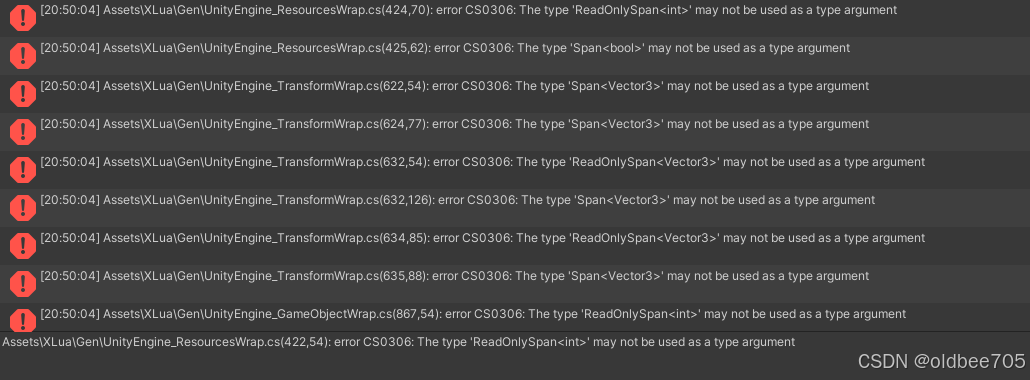
img
Unity使用XLua插件报错 ReadOnlySpan<> & Span<>
解决办法:在Editor/xlua/genconfig.cs 中 加入下面代码
[BlackList]
public static List BlackGenericTypeList = new List()
{
typeof(Span<>),
typeof(ReadOnlySpan<>)
};
private static bool IsBlacklistedGenericType(Type type)
{
if (!type.IsGenericType) return false;
return BlackGenericTypeList.Contains(type.GetGenericTypeDefinition());
}

[BlackList]
public static Func<MemberInfo, bool> GenericTypeFilter = (memberInfo) =>
{
switch (memberInfo)
{
case PropertyInfo propertyInfo:
return IsBlacklistedGenericType(propertyInfo.PropertyType);
case ConstructorInfo constructorInfo:
return constructorInfo.GetParameters().Any(p => IsBlacklistedGenericType(p.ParameterType));
case MethodInfo methodInfo:
return methodInfo.GetParameters().Any(p => IsBlacklistedGenericType(p.ParameterType));
default:
return false;
}
};
然后clear xlua genarated code ,重新生成一下就好了

问题三:
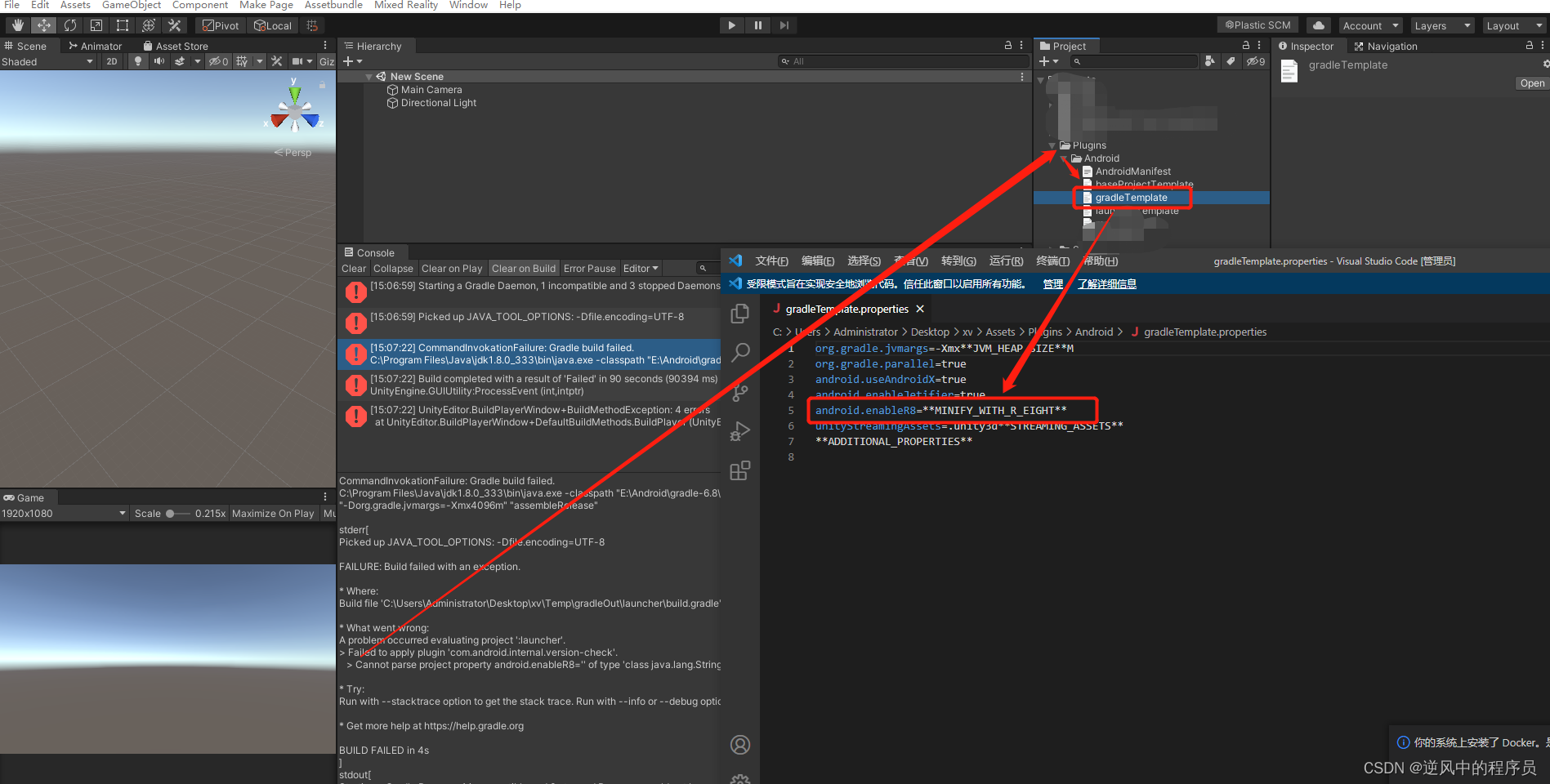
img
(1)Cannot parse project property android.enableR8=‘’ of type ‘class java.lang.String’ as boolean. Expected ‘true’ or ‘false’.
解决办法:
注释掉android.enableR8=MINIFY_WITH_R_EIGHT打包就可以了

问题四:
(3) Installed Build Tools revision 34.0.0 is corrupted. Remove and install again using the SDK Manager.
在unity hub 安装目录 mac 上的路径 /Applications/Unity/Hub/Editor/2022.3.60f1c1/PlaybackEngines/AndroidPlayer/SDK/build-tools/34.0.0
中的 d8 改成 dx,lib/r8.jar 改成 rx.jar

框架之消息机制(通知系统,观察者模式)

本篇我们实现一种消息机制。为什么需要消息机制,很简单,解耦合。

举个例子,游戏里面当资源数量更新时(例如粮食+200),所有显示该资源数量的界面都需要更新该资源的数量文本(例如训练士兵、升级建筑、治疗、研发等等),这可能会涉及十几种界面,而只有打开的界面需要更新。

那么当客户端收到服务端的数量更新消息时,在逻辑类里一个个的判断界面是否打开,如果界面打开则调用界面的更新方法显然是很低效、耦合的。那么消息机制的实现方式是怎么样的呢?

界面在打开时监听一条事件RESOURCE_DATA_UPDATE,在关闭时移除该事件RESOURCE_DATA_UPDATE,逻辑类收到资源更新消息时会触发这个事件,这样每个监听该事件的界面都可以收到资源更新的通知。

具体的实现是通过事件类型EventType 和c#委托Delegate实现的,EventType是自己定义的枚举。关键代码如下所示

1
2
3
4
5
6
7
8
9
10
11
12
13
14
15
16
17
18
19
20
21
22
23
24
25
26
27
28
29
30
31
32
33
private static Dictionary<EventType, Delegate> m_EventTable = new Dictionary<EventType, Delegate>();
public delegate void CallBack();

//添加一个事件(例如界面打开时)
public static void AddListener(EventType eventType, CallBack callBack)
{
m_EventTable[eventType] = (CallBack)m_EventTable[eventType] + callBack;
}

//移除一个事件(例如界面关闭时)
public static void RemoveListener(EventType eventType, CallBack callBack)
{
m_EventTable[eventType] = (CallBack)m_EventTable[eventType] - callBack;
OnListenerRemoved(eventType);
}

//触发事件,逻辑类调用
public static void Broadcast(EventType eventType)
{
Delegate d;
if (m_EventTable.TryGetValue(eventType, out d))
{
CallBack callBack = d as CallBack;
if (callBack != null)
{
callBack();
}
else
{
throw new Exception(string.Format("广播事件错误:事件{0}对应委托具有不同的类型", eventType));
}
}
}

详细代码如下:

一、c#端

1.回调定义:原本打算使用params object[] param作为回调参数,这样只需要定义一个回调。但是这种做法会导致频繁的装箱、拆箱操作,而且业务的代码也不好写。

装箱:值类型转引用类型,例如int装object。对值类型进行装箱会在堆中分配一个对象实例,并将该值复制到新的对象中。 最后会返回指向该内存的指针。我们应该尽量避免装箱操作。

1
2
3
4
5
6
7
public delegate void CallBack();
public delegate void CallBack<T>(T arg);
public delegate void CallBack<T, X>(T arg1, X arg2);
public delegate void CallBack<T, X, Y>(T arg1, X arg2, Y arg3);
public delegate void CallBack<T, X, Y, Z>(T arg1, X arg2, Y arg3, Z arg4);
public delegate void CallBack<T, X, Y, Z, W>(T arg1, X arg2, Y arg3, Z arg4, W arg5);
//public delegate void CallBack(params object[] param);

2.事件定义:

public enum EventType
{
ShowText,
}
3.事件添加、移除、分发:最多支持五个参数的回调

1
2
3
4
5
6
7
8
9
10
11
12
13
14
15
16
17
18
19
20
21
22
23
24
25
26
27
28
29
30
31
32
33
34
35
36
37
38
39
40
41
42
43
44
45
46
47
48
49
50
51
52
53
54
55
56
57
58
59
60
61
62
63
64
65
66
67
68
69
70
71
72
73
74
75
76
77
78
79
80
81
82
83
84
85
86
87
88
89
90
91
92
93
94
95
96
97
98
99
100
101
102
103
104
105
106
107
108
109
110
111
112
113
114
115
116
117
118
119
120
121
122
123
124
125
126
127
128
129
130
131
132
133
134
135
136
137
138
139
140
141
142
143
144
145
146
147
148
149
150
151
152
153
154
155
156
157
158
159
160
161
162
163
164
165
166
167
168
169
170
171
172
173
174
175
176
177
178
179
180
181
182
183
184
185
186
187
188
189
190
191
192
193
194
195
196
197
198
199
200
201
202
203
204
205
206
207
208
209
210
211
212
213
214
215
216
217
218
219
220
221
222
223
224
225
226
public class EventCenter
{
private static Dictionary<EventType, Delegate> m_EventTable = new Dictionary<EventType, Delegate>();

private static void OnListenerAdding(EventType eventType, Delegate callBack)
{
if (!m_EventTable.ContainsKey(eventType))
{
m_EventTable.Add(eventType, null);
}
Delegate d = m_EventTable[eventType];
if (d != null && d.GetType() != callBack.GetType())
{
throw new Exception(string.Format("尝试为事件{0}添加不同类型的委托,当前事件所对应的委托是{1},要添加的委托类型为{2}", eventType, d.GetType(), callBack.GetType()));
}
}
private static void OnListenerRemoving(EventType eventType, Delegate callBack)
{
if (m_EventTable.ContainsKey(eventType))
{
Delegate d = m_EventTable[eventType];
if (d == null)
{
throw new Exception(string.Format("移除监听错误:事件{0}没有对应的委托", eventType));
}
else if (d.GetType() != callBack.GetType())
{
throw new Exception(string.Format("移除监听错误:尝试为事件{0}移除不同类型的委托,当前委托类型为{1},要移除的委托类型为{2}", eventType, d.GetType(), callBack.GetType()));
}
}
else
{
throw new Exception(string.Format("移除监听错误:没有事件码{0}", eventType));
}
}
private static void OnListenerRemoved(EventType eventType)
{
if (m_EventTable[eventType] == null)
{
m_EventTable.Remove(eventType);
}
}
//no parameters
public static void AddListener(EventType eventType, CallBack callBack)
{
OnListenerAdding(eventType, callBack);
m_EventTable[eventType] = (CallBack)m_EventTable[eventType] + callBack;
}
//Single parameters
public static void AddListener<T>(EventType eventType, CallBack<T> callBack)
{
OnListenerAdding(eventType, callBack);
m_EventTable[eventType] = (CallBack<T>)m_EventTable[eventType] + callBack;
}
//two parameters
public static void AddListener<T, X>(EventType eventType, CallBack<T, X> callBack)
{
OnListenerAdding(eventType, callBack);
m_EventTable[eventType] = (CallBack<T, X>)m_EventTable[eventType] + callBack;
}
//three parameters
public static void AddListener<T, X, Y>(EventType eventType, CallBack<T, X, Y> callBack)
{
OnListenerAdding(eventType, callBack);
m_EventTable[eventType] = (CallBack<T, X, Y>)m_EventTable[eventType] + callBack;
}
//four parameters
public static void AddListener<T, X, Y, Z>(EventType eventType, CallBack<T, X, Y, Z> callBack)
{
OnListenerAdding(eventType, callBack);
m_EventTable[eventType] = (CallBack<T, X, Y, Z>)m_EventTable[eventType] + callBack;
}
//five parameters
public static void AddListener<T, X, Y, Z, W>(EventType eventType, CallBack<T, X, Y, Z, W> callBack)
{
OnListenerAdding(eventType, callBack);
m_EventTable[eventType] = (CallBack<T, X, Y, Z, W>)m_EventTable[eventType] + callBack;
}

//no parameters
public static void RemoveListener(EventType eventType, CallBack callBack)
{
OnListenerRemoving(eventType, callBack);
m_EventTable[eventType] = (CallBack)m_EventTable[eventType] - callBack;
OnListenerRemoved(eventType);
}
//single parameters
public static void RemoveListener<T>(EventType eventType, CallBack<T> callBack)
{
OnListenerRemoving(eventType, callBack);
m_EventTable[eventType] = (CallBack<T>)m_EventTable[eventType] - callBack;
OnListenerRemoved(eventType);
}
//two parameters
public static void RemoveListener<T, X>(EventType eventType, CallBack<T, X> callBack)
{
OnListenerRemoving(eventType, callBack);
m_EventTable[eventType] = (CallBack<T, X>)m_EventTable[eventType] - callBack;
OnListenerRemoved(eventType);
}
//three parameters
public static void RemoveListener<T, X, Y>(EventType eventType, CallBack<T, X, Y> callBack)
{
OnListenerRemoving(eventType, callBack);
m_EventTable[eventType] = (CallBack<T, X, Y>)m_EventTable[eventType] - callBack;
OnListenerRemoved(eventType);
}
//four parameters
public static void RemoveListener<T, X, Y, Z>(EventType eventType, CallBack<T, X, Y, Z> callBack)
{
OnListenerRemoving(eventType, callBack);
m_EventTable[eventType] = (CallBack<T, X, Y, Z>)m_EventTable[eventType] - callBack;
OnListenerRemoved(eventType);
}
//five parameters
public static void RemoveListener<T, X, Y, Z, W>(EventType eventType, CallBack<T, X, Y, Z, W> callBack)
{
OnListenerRemoving(eventType, callBack);
m_EventTable[eventType] = (CallBack<T, X, Y, Z, W>)m_EventTable[eventType] - callBack;
OnListenerRemoved(eventType);
}


//no parameters
public static void Broadcast(EventType eventType)
{
Delegate d;
if (m_EventTable.TryGetValue(eventType, out d))
{
CallBack callBack = d as CallBack;
if (callBack != null)
{
callBack();
}
else
{
throw new Exception(string.Format("广播事件错误:事件{0}对应委托具有不同的类型", eventType));
}
}
}
//single parameters
public static void Broadcast<T>(EventType eventType, T arg)
{
Delegate d;
if (m_EventTable.TryGetValue(eventType, out d))
{
CallBack<T> callBack = d as CallBack<T>;
if (callBack != null)
{
callBack(arg);
}
else
{
throw new Exception(string.Format("广播事件错误:事件{0}对应委托具有不同的类型", eventType));
}
}
}
//two parameters
public static void Broadcast<T, X>(EventType eventType, T arg1, X arg2)
{
Delegate d;
if (m_EventTable.TryGetValue(eventType, out d))
{
CallBack<T, X> callBack = d as CallBack<T, X>;
if (callBack != null)
{
callBack(arg1, arg2);
}
else
{
throw new Exception(string.Format("广播事件错误:事件{0}对应委托具有不同的类型", eventType));
}
}
}
//three parameters
public static void Broadcast<T, X, Y>(EventType eventType, T arg1, X arg2, Y arg3)
{
Delegate d;
if (m_EventTable.TryGetValue(eventType, out d))
{
CallBack<T, X, Y> callBack = d as CallBack<T, X, Y>;
if (callBack != null)
{
callBack(arg1, arg2, arg3);
}
else
{
throw new Exception(string.Format("广播事件错误:事件{0}对应委托具有不同的类型", eventType));
}
}
}
//four parameters
public static void Broadcast<T, X, Y, Z>(EventType eventType, T arg1, X arg2, Y arg3, Z arg4)
{
Delegate d;
if (m_EventTable.TryGetValue(eventType, out d))
{
CallBack<T, X, Y, Z> callBack = d as CallBack<T, X, Y, Z>;
if (callBack != null)
{
callBack(arg1, arg2, arg3, arg4);
}
else
{
throw new Exception(string.Format("广播事件错误:事件{0}对应委托具有不同的类型", eventType));
}
}
}
//five parameters
public static void Broadcast<T, X, Y, Z, W>(EventType eventType, T arg1, X arg2, Y arg3, Z arg4, W arg5)
{
Delegate d;
if (m_EventTable.TryGetValue(eventType, out d))
{
CallBack<T, X, Y, Z, W> callBack = d as CallBack<T, X, Y, Z, W>;
if (callBack != null)
{
callBack(arg1, arg2, arg3, arg4, arg5);
}
else
{
throw new Exception(string.Format("广播事件错误:事件{0}对应委托具有不同的类型", eventType));
}
}
}
}

二、lua端,lua对调并不需要定义。

1.事件定义:

1
2
3
4
5
6
7
8
9
10
11
12
13
14
15
16
17
18
19
20
21
22
23
24
25
26
27
28
29
30
31
32
33
34
35
36
37
38
39
40
41
42
43
44
45
46
47
48
49
50
51
52
53
54
55
56
57
58
59
60
61
62
63
64
65
66
67
68
69
70
71
72
73
74
75
76
77
78
79
80
81
82
83
84
85
86
87
88
89
90
91
92
93
94
95
96
97
98
99
100
101
102
103
104
105
-- 广播消息定义
local BroadcastMsgConfig = {
ACTIVITY_INIT = "ACTIVITY_INIT", -- 活动初始化
ACTIVITY_EXPIRE = "ACTIVITY_EXPIRE", -- 活动过期
ACTIVITY_REFRESH = "ACTIVITY_REFRESH", -- 活动刷新
ACTIVITY_ENTER = "ACTIVITY_ENTER", -- 进入活动
ACTIVITY_PLAY = "ACTIVITY_PLAY", -- 玩活动
...
}

-- 广播消息中心管理
local BroadcastCenter = BaseClass("BroadcastCenter", Singleton)
local Messenger = require "Framework.Common.Messenger"

-- 构造函数
function BroadcastCenter.__init(cls_obj)
cls_obj.msgRegister = Messenger.New() -- 广播消息注册器
end

-- 析构函数
function BroadcastCenter.__delete(cls_obj)
cls_obj.msgRegister:Delete()
cls_obj.msgRegister = nil
end

-- 注册消息
function BroadcastCenter:AddListener(msg_type, msg_listener, ...)
self.msgRegister:AddListener(msg_type, msg_listener, ...)
end

-- 注销消息
function BroadcastCenter:RemoveListener(msg_type, msg_listener)
if self.msgRegister then
self.msgRegister:RemoveListener(msg_type, msg_listener)
end
end

-- 发送消息
function BroadcastCenter:Broadcast(msg_type, ...)
if self.msgRegister then
self.msgRegister:Broadcast(msg_type, ...)
end
end

return BroadcastCenter

local Messenger = BaseClass("Messenger");

function Messenger.__init(cls_obj)
cls_obj.events = {}
end

function Messenger.__delete(cls_obj)
cls_obj.events = nil
cls_obj.error_handle = nil
end

function Messenger.AddListener(cls_obj, e_type, e_listener, ...)
local event = cls_obj.events[e_type]
if event == nil then
event = setmetatable({}, {__mode = "k"})
end

for k, v in pairs(event) do
if k == e_listener then
error("Aready cotains listener : "..tostring(e_listener))
return
end
end

event[e_listener] = setmetatable(SafePack(...), {__mode = "kv"})
cls_obj.events[e_type] = event;
end

function Messenger.Broadcast(cls_obj, e_type, ...)
local event = cls_obj.events[e_type]
if event == nil then
return
end

for k, v in pairs(event) do
assert(k ~= nil)
local args = ConcatSafePack(v, SafePack(...))
k(SafeUnpack(args))
end
end

function Messenger.RemoveListener(cls_obj, e_type, e_listener)
local event = cls_obj.events[e_type]
if event == nil then
return
end

event[e_listener] = nil
end

function Messenger.RemoveListenerByType(cls_obj, e_type)
cls_obj.events[e_type] = nil
end

function Messenger.Cleanup(cls_obj)
cls_obj.events = {};
end

return Messenger

注意:
1、模块实例销毁时,要自动移除消息监听,不移除的话不能自动清理监听
2、使用弱引用,即使监听不手动移除,消息系统也不会持有对象引用,所以对象的销毁是不受消息系统影响的
3、换句话说:广播发出,回调一定会被调用,但回调参数中的实例对象,可能已经被销毁,所以回调函数一定要注意判空

unity游戏开发之三方SDK接入

出海游戏开发中,sdk接入是必不可少的,sdk接入包括:

1.账号类:创建、登录、切换 Facebook SDK, AppleId SDK

2.充值 ,unity IAP,如果接入其他平台,比如亚马逊,需要调用这些平台的接口

3.外部分享如微信、朋友圈、FB等

4.打开外部链接,如helpshift ,广告平台

5.功能类:语音、头像、埋点

这些功能都是sdk提供的,而我们要做的就是调用sdk的接口(有的有Unity SDK,有的是原生接口,ios的OC接口,android的java接口)
如果有Unity SDK ,直接导入到Unity 工程,像调用正常的C#方法一样调用即可。

一、android和c#交互

1.c#调用android方法,如下,使用 AndroidJavaClass获取AndroidJavaObject对象,在通过AndroidJavaObject调用java方法。最常用的是AndroidJavaObject的Call方法,unity文档:http://docs.unity3d.com/ScriptReference/AndroidJavaObject.html
这个Call是支持多参数的,第一个参数必须是方法名,第二个开始则是各种参数。如果有返回值则需要使用泛型版本Call

1
2
3
4
5
6
7
8
9
10
11
12
13
14
15
16
17
18
19
20
21
22
23
24
25
26
27
28
29
30
31
32
33
34
35
36
37
38
39
40
41
42
43
44
45
46
47
48
49
50
51
52
53
54
55
56
57
58
59
60
61
62
63
64
65
66
67
68
69
70
71
72
73
74
75
76
77
78
79
80
using UnityEngine;

/// <summary>
/// Android帮助库
/// 提供unity对android端的调用,属性的get和set麻烦封装成方法
/// </summary>
public class AndroidHelper
{
const string AndroidMainActivity = "com.unity3d.player.UnityPlayer";

static AndroidJavaObject ms_MainActivity;
public static AndroidJavaObject MainActivity {
get {
if (ms_MainActivity == null) {
AndroidJavaClass jc = new AndroidJavaClass (AndroidMainActivity);
if (jc != null) {
ms_MainActivity = jc.GetStatic<AndroidJavaObject> ("currentActivity");
}
}

return ms_MainActivity;
}
}

#region MainActivity的非静态方法
public static void Call(string method)
{
MainActivity.Call(method);
}

public static void Call(string method, object[] args)
{
MainActivity.Call(method, args);
}

public static void Call(string method, bool val)
{
MainActivity.Call(method, new object[] { val });
}

public static void Call(string method, string val)
{
MainActivity.Call(method, new object[] { val });
}

public static string CallWithReturn(string method)
{
string result = "";

AndroidJavaClass jc = new AndroidJavaClass("com.unity3d.player.UnityPlayer");
AndroidJavaObject jo = jc.GetStatic<AndroidJavaObject>("currentActivity");
result = jo.Call<string>(method);

return result;
}
#endregion

#region MainActivity的静态方法
public static void CallStatic(string method)
{
MainActivity.CallStatic(method);
}

public static void CallStatic(string method, string val)
{
MainActivity.CallStatic(method, new object[] { val });
}

public static string CallStaticWithReturn(string val)
{
string result = "";

AndroidJavaClass jc = new AndroidJavaClass("com.unity3d.player.UnityPlayer");
AndroidJavaObject jo = jc.GetStatic<AndroidJavaObject>("currentActivity");
result = jo.CallStatic<string>(val);

return result;
}
#endregion
}

2.Java回调unity,public static void UnitySendMessage(String var0, String var1, String var2) ,第一个参数为unity中的一个gameobject名称,第二个参数为这个gameobject身上捆绑的脚本中的一个方法,而第三参数是这个对应方法上的参数

1
2
3
4
5
6
7
8
9
10
public static final String UNITY_HANDLER = "SDKMsgHandler";
**
* 向Unity传送
* @param arg1 函数名
* @param arg2 参数
*/
public static void UnitySendMessage(String arg1, String arg2)
{
UnityPlayer.UnitySendMessage(UNITY_HANDLER, arg1, arg2);
}

二、ios和c#的交互,可以参照官网:https://docs.unity3d.com/Manual/PluginsForIOS.html,
你需要把你的oc代码放在Plugins/iOS文件夹下才能正确调用到OC的代码

c#调用ios:c#端

1
2
3
4
5
6
7
8
9
10
11
[DllImport("__Internal")]
private static extern string U3dGetAvailableDiskSize();

/// <summary>
/// 获取磁盘空间
/// </summary>
public long GetAvailableDiskSize()
{
string size = U3dGetAvailableDiskSize();
return long.Parse(size);
}

OC端

1
2
3
4
5
6
7
8
9
10
11
12
13
14
15
16
17
18
19
20
21
22
char* _MakeStringCopy( const char* string)
{
if (NULL == string) {
return NULL;
}
char* res = (char*)malloc(strlen(string)+1);
strcpy(res, string);
return res;
}

const char* U3dGetAvailableDiskSize()
{
struct statfs buf;
long long freespace = -1;
if(statfs("/var", &buf) >= 0)
{
freespace = (long long)(buf.f_bsize * buf.f_bfree);
}
NSString *_msg = [NSString stringWithFormat:@"%lld", freespace];

return _MakeStringCopy([_msg UTF8String]);
}

2.OC回调unity:

UnitySendMessage(“GameObjectName1”, “MethodName1”, “Message to send”);
参数1:gameobject名字;参数2:回调函数的名字;参数3:参数。同android开发中java回调c#一样,三个参数都是字符串类型!

三、好了。我们知道unity跟ios\android怎么交互了,可以开始设计我们的接口了,首先在c#端,我们需要区分三种平台,ios\android\unity editor三种平台,我们不可能像下面这么写,几十个接口如果都这么写,会原地爆炸的,所以我们需要用的接口来规范我们的代码

1
2
3
4
5
6
7
8
9
if(platform == ios)
{
//xxxx
}else if(paltform == android)
{
//xxxx
}else if(platform == editor){
//xxxx
}

1.首先我们需要有一个接口类:

1
2
3
4
5
6
7
8
public interface SDKInterface
{
/** 登录 **/
void Login();

/** 打开SDK用户中心界 **/
void ShowUserCenter();
}

2.我们需要有每个平台的具体实现类(其实就是ios调用OC,android调用Java,editor平台啥也不做),如下所示,U3dLogin\ShowUserCenter是Ios、android两端的实现代码,这里就不上了

1
2
3
4
5
6
7
8
9
10
11
12
13
14
15
16
17
18
19
20
#if UNITY_ANDROID
public class AndroidSDK : SDKInterface
{
/// <summary>
/// 登录
/// </summary>
public void Login()
{
Call("U3dLogin");
}

/// <summary>
/// 打开SDK用户中心界
/// </summary>
public void ShowUserCenter()
{
Call("U3dShowUserCenter");
}
}
#endif
1
2
3
4
5
6
7
8
9
10
11
12
13
14
15
16
17
18
19
20
21
22
23
24
25
26
#if UNITY_IOS
public class IOSSDK : SDKInterface
{
[DllImport("__Internal")]
private static extern void U3dLogin();

[DllImport("__Internal")]
private static extern void U3dShowUserCenter();

/// <summary>
/// 登录
/// </summary>
public void Login()
{
U3dLogin();
}

/// <summary>
/// 打开SDK用户中心界
/// </summary>
public void ShowUserCenter()
{
U3dShowUserCenter();
}
}
#endif
1
2
3
4
5
6
public class EmptySDK : SDKInterface
{
public void Login() { }

public void ShowUserCenter() { }
}

3.一个接受两端回调消息的类,ios\android共用一个就好了,该类会在管理类里面初始化

1
2
3
4
5
6
7
8
9
10
11
public class SDKMsgHandler : MonoBehaviour
{
/// <summary>
/// 登录回调
/// </summary>
/// <param name="msg">msg</param>
public void LoginNotification(string msg)
{
    Debug.Log("登录回调:" + msg);
}
}

4.我们需要一个管理类,来确定具体是调用哪一个接口

1
2
3
4
5
6
7
8
9
10
11
12
13
14
15
16
17
18
19
20
21
22
23
24
25
26
27
28
29
30
31
32
33
34
35
36
37
public class SDKModule : ModuleBase
{
public SDKModule ()
{
#if UNITY_EDITOR || GUIDE
_sdk = new EmptySDK ();
#elif UNITY_IOS
_sdk = new IOSSDK();
#elif UNITY_ANDROID
_sdk = new AndroidSDK();
#else
_sdk = new EmptySDK();
#endif

GameObject go = new GameObject ("SDKMsgHandler");
GameObject.DontDestroyOnLoad (go);
go.AddComponent<SDKMsgHandler> ();
}

/// <summary>
/// 登录
/// </summary>
public void Login ()
{
Debug.Log("Login c");
_sdk.Login ();
}

/// <summary>
/// 打开SDK用户中心界
/// </summary>
public void ShowUserCenter ()
{
Debug.Log("ShowUserCenter c");
_sdk.ShowUserCenter ();
}
}

至此,c#端就完成了。

框架之UI管理模块

1.界面的加载、卸载

2.打开、关闭、隐藏、显示界面,这边隐藏是指界面被遮挡的意思,一般来说,界面被遮住时,应该关闭界面的更新

3.界面栈的管理,主要是用于场景切换时需要回到上一个场景打开的界面栈

4.需要的功能:图片镜像(节省资源)、滑动列表(复用)、模糊背景等

注意点:

1.界面的生成:class的生成、预制体的实例化,类和实例的关联。

业务打开一个界面需要传入界面的标识(枚举、或者字符串),如何通过这个标识找到预制体并实例化go、如何生成指定的界面view,如何绑定view和go

如何销毁一个界面,清除ab缓存、清除引用关系、destory go

2.界面的层级关系:每次打开一个新的UI,都将它堆入栈,关闭时出栈。这个栈是一个特殊的栈,例如它可以实现,某个不在栈顶的UI,可以“TOP”到栈顶。

打开一个界面:1.从已打开界面搜索,避免重复打开界面。2.从缓存界面搜索,避免重复加载。3.隐藏栈顶界面。4.打开新界面

关闭一个界面:1.关闭界面并加入缓存。2.从已打开界面栈顶取出一个界面,显示该界面。3.重复步骤2直到打开一个全屏界面。

退出场景:1.所有界面入栈,当再次回到场景时可以恢复界面栈。2.关闭界面

进入场景:1.如果需要恢复界面栈,从界面栈取出界面并打开显示该界面。2.重复1步骤直到打开一个全屏界面。3.不需要恢复:打开当前场景的界面。

3.界面间的通信:最好不要有界面之间的通信,界面的更新通过数据(逻辑)类发送消息通知给界面。例如使用道具后界面的更新,数据类接收到服务器道具使用成功后,发送道具更新消息BAG_DATA_UPDATE,需要更新的界面监听BAG_DATA_UPDATE消息并刷新界面。

4.界面打开动画控制。统一使用Animator(Animation),且每个界面最多只有一个Animator(Animation),界面获取焦点时调用Animator的Play方法播放动画。

5.界面特效控制:游戏会有很多进入界面播放一次的特效,如果你的界面关闭不是使用SetActive处理的(例如设置layer、移到屏幕外等),那么在你的界面再次打开时特效不会再次被播放。

6.界面内使用的对象怎么获取?(例如要修改界面的某个text)

每个需要在脚本内加载的对象都挂载一个UIExportItem对象,在界面初始化时统一收集这些对象,并存储在一个map里给界面使用

UI模块分以下几部分:

1.界面类:负责界面的逻辑,提供生命周期方法供业务使用,如OnOpen、OnClose等。负责界面的生成、销毁(以及界面ab包的加载、卸载)。子窗口、子item的管理(生成、缓存、销毁)

2.管理类:提供界面的生命周期管理,如打开、关闭、显示(获得焦点,显示在最上层)、隐藏(失去焦点,可以理解成被其他界面挡住了)一个界面、打开、关闭一堆界面(场景切入、切出时)。缓存界面。维护窗体中间的层级关系。

3.配置类:负责配置界面的预制体路径、类、界面类型等参数。

4.功能类:滑动列表、图片镜像、模糊、弹窗适配、通用的标题、通用的tab等。

5.item类,例如界面的滑动列表的子项。

详细代码如下:

一、ViewDefine:定义类的配置:这边主要是一些界面定义以及界面的配置,通过配置类名可以用反射实例化界面类,通过配置的路径可以加载并实例化预制体。

1
2
3
4
5
6
7
8
9
10
11
12
13
14
15
16
17
18
19
20
21
22
23
24
25
26
27
28
29
30
31
32
33
34
35
36
37
38
39
40
41
42
43
44
45
46
47
48
49
50
51
52
53
54
55
56
57
58
59
60
61
62
63
64
65
66
67
68
69
70
71
72
73
74
75
76
77
78
79
80
81
82
83
84
85
86
87
88
using System.Collections.Generic;
using UnityEngine;

public class ViewDefine
{
public enum ViewType
{
MAIN = 1, // 主窗口(全屏)
POPUP = 2, // 弹窗
FIXED = 3, // 固化窗口
SCENE = 4, // 场景UI窗口
GUIDE = 5, // 引导UI窗口
}

public enum ViewPopModal
{
Blur = 1, // 带有模糊效果的模态弹窗
Lucency_ImPenetrable = 2, // 无模糊,不可穿透
Lucency_Penetrate = 3, // 无模糊, 可穿透
}

public enum ViewLoadStateDefine
{
NONE = 0,
LOADING = 1,
LOADED = 2,
}

public enum ViewOnLoadDefine
{
Cache = 1,
Destroy = 2,
}

public enum ViewAlignmentType
{
UpperLeft = 0,
UpperCenter = 1,
UpperRight = 2,
MiddleLeft = 3,
MiddleCenter = 4,
MiddleRight = 5,
LowerLeft = 6,
LowerCenter = 7,
LowerRight = 8,
}

public enum ViewID
{
TOAST, // 吐司界面
TOAST_BATTLE, // 战斗中吐司界面
NETWAIT, // 网络等待界面
NETWORK_TIPS, // 网络异常提示
}

private static Dictionary<int, string> _viewConfig = new Dictionary<int, string>
{
{ (int)ViewID.TOAST, "ToastView,Prefab/Common/ToastPanel" },
{ (int)ViewID.TOAST_BATTLE, "ToastBattleView,Prefab/Common/ToastBattlePanel" },
{ (int)ViewID.NETWAIT, "NetwaitView,Prefab/Common/NetwaitPanel" }
};

public static string GetViewType(ViewID viewID)
{
string config = _viewConfig[(int)viewID];
if (string.IsNullOrEmpty(config))
{
Debug.LogErrorFormat("未配置界面路径 : {0}", viewID);
return null;
}

string[] split = config.Split(',');
return split[0];
}

public static string GetViewPath(ViewID viewID)
{
string config = _viewConfig[(int)viewID];
if (string.IsNullOrEmpty(config))
{
Debug.LogErrorFormat("未配置界面路径 : {0}", viewID);
return null;
}

string[] split = config.Split(',');
return split[1];
}
}

二、UIBase ,ui元素基类,主要提供go的销毁以及导入界面需要引用的对象并保存在_viewObj里,业务可以通过_viewObj[“对象名”]访问对象而不用去定义参数。

1
2
3
4
5
6
7
8
9
10
11
12
13
14
15
16
17
18
19
20
21
22
23
24
25
26
27
28
29
30
31
32
33
34
35
36
37
38
39
40
41
42
43
44
45
46
47
48
49
50
51
52
53
54
55
56
57
58
59
60
61
62
63
64
65
66
67
using System.Collections.Generic;
using UnityEngine;

/// <summary>
/// item、view的基类,提供预制体的生成、卸载(ab包的维护),提供子节点的生成
/// </summary>
public class UIBase
{
protected GameObject gameObject;
protected Transform transform;

public string Name { get; set; }

protected Dictionary<string, Object> _viewObj = new Dictionary<string, Object>();//导出的界面对象

public virtual void Ctor(GameObject obj, Transform parent)
{
if (obj != null)
{
gameObject = obj;
transform = obj.transform;
ExportHierarchy();

if (parent != null) {
transform.SetParent(parent);
transform.localPosition = Vector3.zero;
transform.localScale = Vector3.zero;
}
}
}

protected virtual void OnLoad() { }

public void SetActive(bool isShow)
{
gameObject.SetActive(isShow);
}

public virtual void Dispose()
{
if (gameObject != null) {
GameObject.Destroy(gameObject);
transform = null;
gameObject = null;
}
}

protected void ExportHierarchy()
{
if (gameObject)
{
UIHierarchy hierarchy = gameObject.GetComponent<UIHierarchy>();
if (hierarchy)
{
foreach (var item in hierarchy.widgets)
{
_viewObj.Add(item.name, item.item);
}

foreach (var item in hierarchy.externals)
{
_viewObj.Add(item.name, item.item);
}
}
}
}
}

三、UIItemBase ,item类,主要是提供OnItemOpen、OnItemClose方法,方便item在界面打开和关闭时监听(移除)事件

1
2
3
4
5
6
7
8
9
10
11
12
13
14
15
16
17
18
19
20
21
22
23
24
25
26
27
28
/// <summary>
/// 界面item
/// </summary>
public class UIItemBase:UIBase
{
protected ViewBase parentView;
protected bool isItemOpen = false;

public virtual void OnItemOpen()
{
isItemOpen = true;
}

public virtual void OnItemClose()
{
isItemOpen = false;
}

public bool IsItemOpen()
{
return isItemOpen;
}

public void SetParentView(ViewBase parent)
{
parentView = parent;
}
}

四、PanelBase ,子界面、界面的基类。主要是提供子item的生成、维护。

1
2
3
4
5
6
7
8
9
10
11
12
13
14
15
16
17
18
19
20
21
22
23
24
25
26
27
28
29
30
31
32
33
34
35
36
37
38
39
40
41
42
43
44
45
46
47
48
49
50
51
52
53
54
55
56
57
58
59
60
61
62
63
64
65
66
67
68
69
70
71
72
73
74
75
76
77
78
79
80
81
82
83
84
85
86
87
88
89
90
91
92
93
94
95
96
97
98
99
100
101
102
103
104
105
106
107
108
109
110
111
112
113
114
115
116
117
118
119
120
121
122
123
124
125
126
127
128
129
130
131
132
133
134
135
136
137
138
139
140
141
142
143
144
145
146
147
148
149
150
151
152
153
154
155
156
157
158
159
160
161
162
163
164
165
166
167
168
169
170
171
172
173
174
175
176
177
178
179
180
181
182
183
184
185
186
187
using System.Collections.Generic;
using UnityEngine;

/// <summary>
/// 所有界面的基类,包括子窗口、所有的界面
/// 这个类主要功能是:提供给子界面生个生成、维护item的接口
/// </summary>
public class PanelBase:UIBase
{
protected bool isOpen = false;
protected Dictionary<string, Queue<UIItemBase>> childItemPool = new Dictionary<string, Queue<UIItemBase>>(); //缓存item的池子
protected List<UIBase> subItems = new List<UIBase>();//维护子对象,包括子窗口、子item

/// <summary>
/// UIModule调用,用于打开一个界面。如果该界面还未加载,会调用Load加载界面
/// </summary>
/// <param name="args"></param> 界面参数
public virtual void Open(params object[] args)
{

}

public virtual void Close()
{

}

public bool IsOpen()
{
return isOpen;
}

/// <summary>
/// 生成一个子item
/// </summary>
/// <param name="className"></param> 子item的类名
/// <param name="prefabs"></param> 子item的预制体
/// <param name="parent"></param> 子item的父节点
/// <returns></returns>
protected UIItemBase GenerateItem(string className, GameObject prefabs, Transform parent)
{
Queue<UIItemBase> pool = childItemPool[className];

if (pool != null && pool.Count > 0)
{
return pool.Dequeue();
}

UIItemBase item = InstantiateItem(className, prefabs, parent);
AddSubItem(item);
return item;
}

protected void GenerateItemList(string className, GameObject prefabs, Transform parent, int count, ref List<UIItemBase> container)
{
while (container.Count < count)
{
UIItemBase item = GenerateItem(className, prefabs, transform);
container.Add(item);
}

while (container.Count > count)
{
UIItemBase item = container[container.Count];
container.Remove(item);
RecyleItem(item);
}
}

protected UIItemBase InstantiateItem(string className, GameObject prefabs, Transform parent)
{
GameObject obj = GameObject.Instantiate(prefabs, parent);
UIItemBase item = (UIItemBase)UIModule.Instance.CreateUIClass(className);
item.Ctor(obj, parent);
item.Name = className;
return item;
}

/// <summary>
/// 回收子item
/// </summary>
/// <param name="item"></param>
protected void RecyleItem(UIItemBase item)
{
RemoveSubItem(item);

Queue<UIItemBase> cachePool = childItemPool[item.Name];
if (cachePool == null)
{
cachePool = new Queue<UIItemBase>();
}

cachePool.Enqueue(item);
item.SetActive(false);
if (item.IsItemOpen())
{
item.OnItemClose();
}
}

protected void RecyleItemList(int count, ref List<UIItemBase> container)
{
while (container.Count > count)
{
UIItemBase item = container[container.Count];
RecyleItem(item);
container.Remove(item);
}
}

protected void ClearCache()
{
foreach (var pool in childItemPool.Values)
{
foreach (var item in pool)
{
item.Dispose();
}
pool.Clear();
}

childItemPool.Clear();
}

/// <summary>
/// 添加子对象,包括item、childview
/// </summary>
/// <param name="item"></param>
protected void AddSubItem(UIBase item)
{
if (subItems.Contains(item))
{
Debug.Log("item已存在");
return;
}

subItems.Add(item);
}

protected void RemoveSubItem(UIBase item)
{
if (subItems.Contains(item))
{
subItems.Remove(item);
}
}

protected void RemoveAllSubItem()
{
foreach (var item in subItems)
{
item.Dispose();
}

subItems.Clear();
}

protected void OnOpenSubItem()
{
foreach (var item in subItems)
{
if (item is UIItemBase)
{
(item as UIItemBase).OnItemOpen();
}
}
}

protected void OnCloseSubItem()
{
foreach (var item in subItems)
{
if (item is UIItemBase)
{
(item as UIItemBase).OnItemClose();
}
}
}

public override void Dispose()
{
base.Dispose();

RemoveAllSubItem();
ClearCache();
}
}

五、ChildViewBase :重写了Open、Close方法

1
2
3
4
5
6
7
8
9
10
11
12
13
14
15
16
17
18
19
20
21
22
23
24
25
26
public class ChildViewBase:PanelBase
{
/// <summary>
/// UIModule调用,用于打开一个界面。如果该界面还未加载,会调用Load加载界面
/// </summary>
/// <param name="args"></param> 界面参数
public override void Open(params object[] args)
{
if (!isOpen)
{
SetActive(true);
OnOpenSubItem();
isOpen = true;
}
}

public override void Close()
{
if (isOpen)
{
OnCloseSubItem();
SetActive(false);
isOpen = false;
}
}
}

六、ViewBase :所有界面基类,主要是提供了界面的加载、卸载(注意ab的加、卸载),子界面的添加、维护。

1
2
3
4
5
6
7
8
9
10
11
12
13
14
15
16
17
18
19
20
21
22
23
24
25
26
27
28
29
30
31
32
33
34
35
36
37
38
39
40
41
42
43
44
45
46
47
48
49
50
51
52
53
54
55
56
57
58
59
60
61
62
63
64
65
66
67
68
69
70
71
72
73
74
75
76
77
78
79
80
81
82
83
84
85
86
87
88
89
90
91
92
93
94
95
96
97
98
99
100
101
102
103
104
105
106
107
108
109
110
111
112
113
114
115
116
117
118
119
120
121
122
123
124
125
126
127
128
129
130
131
132
133
134
135
136
137
138
139
140
141
142
143
144
145
146
147
148
149
150
151
152
153
154
155
156
157
158
159
160
161
162
163
164
165
166
167
168
169
170
171
172
173
174
175
176
177
178
179
180
181
182
183
184
185
186
187
188
189
190
191
192
193
194
195
196
197
198
199
200
201
202
203
204
205
206
207
208
209
210
211
212
using System.Collections.Generic;
using UnityEngine;

/// <summary>
/// 界面基类,可以生成ChildView
/// </summary>
public class ViewBase: PanelBase
{
protected object[] openParam;
protected ViewDefine.ViewType viewType;
protected ViewDefine.ViewLoadStateDefine loadState = ViewDefine.ViewLoadStateDefine.NONE;
protected bool isHide = false;
protected float closeTime = 0;//用于回收计时

public ViewDefine.ViewID ViewID { get; set; }

/// <summary>
/// 打开界面,一次OnOpen对应一次OnClose,子类实现
/// </summary>
/// <param name="args"></param>
protected virtual void OnOpen(params object[] args){ }

/// <summary>
/// 用于刷新界面,每次调用OpenView都会调用,避免业务重复打开界面
/// </summary>
/// <param name="args"></param>
protected virtual void OnRefreshView(params object[] args) { }

/// <summary>
/// 获得焦点。1.打开界面。2.上一层界面被关闭,重新获得焦点
/// </summary>
protected virtual void OnEnabled() { }

public virtual void Update(float dt) { }

/// <summary>
/// 失去焦点。1.关闭界面。2.有新的界面打开。
/// </summary>
protected virtual void OnDisable() { }

protected virtual void OnClose() { }


/// <summary>
/// UIModule调用,用于打开一个界面。如果该界面还未加载,会调用Load加载界面
/// </summary>
/// <param name="args"></param> 界面参数
public override void Open(params object[] args)
{
openParam = args;
if (loadState == ViewDefine.ViewLoadStateDefine.LOADED)
{
DoRealOpen();
}
else
{
Load();
}
}

/// <summary>
/// 加载界面,包括界面的ab包,ab的依赖包,最终返回一个Prefab用于实例化界面
/// </summary>
private void Load()
{
if (loadState != ViewDefine.ViewLoadStateDefine.NONE) return;

loadState = ViewDefine.ViewLoadStateDefine.LOADING;
ResManager.Instance.LoadPrefab(ViewDefine.GetViewPath(ViewID), "", LoadFinish);
}

private void LoadFinish(object prefab)
{
loadState = ViewDefine.ViewLoadStateDefine.LOADED;
gameObject = GameObject.Instantiate((GameObject)prefab, UIModule.Instance.GetViewRoot(viewType));
transform = gameObject.transform;
ExportHierarchy();

OnLoad();
DoRealOpen();
}

private void DoRealOpen()
{
if (!isOpen)
{
SetActiveEx(true);
OnOpen(openParam);
OnOpenSubItem();
}

OnRefreshView(openParam);
ShowView();
}

/// <summary>
/// 显示、隐藏界面,这边使用的方式是将界面移到屏幕外。
/// 另外几种做法是:1.SetActive直接隐藏go。2.设置Scale为0。3.设置layer out
/// </summary>
/// <param name="isActive"></param> 是否显示
public void SetActiveEx(bool isActive)
{
if (transform) {
if (isActive)
{
transform.localPosition = Vector3.zero;
}
else
{
transform.localPosition = new Vector3(10000, 10000, 0);
}
}
}

public virtual void ShowView()
{
SetActiveEx(true);
transform.SetAsFirstSibling();

if (!isHide)
{
isHide = true;
OnEnabled();
}
}

/// <summary>
/// 界面失去焦点,如果是打开弹窗,不隐藏该界面。
/// </summary>
/// <param name="keepShow"></param>
public virtual void HideView(bool keepShow = false)
{
SetActiveEx(keepShow);

if (isHide)
{
isHide = false;
OnDisable();
}
}

public override void Close()
{
if (isOpen)
{
UIModule.Instance.CloseView(ViewID);
}
}

public virtual void CloseView()
{
HideView();
if (isOpen)
{
OnClose();
OnCloseSubItem();
CloseSubPanel();
closeTime = Time.realtimeSinceStartup;
}
}

public float GetCloseTime()
{
return closeTime;
}

public bool IsPopView()
{
return viewType == ViewDefine.ViewType.POPUP;
}

public bool IsMainView()
{
return viewType == ViewDefine.ViewType.MAIN;
}

public bool IsFixedView()
{
return viewType == ViewDefine.ViewType.FIXED;
}

public bool IsShow()
{
return !isHide;
}

public bool IsOnLoadDestroy()
{
return loadState == ViewDefine.ViewLoadStateDefine.LOADING;
}

protected List<ChildViewBase> childView = new List<ChildViewBase>();
protected ChildViewBase AddChildPanel(string className, GameObject obj, Transform parent)
{
ChildViewBase view = (ChildViewBase)UIModule.Instance.CreateUIClass(className);
view.Ctor(obj, parent);
childView.Add(view);
AddSubItem(view);
return view;
}

protected void CloseSubPanel()
{
foreach (var item in childView)
{
if (item.IsOpen())
{
item.Close();
}
}
}
}

七、UIHierarchy:保存了业务导出的引用对象。ExportPanelHierarchy寻找UIExportItem 元素并保存到UIHierarchy

1
2
3
4
5
6
7
8
9
10
11
12
13
14
15
16
17
18
19
20
21
22
23
24
25
26
27
28
29
30
31
32
33
34
35
36
37
public class UIHierarchy : MonoBehaviour
{
[System.Serializable]
public class ItemInfo
{
public string name;
public Object item;

public ItemInfo() { }
public ItemInfo(string _name, Object _item) { name = _name; item = _item; }
}

// 控件
public List<ItemInfo> widgets;
public void SetWidgets(List<ItemInfo> data)
{
if (data.Count == 0) return;
if (widgets == null)
{
widgets = new List<ItemInfo>();
}

widgets.Clear();
widgets.AddRange(data);
}

// 外部引用
public List<ItemInfo> externals;
}

using UnityEngine;

[DisallowMultipleComponent]
public class UIExportItem : MonoBehaviour
{
public string FieldName;
}
1
2
3
4
5
6
7
8
9
10
11
12
13
14
15
16
17
18
19
20
21
22
23
24
25
26
27
28
29
30
31
32
33
34
35
36
37
38
39
40
41
42
43
44
45
46
47
48
49
50
51
52
53
54
55
56
57
58
59
60
61
62
63
64
65
66
67
68
69
70
71
72
73
74
75
76
77
78
79
80
81
82
83
84
85
86
87
88
89
90
91
92
93
94
95
96
97
98
99
100
101
102
103
104
105
106
107
using UnityEngine;
using UnityEngine.UI;
using UnityEditor;
using System.Collections.Generic;

public class ExportPanelHierarchy
{
/// <summary>
/// 导出组件优先级
/// </summary>
private static System.Type[] ms_componentTypes = {
typeof(Button),
typeof(InputField),
typeof(ScrollRect),
typeof(Dropdown),
typeof(Image),
typeof(RawImage),
typeof(Scrollbar),
typeof(Slider),
typeof(Text),
typeof(Toggle),
typeof(GridLayoutGroup),
typeof(HorizontalOrVerticalLayoutGroup),
typeof(LayoutElement),
typeof(CanvasGroup),
typeof(ToggleGroup),
typeof(TextMesh),
typeof(Animation),
typeof(Camera),
typeof(SpriteRenderer),
};

static Object FindComponent(GameObject go)
{
Object component = null;
for (int i = 0; i < ms_componentTypes.Length; ++i)
{
component = go.GetComponent(ms_componentTypes[i]);
if (component != null)
{
break;
}
}
return component;
}

//生成嵌套UI层级
public static void ExportNested(Object obj)
{
GameObject root = obj as GameObject;
if (root == null) return;

UIHierarchy hierarchy = root.GetComponent<UIHierarchy> ();
if(hierarchy==null)
{
hierarchy = root.AddComponent<UIHierarchy>();
}

//生成根节点层级
List<UIHierarchy.ItemInfo> fields = new List<UIHierarchy.ItemInfo>();
GetChildComponentUtilHierarchy (root.transform, fields);
hierarchy.SetWidgets(fields);

//生成子panel层级
UIHierarchy[] childHierarchys = root.GetComponentsInChildren<UIHierarchy>(true);
for(int i=1; i<childHierarchys.Length; i++)
{
UIHierarchy childHrcy = childHierarchys [i];

List<UIHierarchy.ItemInfo> childUIItem = new List<UIHierarchy.ItemInfo>();
GetChildComponentUtilHierarchy (childHrcy.transform, childUIItem);
childHrcy.SetWidgets(childUIItem);
}

EditorUtility.SetDirty(root);
AssetDatabase.SaveAssets();
}

//导出传入节点的层级,直到某个子节点挂有UIHierarchy组件
private static void GetChildComponentUtilHierarchy(Transform transRoot, List<UIHierarchy.ItemInfo> fields)
{
for(int i=0; i<transRoot.childCount; i++)
{
Transform trans = transRoot.GetChild (i);

UIHierarchy hrchy = trans.GetComponent<UIHierarchy> ();
if(hrchy!=null)
{
fields.Add (new UIHierarchy.ItemInfo(hrchy.name, hrchy));
continue;
}

UIExportItem uiItem = trans.GetComponent<UIExportItem>();
if (uiItem != null)
{
Object fieldItem = FindComponent(uiItem.gameObject);
if (fieldItem == null)
{
fieldItem = uiItem.transform;
}
fields.Add(new UIHierarchy.ItemInfo(uiItem.name, fieldItem));
}

GetChildComponentUtilHierarchy (trans, fields);
}
}
}

八、UIModule:核心管理类,提供给全局唯一的打开界面方法,维护层级栈。维护界面缓存。

1
2
3
4
5
6
7
8
9
10
11
12
13
14
15
16
17
18
19
20
21
22
23
24
25
26
27
28
29
30
31
32
33
34
35
36
37
38
39
40
41
42
43
44
45
46
47
48
49
50
51
52
53
54
55
56
57
58
59
60
61
62
63
64
65
66
67
68
69
70
71
72
73
74
75
76
77
78
79
80
81
82
83
84
85
86
87
88
89
90
91
92
93
94
95
96
97
98
99
100
101
102
103
104
105
106
107
108
109
110
111
112
113
114
115
116
117
118
119
120
121
122
123
124
125
126
127
128
129
130
131
132
133
134
135
136
137
138
139
140
141
142
143
144
145
146
147
148
149
150
151
152
153
154
155
156
157
158
159
160
161
162
163
164
165
166
167
168
169
170
171
172
173
174
175
176
177
178
179
180
181
182
183
184
185
186
187
188
189
190
191
192
193
194
195
196
197
198
199
200
201
202
203
204
205
206
207
208
209
210
211
212
213
214
215
216
217
218
219
220
221
222
223
224
225
226
227
228
229
230
231
232
233
234
235
236
237
238
239
240
241
242
243
244
245
246
247
248
249
250
251
252
253
254
255
256
257
258
259
260
261
262
263
264
265
266
267
268
269
270
271
272
273
274
275
276
277
278
279
280
281
282
283
284
285
286
287
288
289
290
291
292
293
294
295
296
297
298
299
300
301
302
303
304
305
306
307
308
309
310
311
312
313
314
315
316
317
318
319
320
321
322
323
324
325
326
327
328
329
330
331
332
333
334
335
336
337
338
339
340
341
342
343
344
345
346
347
348
349
350
351
352
353
354
355
356
357
358
359
360
361
362
363
364
365
366
367
368
369
370
371
372
373
374
375
376
377
378
379
380
381
382
383
384
385
386
387
388
389
390
391
392
393
394
395
396
397
398
399
400
401
402
403
404
405
406
407
408
409
410
411
412
413
414
415
416
417
418
419
420
421
422
423
424
425
426
427
428
using System.Collections.Generic;
using System.Reflection;
using UnityEngine;

public class UIModule
{
#region Instance
private static UIModule m_Instance;
public static UIModule Instance
{
get
{
return m_Instance ?? (m_Instance = new UIModule());
}
}
#endregion

private const float CACHE_TIME = 30;//界面缓存时间
private int curSceneID = 0;//当前打开的场景id,每个场景都有自己的层级栈
private int curViewID = 0;//当前打开的界面id
private int lastViewID = 0;//上一个界面id

private List<int> openViewList;//当前打开的界面列表,按顺序
private Dictionary<int, ViewBase> cacheView;//缓存区,等待销毁,从缓存区取要移除
private Dictionary<int, List<int>> naviStack;//场景的层级栈,key为场景id,用于维护场景
private Dictionary<int, ViewBase> viewPool;//保存所有ViewBase的引用,包括缓存区的,界面销毁时需要移除。
private Dictionary<ViewDefine.ViewType, Transform> viewRoot;//界面实例化出来的父节点,不同界面的父节点不一样。
private Transform uiRoot;//ui根节点
private float lastCheckCacheTime;//上次检查缓存时间,一秒检查一次

public void Init()
{
openViewList = new List<int>();
cacheView = new Dictionary<int, ViewBase>();
naviStack = new Dictionary<int, List<int>>();
viewPool = new Dictionary<int, ViewBase>();

uiRoot = GameObject.Find("UIRoot").transform;
viewRoot = new Dictionary<ViewDefine.ViewType, Transform>
{
{ ViewDefine.ViewType.MAIN, uiRoot.Find("main") },
{ ViewDefine.ViewType.POPUP, uiRoot.Find("main") },
{ ViewDefine.ViewType.FIXED, uiRoot.Find("fixed") },
{ ViewDefine.ViewType.GUIDE, uiRoot.Find("guide") }
};

lastCheckCacheTime = Time.realtimeSinceStartup;
}

public Transform GetViewRoot(ViewDefine.ViewType viewType)
{
if (viewType == ViewDefine.ViewType.SCENE)
{
return null;
}
else
{
return viewRoot[viewType];
}
}

public void Update(float dt)
{
int openCount = openViewList.Count;
ViewBase view;
for (int i = 0; i < openCount; i++)
{
int viewId = openViewList[i];
if (viewPool.TryGetValue(viewId, out view))
{
view.Update(dt);
}
}

//清楚缓存时间到了的界面
float curTime = Time.realtimeSinceStartup;
if (curTime - lastCheckCacheTime > 1)
{
foreach (var item in cacheView)
{
if (curTime - item.Value.GetCloseTime() > CACHE_TIME)
{
item.Value.Dispose();
cacheView.Remove(item.Key);
viewPool.Remove(item.Key);
}
}
}

lastCheckCacheTime = curTime;
}

/// <summary>
/// 外部调用 打开一个窗口的唯一方式
/// 如果上一个界面lastView存在,需要把lastView入栈
/// </summary>
/// <param name="viewID"></param>
/// <param name="param"></param> 界面打开参数,给业务使用的
/// <returns></returns>
public ViewBase OpenView(ViewDefine.ViewID viewID, params object[] param)
{
int viewKey = (int)viewID;
ViewBase view = FindOpenView(viewKey);

if (view == null)
{
view = CreateView(viewID);

if (view == null)
{
Debug.LogErrorFormat("OpenView CreateView Fail..viewID:", viewID);
return null;
}
view.ViewID = viewID;
AddOpenView(viewKey);
}

if (curViewID == viewKey)
{
view.Open(param);
return view;
}

if (view.IsPopView() || view.IsMainView())
{
lastViewID = curViewID;
curViewID = viewKey;

if (lastViewID > 0)
{
OnBackstage(lastViewID);
}
}

view.Open(param);
return view;
}

private ViewBase FindOpenView(int viewKey)
{
ViewBase view = null;
if (openViewList.Contains(viewKey))
{
viewPool.TryGetValue(viewKey, out view);
}

return view;
}

private void AddOpenView(int viewKey)
{
if (openViewList.Contains(viewKey))
{
Debug.LogFormat("界面已打开:{0}", viewKey);
return;
}
openViewList.Add(viewKey);
}

private void RemoveOpenView(int viewKey)
{
if (openViewList.Contains(viewKey))
{
openViewList.Remove(viewKey);
}
}

/// <summary>
/// 创建新的view,先从缓存里面找
/// </summary>
/// <param name="viewID"></param>
/// <returns></returns>
private ViewBase CreateView(ViewDefine.ViewID viewID)
{
int viewKey = (int)viewID;
ViewBase view = GetViewFromCache(viewKey);

if (view == null)
{
string viewName = ViewDefine.GetViewType(viewID);
//加载程序集,创建程序集里面的 命名空间.类型名 实例
object ect = CreateUIClass(viewName);

view = (ViewBase)ect;//类型转换并返回
viewPool.Add((int)viewID, view);
}

return view;
}

public object CreateUIClass(string calssName)
{
return Assembly.GetExecutingAssembly().CreateInstance(calssName);
}

private ViewBase GetViewFromCache(int viewKey)
{
ViewBase view = null;
if (cacheView.TryGetValue(viewKey, out view)) {
cacheView.Remove(viewKey);
}

return view;
}

private void AddViewToCache(int viewKey, ViewBase view)
{
cacheView[viewKey] = view;
}

private int GetTopViewOfStack()
{
List<int> stack = naviStack[curSceneID];
if (stack == null || stack.Count == 0)
{
return 0;
}

return stack[stack.Count];
}

private ViewBase PopViewFormStack()
{
List<int> stack = naviStack[curSceneID];
if (stack == null || stack.Count == 0)
{
return null;
}

int index = stack.Count;
int viewId = stack[index];
ViewBase view = GetViewByKey(viewId);
stack.RemoveAt(index);

if (view.IsPopView())
{
for (int i = index-1; i > 0; i--)
{
ViewBase temp = GetViewByKey(stack[i]);
temp.SetActiveEx(true);

if (temp.IsMainView()) break;
}
}

curViewID = viewId;
view.ShowView();
AddOpenView(viewId);
return view;
}

/// <summary>
/// 向栈里添加元素
/// </summary>
/// <param name="viewKey"></param>
/// <param name="isForce"></param>true时,栈里存在会先移除在加入,否则栈里存在就不处理了
private void AddViewToStack(int viewKey, bool isForce = true)
{
List<int> stack = naviStack[curSceneID];
if (stack == null)
{
stack = new List<int>();
}

if (stack.Contains(viewKey))
{
if (isForce)
{
stack.Remove(viewKey);
}
else
{
return;
}
}

stack.Add(viewKey);
}

private void RemoveFromStack(int viewKey)
{
List<int> stack = naviStack[curSceneID];
if (stack == null || stack.Count == 0)
{
return;
}

if (stack.Contains(viewKey))
{
stack.Remove(viewKey);
}
}

/// <summary>
/// 进入后台
/// </summary>
/// <param name="viewKey"></param>
private void OnBackstage(int viewKey)
{
AddViewToStack(viewKey);
ViewBase lastView = GetViewByKey(lastViewID);

if (lastView.IsPopView())
{
lastView.HideView(true);
}
else
{
lastView.HideView(false);
}
}

/// <summary>
/// 关闭界面,如果是当前打开界面,需要从栈顶弹出新的界面
/// </summary>
/// <param name="viewKey"></param>
private void InsertClose(int viewKey)
{
RemoveView(viewKey);

if (viewKey == curViewID)
{
curViewID = 0;
PopViewFormStack();
}
else
{
RemoveFromStack(viewKey);
}
}

/// <summary>
/// 移除界面,从打开列表移除,添加到缓存
/// </summary>
/// <param name="viewKey"></param>
private void RemoveView(int viewKey)
{
RemoveOpenView(viewKey);
RemoveFromStack(viewKey);
ViewBase view = GetViewByKey(viewKey);
view.CloseView();
AddViewToCache(viewKey, view);
}

private ViewBase GetViewByKey(int viewKey)
{
return viewPool[viewKey];
}

public void CloseView(ViewDefine.ViewID viewID)
{
int viewKey = (int)viewID;
if (openViewList.Contains(viewKey))
{
InsertClose(viewKey);
}
}

public void CloseCurView()
{
if (curViewID > 0)
{
CloseView((ViewDefine.ViewID)curViewID);
}
}

/// <summary>
/// 进入新的场景
/// </summary>
/// <param name="sceneID"></param> 场景id
/// <param name="isNative"></param> 是否需要打开ui栈,isBack=true时,从当前场景的栈顶弹出界面
public void EnterScene(int sceneID, bool isBack)
{
curSceneID = sceneID;
if (naviStack[sceneID] == null)
{
naviStack[sceneID] = new List<int>();
}

if (isBack)
{
PopViewFormStack();
}
}

/// <summary>
/// 退出当前场景
/// </summary>
/// <param name="pushToStack"></param> 是否压栈,用于场景返回时恢复ui层级
public void ExitScene(bool pushToStack)
{
int count = openViewList.Count;
ViewBase temp = null;
int viewKey = 0;

for (int i = count; i > 0; i--)
{
viewKey = openViewList[i];
temp = GetViewByKey(viewKey);

if (temp != null && (temp.IsMainView() || temp.IsPopView()))
{
if (pushToStack)
{
RemoveOpenView(viewKey);
AddViewToStack(viewKey, false);
}
else
{
RemoveView(viewKey);
}
}
}

List<int> stack = naviStack[curSceneID];
if (stack != null)
{
for (int i = 0; i < stack.Count; i++)
{
ViewBase view = GetViewByKey(stack[i]);
view.HideView();
}
}

curViewID = 0;
lastViewID = 0;
}
}

框架之资源加载

本篇我们实现unity里的加载模块,他的主要功能是,业务传入资源名字和资源类型,加载模块加载到对应的资源后返回给业务,业务不需要关心该资源是从本地加载还是从AssetBundle里加载。

加载模块分两部分1.各资源的加载器,例如ab包加载器、Asset加载器、网络下载。2.各加载器的管理类,提供给业务的接口都在这里

需要支持的能力

1.能切换不同加载模式 开发阶段编辑器运行直接加载资源无需打ab包,测试或正式发布阶段通过ab包加载资源

2.缓存机制 能定时清理长时间未使用的资源内存

3.既有同步加载 也有异步加载

复杂点:

1.根据业务传入的资源名字,获取到editor路径、ab包名字。需要事先根据资源名字保存资源的路径、ab包路径配置。

2.ab包的引用计数维护:加载时ReferencedCount+1,卸载时ReferencedCount-1。

两种引用:AB包之间的相互依赖,ab包加载时,依赖包引用计数加1,ab包卸载时,依赖包引用减1。2.资源引用,例如使用AssetBundle.LoadAsset加载资源时,该ab包引用计数加一,引用对象被删除时,引用计数减1.

问题是如何确保被删除的引用对象引用计数能正确减少。

有两种方式:

  1.纯引用计数。ab包依赖和asset引用都使用引用计数。asset引用类型大概以下几种

  1-1.预制体,额外封装一层,所有预制体的生成和销毁都由一个管理类统一管理。

例如封装一个ResourceItem类,所有预制体的生成和销毁都必须走这个类的的Create和Dispose类,在ctor方法里加载ab包、实例化预制体,在Dispose方法里Distory对象、卸载ab包(这里的加、卸载只是引用计数加1、减1)。需要业务手动的释放调用Dispose释放对象。

1
2
3
4
5
6
7
8
9
10
11
12
13
14
15
16
17
18
19
20
21
22
23
24
25
26
27
28
29
30
31
32
33
34
35
36
37
38
39
40
41
42
43
44
45
46
47
48
49
50
51
52
53
54
55
56
57
58
59
60
61
62
63
64
65
66
67
68
69
70
71
72
73
74
75
76
77
78
79
80
81
82
-- 资源
-- 所有非UI的预制加载
local ResourceItem = class("ResourceItem", ObjectBase)

-- 静态创建ResourceItem接口
-- path Data目录以下,预制的路径
function ResourceItem.Create(target, filepath, parent, onLoaded, async)
local abpath = PubFunc.GetAbNameOfPath(filepath)
local name = PubFunc.GetNameFromPath(filepath)
local item = ResourceItem.new(filepath, abpath, name, parent, onLoaded, async)
target:AddSubItem(item)
return item
end

function ResourceItem.CreateUIItem(target, abpath, name, parent, onLoaded, async)
local filepath = abpath
if string.find(abpath, name)==nil then
filepath = abpath..name
end

local item = ResourceItem.new(filepath, abpath, name, parent, onLoaded, async)
target:AddSubItem(item)
return item
end

function ResourceItem:ctor(filepath, abpath, name, parent, onLoaded, async)
ResourceItem.super.ctor(self)async = async and true or false

self._filepath = filepath
self._path = abpath -- 文件路径
self._name = name
self._parent = parent
self._onLoaded = onLoaded -- 加载完回调

self.gameObject = nil --外部可直接获取
self.transform = nil

self._loadKey = me.modules.resource:CreateAsyn(abpath, name, handler(self, self.OnLoadComplete), async)
end-- 清理
function ResourceItem:Dispose()
if self.gameObject then
-- 销毁
me.modules.resource:Delete(self.gameObject)
self.gameObject = nil
self.transform = nil
elseif self._loadKey then
-- 取消加载
me.modules.resource:CancelLoad(self._loadKey)
self._loadKey = nil
end

ResourceItem.super.Dispose(self)
end-- 是否已加载
function ResourceItem:IsLoaded()
return self.gameObject ~= nil
end

-- 加载完成回调
function ResourceItem:OnLoadComplete(go)
self._loadKey = nil
local trans = nil

if go then
trans = go.transform
if self._parent then
go:SetParent(self._parent)
end
trans:SetLocalPositionZero()
trans:SetLocalScaleOne()
else
printError("加载RedourceItem失败,path:", self._path)
end
self.gameObject = go
self.transform = trans

-- 回调给外部
if self._onLoaded then
self._onLoaded(self)
end
end

return ResourceItem

你也可以在每个实例化的GameObject上挂在一个脚本,并在该脚本的Destory方法里卸载ab包的引用  

1-2.场景类,这个比较简单,场景管理类肯定会记录当前的场景信息,在加载新场景时,先卸载当前的ab包就可以了。

1-3.sprite类,sprite是给image使用的,那么我们可以扩展一下Image的类。例如业务传入图片的名字,ImageEx类根据名字到LoadModule加载对应的ab及sprite并记录当前的sprite名字,当业务下次设置图片或Image对象被Destory时,根据保存的sprite名字卸载ab包。  

1
2
3
4
5
6
7
8
9
10
11
12
13
14
15
16
17
18
19
20
21
22
23
24
25
26
27
28
29
30
31
32
33
34
35
36
37
38
39
40
41
42
43
44
45
46
47
48
49
50
51
52
53
54
55
56
57
58
59
60
61
62
63
64
65
66
67
68
69
70
71
72
using System.Collections;
using System.Collections.Generic;
using UnityEngine;
using UnityEngine.UI;
using Debugger = LuaInterface.Debugger;

/// <summary>
/// image扩展,提供通过图片名字加载图片、从ab包、url、高清资源下载、emoji加载图片接口
/// TP形Image.
/// </summary>
public class ImageEx : Image
{
private string m_SpriteName = "";
public string SpriteName
{
get
{
return m_SpriteName;
}
set
{
m_SpriteName = value;
}
}protected override void OnDestroy()
{
// 销毁的时候要卸载一下ab
UnloadSprite();
StopCurrLoadingUrl();
}

private void UnloadSprite()
{
if (!string.IsNullOrEmpty(SpriteName) && sprite != null)
{
SpriteModule.Instance.UnloadSpriteByName(SpriteName);
SpriteName = null;
this.sprite = null;
}
}public void SetSpriteName(string name)
{
if (sprite != null && SpriteName == name)
{
return;
}

UnloadSprite();

if(string.IsNullOrEmpty(name))
{
this.sprite = null;
return;
}

SpriteName = name;
SpriteModule.Instance.LoadSpriteByName(name, onLoadedSprite);
}private void onLoadedSprite(object obj)
{
Sprite sp = obj as Sprite;
this.sprite = sp;
if (sp == null)
{
Debugger.LogError("Load sprite null, name:{0}", m_SpriteUrl);
}
else
{
if(!string.IsNullOrEmpty(m_strHdResName))
{
sprite.name = m_strHdResName;
}
}
}
}

  1-4.shader类:全局就一个ab包,常驻内存就好了

  1-5.音乐类:PlayMusic加载、StopMusic卸载就好了

1
2
3
4
5
6
7
8
9
10
11
12
13
14
15
16
17
18
19
20
21
22
23
24
25
26
27
28
29
30
31
32
33
34
35
36
37
38
39
40
41
42
43
44
45
46
47
48
49
50
51
52
53
// 背景音乐
// fromResources 是否从Resources文件夹下加载
public void PlayMusic(string name, bool fromResources = false)
{
if (string.IsNullOrEmpty(name)) return;

if (fromResources)
{
if(MusicMute)
{
return;
}
AudioClip clip = Resources.Load<AudioClip>(name);
if(clip != null)
{
m_musicSource.enabled = true;
m_musicSource.clip = clip;
m_musicSource.loop = true;
m_musicSource.Play();
}
}
else
{
string strBundleName = "sound/music/" +name;
LoadModule.Instance.LoadAssetFromBundle(strBundleName, name, typeof(AudioClip), (data) => {
m_musicSource.enabled = true;
m_musicSource.clip = data as AudioClip;
m_musicSource.loop = true;
m_musicSource.Play();
});
}
}

/// <summary>
/// 停止音乐并清理
/// </summary>
public void StopMusic()
{
AudioClip m_musicClip = m_musicSource.clip;
if (m_musicClip)
{
m_musicSource.Stop();
m_musicSource.clip = null;

string currentMusicName = m_musicClip.name;
AssetBundleCache assetBundleCache = ABCachePool.Instance.GetABCacheByName(string.Format("sound_music_{0}.unity3d", currentMusicName));
if (assetBundleCache != null)
{
assetBundleCache.ReferencedCount = 1;
LoadModule.Instance.UnloadAssetBundle(string.Format("sound/music/{0}", currentMusicName), true);
}
}
}

  2.引用计数+弱引用。ab包依赖使用引用计数,asset引用使用弱引用,业务在加载asset时需要传入引用的对象(实例化就不用了,可以把实例化出来的GameObject当作引用对象),通过判断对象是否为空来判断引用关系。

  强引用:我们实例化一个对象,直接引用了这个对象就是强引用。在这个对象被强引用的时,GC无法回收这个对象。只有当该对象所有的强引用都失去的时候,GC才会回收该对象。

  弱引用:弱引用可以保持对对象的引用,同时允许GC在必要时释放对象,回收内存。这边一定要用弱引用,不然会影响对象的回收。

1
2
3
4
5
6
7
8
9
10
11
12
13
14
15
16
17
18
19
20
21
22
23
24
25
26
27
28
29
30
31
32
33
34
35
36
37
38
39
40
41
42
protected List<System.WeakReference> mReferenceOwnerList;
/// <summary>
/// 为AB添加指定owner的引用
/// 所有owner都销毁则ab引用计数归零可回收
/// </summary>
/// <param name="owner"></param>
protected void retainOwner(UnityEngine.Object owner)
{
if (owner == null)
{
ResourceLogger.logErr(string.Format("引用对象不能为空!无法为资源:{0}添加引用!", AssetBundleName));
return;
}

foreach (var referenceowner in mReferenceOwnerList)
{
if (owner.Equals(referenceowner))
{
return;
}
}

System.WeakReference wr = new System.WeakReference(owner);
mReferenceOwnerList.Add(wr);
}
/// <summary>
/// 获取AB有效的引用对象计数
/// </summary>
/// <returns></returns>
protected int updateOwnerReference()
{
for (int i = 0; i < mReferenceOwnerList.Count; i++)
{
UnityEngine.Object o = (UnityEngine.Object)mReferenceOwnerList[i].Target;
if (!o)
{
mReferenceOwnerList.RemoveAt(i);
i--;
}
}
return mReferenceOwnerList.Count;
}

第一种方式需要业务手动Dispose无用的对象,当然这是个好习惯,需要框架严格注意引用对象的管理。第二种需要业务在引用时传入引用的对象,需要额外的参数。

一个加载模块大致结构如下:

加载模块结构如上图,load为加载器,ResManager为提供给业务调用的接口,LoadModule为不使用ab包的加载接口,ABLoadModule为使用ab包的加载接口,这两个module对用户封闭。

AssetLoader:在editor模式下加载资源。AssetBundleLoader :ab包加载器,负责从内存加载AssetBundle。BundleAssetLoader :负责从指定的ab包加载资源。AssetBundleCache:缓存的ab包。

一、加载器实现

上篇我们有说到,unity有四种加载方式

1.AssetDatabase:在编辑器内加载卸载资源,并不能在游戏发布时使用,它只能在编辑器内使用。但是,它加载速度快,使用简单。

2.Resources:因为使用Resources文件夹无法热更,本片篇就不实现此途径了。

3.AssetBundle:支持热更,但是每次资源变化都得重新打ab包(奇慢),所以适合发布模式,但开发模式千万别用。

4.UnityWebRequest:从网络端下载

1.所有的加载器都继承自一个接口:Loader,该类定义了当前的加载类型、初始化、回收的重置方法、加载方法、加载进度回调等

1
2
3
4
5
6
7
8
9
10
11
12
13
14
15
16
17
18
19
20
21
22
23
24
25
26
27
28
29
30
31
32
33
34
35
36
37
38
39
40
41
42
43
44
45
46
47
48
49
50
51
52
53
54
55
56
57
58
59
60
61
62
63
64
65
66
67
68
69
70
71
72
73
74
75
76
77
78
79
80
81
82
83
84
85
86
87
88
89
90
91
92
93
94
95
96
97
98
99
100
101
102
103
104
105
106
107
108
109
110
111
112
113
public class Loader
{
#region Define
public enum LoaderType
{
STREAM, // 流(原则上可以是任何文件,包括远程服务器上的)
ASSET, // Asset目录下的资源
BUNDLE, // AssetBundle
BUNDLEASSET, // AssetBundle中的资源
SCENE, // 场景
Texture, // 图片
}

public enum LoaderState
{
NONE, //
LOADING, // 加载中
FINISHED, // 完成
}

public delegate void ProgressHandle(Loader loader, float rate);
public delegate void LoadedHandle(Loader loader, object data);
#endregion

protected Loader(LoaderType type)
{
m_type = type;
}

protected LoaderType m_type; // 加载器类型
protected LoaderState m_state; // 加载状态
protected string m_path; // 路径
protected bool m_async; // 是否异步

protected ProgressHandle m_onProgress; // 加载进度
protected LoadedCallback m_onloaded; // 加载完成回调通知

protected System.Diagnostics.Stopwatch m_watch = new System.Diagnostics.Stopwatch ();//加载时间统计

public LoaderType Type { get { return m_type; } }
public string Path { get { return m_path; } }
public bool IsFinish { get { return m_state == LoaderState.FINISHED; } }
public bool IsAsync { get { return m_async; } }

  //主要用于ab包的判断,因为ab包需要等待依赖包的加载
public virtual bool IsPrepareToLoad()
{
return true;
}

//初始化参数
public virtual void Init(string path, LoadedCallback onloaded, bool async = true)
{
m_state = LoaderState.NONE;
m_path = path;
m_async = async;
m_onloaded = onloaded;
}

public virtual void Reset()
{
m_path = "";
m_async = true;
m_onloaded = null;
m_state = LoaderState.NONE;
m_onProgress = null;
}

public virtual void Load()
{
m_watch.Reset ();
m_watch.Start ();
m_state = LoaderState.LOADING;
OnLoadProgress(0f);
}

public virtual void Stop()
{
Reset();
}

public virtual void Update(float dt)
{

}

protected virtual void OnLoadProgress(float rate)
{
if (m_onProgress != null)
{
m_onProgress(this, rate);
}
}

protected virtual void OnLoadCompleted(object data)
{
m_state = LoaderState.FINISHED;

try
{
if (m_onloaded!= null)
{
m_onloaded (data);
}
}
catch(System.Exception e)
{
LuaInterface.Debugger.LogError(e.Message);
}

OnLoadProgress(1f);
}
}

2.editor模式下的加载,直接使用AssetDatabase加载。

1
2
3
4
5
6
7
8
9
10
11
12
13
14
15
16
17
18
19
20
21
22
23
24
25
26
27
28
29
30
31
32
33
34
35
36
37
38
39
40
41
42
43
44
45
46
47
48
49
public class AssetLoader : Loader
{
Object m_data = null;
System.Type m_assetType = null; //资源类型

public AssetLoader()
: base(Loader.LoaderType.ASSET)
{

}

public void Init (string path, System.Type type, LoadedCallback onLoaded, bool async = true)
{
base.Init (path, onLoaded, async);
m_assetType = type;
}

public override void Load()
{
base.Load();

#if UNITY_EDITOR
if (m_assetType == null)
{
m_assetType = typeof(Object);
}

m_data = UnityEditor.AssetDatabase.LoadAssetAtPath(m_path, m_assetType);
if (!m_async)
{
OnLoadCompleted(m_data);
}
#else
if(!m_async)
{
OnLoadCompleted(null);
}
#endif
}

public override void Update(float dt)
{
if (m_state == LoaderState.LOADING)
{
OnLoadCompleted(m_data);
m_data = null;
}
}
}

3.ab包的缓存可以参考我之前的文章:ab包的缓存

ab加载如下:当且仅当IsPrepareToLoad判断通过(即所有依赖包都加载完成)才能调用load方法,开始ab包的加载。InitDependencies方法用于初始化当前ab包的依赖项

load加载分两种,第一种是从扩展包加载,第二种是从本地加载。

ab包的加载无非就是同步和异步加载的区别,ab包的卸载也只需要调用Unload方法就好了。唯一需要注意的是,记载asset前必须保证ab的依赖包都加载完成了。

AssetBundleCache:缓存类,用于缓存ab包,提供从ab包加载asset的方法并缓存a包

1
2
3
4
5
6
7
8
9
10
11
12
13
14
15
16
17
18
19
20
21
22
23
24
25
26
27
28
29
30
31
32
33
34
35
36
37
38
39
40
41
42
43
44
45
46
47
48
49
50
51
52
53
54
55
56
57
58
59
60
61
62
63
64
65
66
67
68
69
70
71
72
73
74
75
76
77
78
79
80
81
82
83
84
85
86
87
88
89
90
91
92
93
94
95
96
97
98
99
100
101
102
103
104
105
106
107
108
109
110
111
112
113
114
115
116
117
118
119
120
121
122
123
124
125
126
127
128
129
130
131
132
133
134
135
136
137
138
139
140
141
142
143
144
145
146
147
148
149
150
151
152
153
154
155
156
157
158
159
160
161
162
163
164
165
166
167
168
169
170
171
172
173
174
175
176
177
178
179
180
181
182
183
184
185
186
187
188
189
190
191
192
193
194
195
196
197
198
199
200
201
202
203
204
205
206
207
208
209
210
211
212
213
214
215
216
217
218
219
220
221
222
223
224
225
226
227
228
229
230
231
232
233
234
235
236
237
238
239
240
241
242
243
244
245
246
247
248
249
250
251
252
253
254
255
256
257
258
259
260
261
262
public class AssetBundleCache
{
private string m_name; // AssetBundle name
private int m_referencedCount; // 引用计数
private float m_unloadTime; // 释放时间

private HashSet<string> m_setAllAssetNames = null;//ab包包含的所有asset的名字,用于判断指定asset是否存在于ab中
private Dictionary<string, AssetBundleRequest> m_dicAsync = new Dictionary<string, AssetBundleRequest>();//正在异步加载的asset
private Dictionary<string, Object> m_dicAssetCache = null;//已经加载完的asset

public AssetBundleCache(string name, AssetBundle ab, int refCount)
{
m_name = name;
Bundle = ab;
ReferencedCount = refCount;
}

// AssetBundle
public AssetBundle Bundle
{
get;
private set;
}

// 是否常驻,通用资源的ab包不卸载
public bool Persistent
{
get;
set;
}

public string BundleName
{
get
{
return m_name;
}
}

// 引用计数
public int ReferencedCount
{
get
{
return m_referencedCount;
}

set
{
m_referencedCount = value;
if (m_referencedCount <= 0)
{
m_unloadTime = Time.realtimeSinceStartup;
}
else
{
m_unloadTime = 0;
}
if (m_referencedCount < 0)
{
Debug.LogWarningFormat("AssetBundleCache reference count < 0, name:{0}, referencecount:{1}", m_name, m_referencedCount);
}
}
}

// 是否可以删除
public bool IsCanRemove
{
get
{
// 常驻资源
if (Persistent) return false;

// 非常驻,并且引用计数为0
if (!Persistent && ReferencedCount <= 0)
{
return true;
}

return false;
}
}

// 缓存时间到
public bool IsTimeOut
{
get
{
return Time.realtimeSinceStartup - m_unloadTime >= Config.Instance.AssetCacheTime;
}
}

// 资源是否正在异步加载中
public bool IsAssetLoading(string name)
{
return m_dicAsync.ContainsKey(name);
}

//判断AB是否包含某个资源
public bool IsExistAsset(string strAssetName)
{
if (m_setAllAssetNames != null && m_setAllAssetNames.Contains(strAssetName))
{
return true;
}
return false;
}

// 获取缓存中的资源
public Object GetCacheAsset(string name)
{
if (m_dicAssetCache != null)
{
Object rst = null;
if (m_dicAssetCache.TryGetValue(name, out rst))
{
return rst;
}
}
return null;
}

// 资源加载完 要缓存一下
public void OnLoadedAsset(string name, Object asset)
{
m_unloadTime = Time.realtimeSinceStartup;

if (m_dicAsync.ContainsKey(name))
{
m_dicAsync.Remove(name);
}

// 常驻ab加载进来的资源 用真实引用 不用弱引用
if (m_dicAssetCache == null)
{
m_dicAssetCache = new Dictionary<string, Object>();
}
if (m_dicAssetCache.ContainsKey(name))
{
Debug.LogWarningFormat("警报! 缓存已经存在了还重新加载:{0}", name);
}
m_dicAssetCache[name] = asset;
return;
}

//异步加载资源,需要添加到m_dicAsync里,防止重复加载
public AssetBundleRequest LoadAssetAsync(string name, System.Type type)
{
if (Bundle == null)
{
Debug.LogWarningFormat("AssetBundle:{0} is null, load asset async:{1},type:{2}, fail!!", m_name, name, type.ToString());
return null;
}
AssetBundleRequest opt;
m_dicAsync.TryGetValue(name, out opt);
if (opt == null)
{
opt = Bundle.LoadAssetAsync(name, type);
m_dicAsync.Add(name, opt);
}
return opt;
}

//加载资源
public Object LoadAsset(string name, System.Type type)
{
if (Bundle == null)
{
Debug.LogWarningFormat("AssetBundle:{0} is null, load asset:{1},type:{2}, fail!!", m_name, name, type.ToString());
return null;
}

Object asset = Bundle.LoadAsset(name, type);
if (asset == null)
{
Debug.LogWarningFormat("AssetBuncleCache.LoadAsset, asset not exist:{0}, {1}", m_name, name);
}
else
{
OnLoadedAsset(name, asset);
}

return asset;
}

//加载所有资源
public UnityEngine.Object[] LoadAllAssets(bool bCache = true)
{
UnityEngine.Object[] allObjs = Bundle.LoadAllAssets();
if (bCache)
{
for (int i = 0; i < allObjs.Length; i++)
{
Object obj = allObjs[i];
OnLoadedAsset(obj.name, obj);
}
}

return allObjs;
}

//异步加载所有资源 只用作预加载使用
public AssetBundleRequest LoadAllAssetsAsync()
{
if (Bundle == null)
{
return null;
}
return Bundle.LoadAllAssetsAsync();
}

public bool LoadAllAssetNames()
{
if (Bundle == null)
{
return false;
}
string[] arrNames = Bundle.GetAllAssetNames();
if (arrNames.Length == 0)
{
return false;
}
if (m_setAllAssetNames == null)
{
m_setAllAssetNames = new HashSet<string>();
}

for (int i = 0; i < arrNames.Length; i++)
{
string strName = System.IO.Path.GetFileNameWithoutExtension(arrNames[i]);
m_setAllAssetNames.Add(strName);
}
return true;
}

//卸载ab包
public void Unload()
{
if (m_dicAsync.Count > 0)
{
Debug.LogWarningFormat("[仅提醒]该Bundle还有资源在加载中,暂时不卸载:{0}", m_name);
return;
}

if (Bundle != null)
{

Bundle.Unload(false);
Bundle = null;
}

if (m_setAllAssetNames != null)
{
m_setAllAssetNames.Clear();
}

if (m_dicAssetCache != null)
{
m_dicAssetCache.Clear();
}
}
}

ABCachePool:负责管理ab包的引用计数、缓存、获取。

1
2
3
4
5
6
7
8
9
10
11
12
13
14
15
16
17
18
19
20
21
22
23
24
25
26
27
28
29
30
31
32
33
34
35
36
37
38
39
40
41
42
43
44
45
46
47
48
49
50
51
52
53
54
55
56
57
58
59
60
61
62
63
64
65
66
67
68
69
70
71
72
73
74
75
76
77
78
79
80
81
82
83
84
85
86
87
88
89
90
91
92
93
94
95
96
97
98
99
100
101
102
103
104
105
106
107
108
109
110
111
112
113
114
115
116
117
118
119
120
121
122
123
124
125
126
127
128
129
130
131
132
133
134
135
136
137
138
139
140
141
142
143
144
145
public class ABCachePool
{
#region Instance
private static ABCachePool m_Instance;
public static ABCachePool Instance
{
get { return m_Instance ?? (m_Instance = new ABCachePool()); }
}
#endregion
Dictionary<string, AssetBundleCache> m_AssetBundleCaches = new Dictionary<string, AssetBundleCache>(); // 缓存队列
HashSet<string> m_persistentABs = new HashSet<string>();

public Dictionary<string, AssetBundleCache> AssetBundleCaches
{
get
{
return m_AssetBundleCaches;
}
}

public void ClearAllCache()
{
foreach (KeyValuePair<string, AssetBundleCache> keyval in m_AssetBundleCaches)
{
keyval.Value.Unload();
}
m_AssetBundleCaches.Clear();
}

public bool IsExistCache(string abName)
{
return m_AssetBundleCaches.ContainsKey(abName);
}

// 引用这个bundle
public AssetBundleCache ReferenceCacheByName(string abName)
{
AssetBundleCache cache = null;
m_AssetBundleCaches.TryGetValue(abName, out cache);
if (cache != null)
{
++cache.ReferencedCount;
}
return cache;
}

// 获取ABCache 不增加引用
public AssetBundleCache GetABCacheByName(string abName)
{
AssetBundleCache cache = null;
m_AssetBundleCaches.TryGetValue(abName, out cache);
return cache;
}

public AssetBundleCache AddCache(string abName, AssetBundle bundle, int refCount)
{
if (m_AssetBundleCaches.ContainsKey(abName))
{
Debug.LogWarningFormat("AssetBundleCache already contains key:{0}, it will be cover by new value.", abName);
}

AssetBundleCache cache = new AssetBundleCache(abName, bundle, refCount);
m_AssetBundleCaches[abName] = cache;

if (m_persistentABs.Contains(abName))
{
cache.Persistent = true;
}

return cache;
}

// immediate 只有场景是立刻卸载
public AssetBundleCache UnReferenceCache(string abName, bool immediate = false)
{
AssetBundleCache cache = null;
if (!m_AssetBundleCaches.TryGetValue(abName, out cache))
{
return null;
}

if (cache.Persistent)
{
return null;
}

--cache.ReferencedCount;

if (immediate && cache.IsCanRemove)
{
RemoveCache(abName);
}

return cache;
}

public void RemoveCache(string abName)
{
AssetBundleCache cache = m_AssetBundleCaches[abName];
cache.Unload();
m_AssetBundleCaches.Remove(abName);
}

private List<string> m_lstRm = new List<string>();
// 清除无引用的AssetBundle缓存
public void ClearNoneRefCache(bool mustTimeout)
{
foreach (KeyValuePair<string, AssetBundleCache> keyval in m_AssetBundleCaches)
{
AssetBundleCache item = keyval.Value;
// 只清除引用计数为0的
if (item.IsCanRemove && (!mustTimeout || item.IsTimeOut))
{
m_lstRm.Add(keyval.Key);
}
}

for (int i = 0; i < m_lstRm.Count; i++)
{
RemoveCache(m_lstRm[i]);
}
m_lstRm.Clear();
}

/// <summary>
/// 常驻ab包设置
/// </summary>
/// <param name="arrAB"></param>
public void SetPersistentABs(string[] arrAB)
{
m_persistentABs.Clear();
for (int i = 0; i < arrAB.Length; i++)
{
string strAB = arrAB[i];//FileHelper.GenBundlePath(arrAB[i]);
m_persistentABs.Add(strAB);

AssetBundleCache abCache;
m_AssetBundleCaches.TryGetValue(strAB, out abCache);
if (abCache != null)
{
abCache.Persistent = true;
}
}
}
}

BundleLoader:用于加载AssetBundle

1
2
3
4
5
6
7
8
9
10
11
12
13
14
15
16
17
18
19
20
21
22
23
24
25
26
27
28
29
30
31
32
33
34
35
36
37
38
39
40
41
42
43
44
45
46
47
48
49
50
51
52
53
54
55
56
57
58
59
60
61
62
63
64
65
66
67
68
69
70
71
72
73
74
75
76
77
78
79
80
81
82
83
84
85
86
87
88
89
90
91
92
93
94
95
96
97
98
99
100
101
102
103
104
105
106
107
108
109
110
111
112
113
114
115
116
117
118
119
120
121
122
123
124
125
126
127
128
129
130
131
132
133
134
135
136
137
138
139
140
141
142
143
144
145
146
147
148
149
150
151
public class BundleLoader : Loader
{
AssetBundleCreateRequest m_abRequest = null;

private int m_iRefCount; // 当前等待此加载的引用计数
private List<string> m_lstDepAbNames = new List<string>(); //依赖的未加载Bundle名字列表

private LoadedCallback m_onABLoaded;

private string m_strBundleName; // 相对路径
public string BundleName { get { return m_strBundleName; } }

System.Diagnostics.Stopwatch m_saveAbWatcher = new System.Diagnostics.Stopwatch();
public BundleLoader()
: base(Loader.LoaderType.BUNDLE)
{

}

public void AddLoadedCallback(LoadedCallback onloaded)
{
m_onABLoaded += onloaded;
m_iRefCount += 1;
}

public void AddReferenced()
{
m_iRefCount += 1;
}

public override void Reset()
{
base.Reset();

m_iRefCount = 0;
m_lstDepAbNames.Clear();
m_strBundleName = "";

m_abRequest = null;
m_onABLoaded = null;
m_lstDepAbNames.Clear();
}

// 判断是否所有依赖都已经加载
public override bool IsPrepareToLoad()
{
for (int i = m_lstDepAbNames.Count - 1; i >= 0; i--)
{
string strABName = m_lstDepAbNames[i];
if (ABCachePool.Instance.IsExistCache(strABName))
{
m_lstDepAbNames.RemoveAt(i);
}
else
{
break;
}
}
return m_lstDepAbNames.Count == 0;
}

public void Init(string path, string strName, string[] dependencies, LoadedCallback onloaded, bool async = true)
{
// Bundle 比较特殊 不使用父类的回调
base.Init(path, null, async);

m_iRefCount = 1;
m_strBundleName = strName;
m_onABLoaded = onloaded;
InitDependencies(dependencies);
}

private void InitDependencies(string[] dependencies)
{
if (dependencies == null || dependencies.Length == 0)
return;
for (int i = 0; i < dependencies.Length; i++)
{
string strName = dependencies[i];
if (!ABCachePool.Instance.IsExistCache(strName))
{
m_lstDepAbNames.Add(strName);
}
}
}

public override void Load()
{
base.Load();

if (m_async)
{
string path = FileHelper.GetAPKPath(m_path);//根据ab包的名字索引ab包的存储路劲
m_abRequest = AssetBundle.LoadFromFileAsync(path);
}
else
{
AssetBundle ab = null;
try
{
// 同步使用AssetBundle.LoadFromFile加载,速度最快
if (ab == null)
{
string path = FileHelper.GetAPKPath(m_path);//根据ab包的名字索引ab包的存储路劲
ab = AssetBundle.LoadFromFile(path);
}
}
catch (System.Exception e)
{
Debug.LogError(e.Message);
}
finally
{
OnLoaded(ab);
}
}
}

public override void Update(float dt)
{
if (m_state == LoaderState.LOADING)
{
if (m_abRequest != null)
{
if (m_abRequest.isDone)
{
OnLoaded(m_abRequest.assetBundle);
}
else
{
DoProgress(m_abRequest.progress);
}
}
}
}

void DoProgress(float rate)
{
}

void OnLoaded(AssetBundle ab)
{
AssetBundleCache cache = ABCachePool.Instance.AddCache(m_strBundleName, ab, m_iRefCount);
OnLoadCompleted(ab);

if (m_onABLoaded != null)
{
m_onABLoaded(cache);
}
}
}

二、缓存池,缓存加载器

1
2
3
4
5
6
7
8
9
10
11
12
13
14
15
16
17
18
19
20
21
22
23
24
25
26
27
28
29
30
31
32
33
34
35
36
37
38
39
40
41
42
43
44
45
46
47
48
49
50
51
52
53
54
55
56
57
58
59
60
public class LoaderPool
{
#region Instance
private static LoaderPool m_Instance;
public static LoaderPool Instance
{
get { return m_Instance ?? (m_Instance = new LoaderPool()); }
}
#endregion

List<Loader> m_bundleLoaderPool = new List<Loader>(); // BundleLoader的缓存
List<Loader> m_assetLoaderPool = new List<Loader>(); // BundleAssetLoader的缓存

public T GetLoader<T>() where T : Loader, new()
{
System.Type type = typeof(T);
T loader = null;
if (type == typeof(BundleLoader))
{
if (m_bundleLoaderPool.Count > 0)
{
loader = (T)m_bundleLoaderPool[0];
m_bundleLoaderPool.RemoveAt(0);
return loader;
}
}
else if (type == typeof(BundleAssetLoader))
{
if (m_assetLoaderPool.Count > 0)
{
loader = (T)m_assetLoaderPool[0];
m_assetLoaderPool.RemoveAt(0);
return loader;
}
}

loader = new T();

return loader;
}

public void RecycleLoader(Loader loader)
{

if (loader.GetType() == typeof(BundleLoader))
{
loader.Reset();
m_bundleLoaderPool.Add(loader);
}
else if (loader.GetType() == typeof(BundleAssetLoader))
{
loader.Reset();
m_assetLoaderPool.Add(loader);
}
else
{
loader.Reset();
}
}
}

三、加载管理器LoadModule

1.ResManager :提供给业务的接口

1
2
3
4
5
6
7
8
9
10
11
12
13
14
15
16
17
18
19
20
21
22
23
24
25
26
27
28
29
30
31
32
33
34
35
36
37
38
39
40
41
42
43
44
45
46
47
48
49
50
51
52
53
54
55
56
57
58
59
60
61
62
63
64
65
66
67
68
69
public class ResManager
{
#region Instance
private static ResManager m_Instance;
public static ResManager Instance
{
get
{
return m_Instance ?? (m_Instance = new ResManager());
}
}
#endregion
public int SyncCount = 6; // 同步加载并发数

private bool m_isUseAssetBundle;
private ILoadModule m_loadModule;

public void Init(bool isUseAssetBundle)
{
m_isUseAssetBundle = isUseAssetBundle;
if (isUseAssetBundle)
{
m_loadModule = new ABLoadModule();
}
else
{
m_loadModule = new LoadModule();
}

m_loadModule.Init(SyncCount);
}

public void UnInit()
{
m_loadModule.UnInit();
}

public void Update(float dt)
{
m_loadModule.Update(dt);
}

public void Clear()
{
ABCachePool.Instance.ClearNoneRefCache(false);

Resources.UnloadUnusedAssets();
}

public void LoadPrefab(string strPath, string name, LoadedCallback onLoaded, bool async = true)
{
m_loadModule.LoadPrefab(strPath, name, onLoaded, async);
}

public void LoadMusic(string name, LoadedCallback onLoaded, bool async = true)
{
m_loadModule.LoadMusic(name, onLoaded, async);
}

public void LoadFont(string name, LoadedCallback onLoaded, bool async = true, bool inBundle = false)
{
m_loadModule.LoadFont(name, onLoaded, async, inBundle);
}

public void LoadScene(string name, string scenePath, bool isAdditive, LoadedCallback onLoaded)
{
m_loadModule.LoadScene(name, scenePath, isAdditive, onLoaded);
}
}

2.两种加载器的接口类ILoadModule

1
2
3
4
5
6
7
8
9
10
11
12
13
14
15
16
public interface ILoadModule
{
void Init(int syncCout);

void UnInit();

void Update(float dt);

void LoadPrefab(string strPath, string name, LoadedCallback onLoaded, bool async = true);

void LoadMusic(string name, LoadedCallback onLoaded, bool async = true);

void LoadFont(string name, LoadedCallback onLoaded, bool async = true, bool inBundle = false);

void LoadScene(string name, string scenePath, bool isAdditive, LoadedCallback onLoaded);
}

3.editor模式下的加载器

1
2
3
4
5
6
7
8
9
10
11
12
13
14
15
16
17
18
19
20
21
22
23
24
25
26
27
28
29
30
31
32
33
34
35
36
37
38
39
40
41
42
43
44
45
46
47
48
49
50
51
52
53
54
55
56
57
58
59
60
61
62
63
64
65
66
67
68
69
70
71
72
73
74
75
76
77
78
79
80
81
82
83
84
85
86
87
88
89
90
91
92
93
94
95
96
97
98
99
100
101
102
103
104
105
106
107
108
109
110
111
112
113
114
115
116
117
118
119
120
121
122
123
124
125
126
127
128
129
130
131
132
133
134
135
136
137
138
139
140
141
142
143
144
145
146
147
148
149
150
151
152
153
154
155
156
157
158
159
160
161
162
163
164
165
166
167
168
169
170
171
172
173
174
175
176
177
178
179
180
181
182
183
184
185
186
187
188
189
190
191
192
193
194
195
196
197
198
199
200
201
202
203
204
205
206
207
208
209
210
211
212
213
214
/// <summary>
/// 不使用ab加载资源(Editor模式下)
/// </summary>
public class LoadModule : ILoadModule
{
public int SyncCount; // 同步加载并发数
public HashSet<string> m_loadedBundleNames = new HashSet<string>();
// 加载队列
List<Loader> m_loadings = new List<Loader>();//正在加载
List<Loader> m_loaderQueue = new List<Loader>();//等待加载

float m_lastClear = 0; // 上一次清除时间

public void Init(int syncCout)
{
SyncCount = syncCout;
}

public void UnInit()
{
for (int i = 0; i < m_loadings.Count; i++)
{
m_loadings[i].Stop();
}

m_loadings.Clear();
m_loaderQueue.Clear();
}

private List<int> m_lstRmTemp = new List<int>();
public void Update(float dt)
{
for (int i = m_loadings.Count - 1; i >= 0; i--)
{
Loader loader = m_loadings[i];
loader.Update(dt);
if (loader.IsFinish)
{
m_loadings.RemoveAt(i);
LoaderPool.Instance.RecycleLoader(loader);
}
}

int remain = Mathf.Min(SyncCount - m_loadings.Count, m_loaderQueue.Count);
for (int i = 0; i < m_loaderQueue.Count; i++)
{
Loader loader = m_loaderQueue[i];
m_loadings.Add(loader);
loader.Load();
loader.Update(dt);
m_lstRmTemp.Add(i);
if (m_lstRmTemp.Count >= remain)
{
break;
}
}

if (m_lstRmTemp.Count > 0)
{
for (int i = m_lstRmTemp.Count - 1; i >= 0; i--)
{
m_loaderQueue.RemoveAt(m_lstRmTemp[i]);
}
m_lstRmTemp.Clear();
}
}

public void Clear()
{
Resources.UnloadUnusedAssets();
}

public void LoadPrefab(string strPath, string name, LoadedCallback onLoaded, bool async = true)
{
LoadAssetByPath(strPath, name, typeof(GameObject), onLoaded, async);
}

public void LoadMusic(string name, LoadedCallback onLoaded, bool async = true)
{
string path = string.Format("music/{0}", name);
LoadAssetByPath(path, name, typeof(AudioClip), onLoaded, async);
}

public void LoadFont(string name, LoadedCallback onLoaded, bool async = true, bool inBundle = false)
{
string path = string.Format("ui/font/{0}", name);
LoadAssetByPath(path, name, typeof(Font), onLoaded, async);
}

#region LoadScene
public void LoadScene(string name, string scenePath, bool isAdditive, LoadedCallback onLoaded)
{
var activeSceneName = SceneManager.GetActiveScene().name;
// 如果当前场景是要加载的场景 直接返回
if (activeSceneName == name)
{
if (onLoaded != null)
{
onLoaded(null);
}
return;
}

if (isAdditive)
{
__LoadScene(name, scenePath, isAdditive, onLoaded);
}
else //大场景先加载idle过渡
{
__LoadScene(name, scenePath, isAdditive, onLoaded);
}
}

private void __LoadScene(string name, string scenePath, bool isAdditive, LoadedCallback onLoaded, bool async = true)
{
SceneLoader sLoader = LoaderPool.Instance.GetLoader<SceneLoader>();
sLoader.Init(name, scenePath, isAdditive, onLoaded, async);
StartLoad(sLoader, true);
}
#endregion

//从Bundle中加载资源
public void LoadAssetByPath(string path, string name, System.Type type, LoadedCallback onLoaded, bool async = true)
{
path = "Assets/Data/" + path;
if (Directory.Exists(path))
{
path += "/" + name;
}

string suffix = GetSuffixOfAsset(type);
string fullPath = string.Format("{0}.{1}", path, suffix);
LoadAsset(fullPath, onLoaded, type, false);
}

// 加载资源(Assets目录下,带后缀)
public void LoadAsset(string path, LoadedCallback onLoaded, System.Type type = null, bool async = true)
{
if (!File.Exists(path))
{
Debug.LogErrorFormat("Load Asset, Path:[{0}] not exist! ", path);
if (onLoaded != null)
{
onLoaded(null);
}
return;
}

AssetLoader aLoader = LoaderPool.Instance.GetLoader<AssetLoader>();
aLoader.Init(path, type, onLoaded, async);
StartLoad(aLoader, async);
}

void StartLoad(Loader loader, bool async, bool toHead = false)
{
// 异步加载或者加载还未准备好,则当做异步处理,外部控制是否加入队列开头
// 同步加载,并且已经具备加载条件,则直接调用Load进行加载
if (async || !loader.IsPrepareToLoad())
{
if (toHead)
{
m_loaderQueue.Insert(0, loader);
}
else
{
m_loaderQueue.Add(loader);
}
}
else
{
m_loadings.Add(loader);
loader.Load();
}
}

// 卸载关卡场景
public void UnloadLevelScene(string sceneName, bool immediate)
{
SceneManager.UnloadSceneAsync(sceneName);
}

private void CallFunc_LoadedBack(LoadedCallback callback, object data)
{
if (callback != null)
{
callback(data);
}
}

private string GetSuffixOfAsset(System.Type type)
{
if (type == typeof(Font))
{
return "ttf";
}
else if (type == typeof(AudioClip))
{
return "ogg";
}
else if (type == typeof(GameObject))
{
return "prefab";
}
else if (type == typeof(TextAsset))
{
return "bytes";
}
else if (type == typeof(Texture2D) || type == typeof(Sprite))
{
return "png";
}
return "";
}
}

4.ab包加载模块:和LoadModule 相比,1.ABLoadModule 需要在初始化前加载manifest文件。2.需要在加载资源前加载ab包以及a包的依赖包。3.需要提供卸载ab包的方法。

1
2
3
4
5
6
7
8
9
10
11
12
13
14
15
16
17
18
19
20
21
22
23
24
25
26
27
28
29
30
31
32
33
34
35
36
37
38
39
40
41
42
43
44
45
46
47
48
49
50
51
52
53
54
55
56
57
58
59
60
61
62
63
64
65
66
67
68
69
70
71
72
73
74
75
76
77
78
79
80
81
82
83
84
85
86
87
88
89
90
91
92
93
94
95
96
97
98
99
100
101
102
103
104
105
106
107
108
109
110
111
112
113
114
115
116
117
118
119
120
121
122
123
124
125
126
127
128
129
130
131
132
133
134
135
136
137
138
139
140
141
142
143
144
145
146
147
148
149
150
151
152
153
154
155
156
157
158
159
160
161
162
163
164
165
166
167
168
169
170
171
172
173
174
175
176
177
178
179
180
181
182
183
184
185
186
187
188
189
190
191
192
193
194
195
196
197
198
199
200
201
202
203
204
205
206
207
208
209
210
211
212
213
214
215
216
217
218
219
220
221
222
223
224
225
226
227
228
229
230
231
232
233
234
235
236
237
238
239
240
241
242
243
244
245
246
247
248
249
250
251
252
253
254
255
256
257
258
259
260
261
262
263
264
265
266
267
268
269
270
271
272
273
274
275
276
277
278
279
280
281
282
283
284
285
286
287
288
289
290
291
292
293
294
295
296
297
298
299
300
301
302
303
304
305
306
307
308
309
310
311
312
313
314
315
316
317
318
319
320
321
322
323
324
325
326
327
328
329
330
331
332
333
334
335
336
337
338
339
340
341
342
343
344
345
346
347
348
349
350
351
352
353
354
355
356
357
358
359
360
361
362
363
364
365
366
367
368
369
370
371
372
373
374
375
376
377
378
379
380
381
382
383
384
385
386
387
388
389
/// <summary>
/// 使用ab加载资源(Editor模式下、线上平台)
/// </summary>
public class ABLoadModule : ILoadModule
{
public int SyncCount; // 同步加载并发数
private AssetBundleManifest m_manifest = null;
private HashSet<string> m_bundleNames = new HashSet<string>();
// 加载队列
List<Loader> m_loadings = new List<Loader>();//正在加载
List<Loader> m_loaderQueue = new List<Loader>();//等待加载
Dictionary<string, AssetBundleLoader> m_dicAllLoader = new Dictionary<string, AssetBundleLoader>();

float m_lastClear = 0; // 上一次清除时间

public void Init(int syncCout)
{
SyncCount = syncCout;
LoadManifest();
}

public void UnInit()
{
for (int i = 0; i < m_loadings.Count; i++)
{
m_loadings[i].Stop();
}
m_loadings.Clear();

m_loaderQueue.Clear();
ABCachePool.Instance.ClearAllCache();
}

private List<int> m_lstRmTemp = new List<int>();
public void Update(float dt)
{
for (int i = m_loadings.Count - 1; i >= 0; i--)
{
Loader loader = m_loadings[i];
loader.Update(dt);
if (loader.IsFinish)
{
if (loader.Type == Loader.LoaderType.BUNDLE)
{
AssetBundleLoader bLoader = loader as AssetBundleLoader;
if (m_dicAllLoader.ContainsKey(bLoader.BundleName))
{
m_dicAllLoader.Remove(bLoader.BundleName);
}
}
m_loadings.RemoveAt(i);
LoaderPool.Instance.RecycleLoader(loader);
}
}

int remain = Mathf.Min(SyncCount - m_loadings.Count, m_loaderQueue.Count) ;

for (int i = 0; i < m_loaderQueue.Count; i++)
{
Loader loader = m_loaderQueue[i];
if (loader.Type == Loader.LoaderType.BUNDLE)
{
AssetBundleLoader bLoader = loader as AssetBundleLoader;
if (!bLoader.IsPrepareToLoad())
{
continue; //如果有依赖未加载完直接跳过
}
}
else if (loader.Type == Loader.LoaderType.BUNDLEASSET)
{
BundleAssetLoader bLoader = loader as BundleAssetLoader;
if (!bLoader.IsPrepareToLoad())
{
continue; //Asset是否准备好加载
}
}

m_loadings.Add(loader);
loader.Load();
loader.Update(dt);
m_lstRmTemp.Add(i);
if (m_lstRmTemp.Count >= remain)
{
break;
}
}

if (m_lstRmTemp.Count > 0)
{
for (int i = m_lstRmTemp.Count - 1; i >= 0; i--)
{
m_loaderQueue.RemoveAt(m_lstRmTemp[i]);
}
m_lstRmTemp.Clear();
}

UpdateAssetBundleCache();
}

// 更新AssetBundle缓存(主要执行定时清理)
public void UpdateAssetBundleCache()
{
// 每5秒回收一次
if (Time.realtimeSinceStartup - m_lastClear < 5)
{
return;
}

m_lastClear = Time.realtimeSinceStartup;

/// 检查无引用的AB节点
ABCachePool.Instance.ClearNoneRefCache(true);
}

public void Clear()
{
ABCachePool.Instance.ClearNoneRefCache(false);

Resources.UnloadUnusedAssets();
}

#region LoadManifest
// 加载资源清单
public void LoadManifest()
{
if (m_manifest != null)
{
Object.DestroyImmediate(m_manifest, true);
m_manifest = null;
}

m_bundleNames.Clear();

string manifestName = FileHelper.MANIFEST_NAME;//manifest文件名
string strFullPath = FileHelper.SearchFilePath(manifestName);//获取manifest路径

AssetBundleLoader bLoader = LoaderPool.Instance.GetLoader<AssetBundleLoader>();
bLoader.Init(strFullPath, manifestName, null, delegate (object data) {
AssetBundleCache ab = data as AssetBundleCache;
if (ab != null)
{
m_manifest = (AssetBundleManifest)ab.LoadAsset("AssetBundleManifest", typeof(AssetBundleManifest));
}

ABCachePool.Instance.UnReferenceCache(manifestName, true); // 不走统一接口是因为manifest文件没有后缀

if (m_manifest != null)
{
string[] bundles = m_manifest.GetAllAssetBundles();

for (int i = 0; i < bundles.Length; ++i)
{
m_bundleNames.Add(bundles[i]);
}
}
}, false);
bLoader.Load();
}
#endregion

public void LoadPrefab(string strPath, string name, LoadedCallback onLoaded, bool async = true)
{
LoadAssetFromBundle(strPath, name, typeof(GameObject), onLoaded, async);
}

public void LoadMusic(string name, LoadedCallback onLoaded, bool async = true)
{
string path = string.Format("music/{0}", name);
LoadAssetFromBundle(path, name, typeof(AudioClip), onLoaded, async);
}

public void LoadFont(string name, LoadedCallback onLoaded, bool async = true, bool inBundle = false)
{
string path = string.Format("ui/font/{0}", name);
LoadAssetFromBundle(path, name, typeof(Font), onLoaded, async);
}

#region LoadScene
public void LoadScene(string name, string scenePath, bool isAdditive, LoadedCallback onLoaded)
{
var activeSceneName = SceneManager.GetActiveScene().name;
// 如果当前场景是要加载的场景 直接返回
if (activeSceneName == name)
{
if (onLoaded != null)
{
onLoaded(null);
}
return;
}

if (isAdditive)
{
RealLoadScene(name, scenePath, isAdditive, onLoaded);
}
else //大场景先加载idle过渡
{
RealLoadScene(name, scenePath, isAdditive, onLoaded);
}
}

private void RealLoadScene(string name, string scenePath, bool isAdditive, LoadedCallback onLoaded)
{
string abPath = "scenes/" + name;
LoadAssetBundle(abPath, delegate (object data) {
if (data == null)
{
CallFunc_LoadedBack(onLoaded, null);
return;
}
__LoadScene(name, scenePath, isAdditive, onLoaded); //场景的bundle在SceneLoader中自动卸载
});
}

private void __LoadScene(string name, string scenePath, bool isAdditive, LoadedCallback onLoaded, bool async = true)
{
SceneLoader sLoader = LoaderPool.Instance.GetLoader<SceneLoader>();
sLoader.Init(name, scenePath, isAdditive, onLoaded, async);
StartLoad(sLoader, true);
}
#endregion

//从Bundle中加载资源
public void LoadAssetFromBundle(string path, string name, System.Type type, LoadedCallback onLoaded, bool async = true)
{
LoadAssetBundle(path, (data) => {
AssetBundleCache abCache = data as AssetBundleCache;
if (abCache == null)
{
Debug.LogWarningFormat("LoadAssetFromBundle, load ab fail:{0}", path);
CallFunc_LoadedBack(onLoaded, null);
return;
}

// 开启任务去做加载
BundleAssetLoader assetLoader = LoaderPool.Instance.GetLoader<BundleAssetLoader>();
assetLoader.Init(abCache, name, type, onLoaded, async);
StartLoad(assetLoader, async);
}, async);
}

// 加载AssetBundle(先从persistentData读,没有找到则从streamingAssets读,带后缀)
public void LoadAssetBundle(string path, LoadedCallback onLoaded, bool async = true)
{
string name = FileHelper.GenBundlePath(path);
if (!HasAssetBundle(name))
{
if (onLoaded != null)
{
onLoaded(null);
}
return;
}

// 加载依赖
LoadDependencies(name, async);

// 检查是否有缓存 有缓存说明依赖资源也是加载过了的
AssetBundleCache abCache = ABCachePool.Instance.ReferenceCacheByName(name);
if (abCache != null)
{
if (onLoaded != null)
{
onLoaded(abCache);
}
return;
}

string fullpath = FileHelper.SearchFilePath(name);
AssetBundleLoader bLoader = null;
m_dicAllLoader.TryGetValue(name, out bLoader);
if (bLoader == null)
{
string[] dependencies = m_manifest.GetDirectDependencies(name);

bLoader = LoaderPool.Instance.GetLoader<AssetBundleLoader>();
bLoader.Init(fullpath, name, dependencies, onLoaded, async);
m_dicAllLoader.Add(name, bLoader);
StartLoad(bLoader, async);
}
else
{
if (onLoaded != null)
{
bLoader.AddLoadedCallback(onLoaded);
}
else
{
bLoader.AddReferenced();
}
}
}

// 依赖
// 加载依赖
//asyncInFact 实际加载方式,如果依赖bundle是异步加载并且正在加载中,那么整个bundle的加载方式变成异步加载
void LoadDependencies(string name, bool async)
{
if (m_manifest == null)
{
return;
}

string[] dependencies = m_manifest.GetDirectDependencies(name);
for (int i = 0; i < dependencies.Length; ++i)
{
LoadAssetBundle(dependencies[i], null, async);
}
}

void StartLoad(Loader loader, bool async, bool toHead = false)
{
// 异步加载或者加载还未准备好,则当做异步处理,外部控制是否加入队列开头
// 同步加载,并且已经具备加载条件,则直接调用Load进行加载
if (async || !loader.IsPrepareToLoad())
{
if (toHead)
{
m_loaderQueue.Insert(0, loader);
}
else
{
m_loaderQueue.Add(loader);
}
}
else
{
m_loadings.Add(loader);
loader.Load();
}
}

public bool HasAssetBundle(string path)
{
path = path.Replace("/", "_").ToLower();
return m_bundleNames.Count == 0 || m_bundleNames.Contains(path) || string.Equals(path, FileHelper.MANIFEST_NAME);
}

// 卸载关卡场景
public void UnloadLevelScene(string sceneName, bool immediate)
{
SceneManager.UnloadSceneAsync(sceneName);
UnloadSceneAssetBundle(sceneName, immediate);
}

// 卸载场景的AssetBundle
public void UnloadSceneAssetBundle(string sceneName, bool immediate)
{
if (Config.Instance.UseAssetBundle)
{
string strABPath = "scenes/" + sceneName;
UnloadAssetBundle(strABPath, immediate);
}
}

// 卸载AssetBundle
public void UnloadAssetBundle(string path, bool immediate = false)
{
string name = FileHelper.GenBundlePath(path);
AssetBundleCache cache = ABCachePool.Instance.UnReferenceCache(name, immediate);
if (cache != null)
{
UnloadDependencies(name, immediate);
}
}

// 卸载依赖
void UnloadDependencies(string name, bool immediate)
{
if (m_manifest == null)
{
return;
}

string[] dependencies = m_manifest.GetDirectDependencies(name);
for (int i = 0; i < dependencies.Length; ++i)
{
UnloadAssetBundle(dependencies[i], immediate);
}
}

private void CallFunc_LoadedBack(LoadedCallback callback, object data)
{
if (callback != null)
{
callback(data);
}
}
}

框架之资源管理

这篇只涉及基础原理,下篇会讲如何实现一个简单的资源管理框架。

一、Assets和Objects

资源(Asset)是存储在Unity项目的 Assets 文件夹中的磁盘文件。有些资源的数据格式是Unity原生支持的,有些资源则需要转换为原生的数据格式后才能被使用。
对象(UnityEngine.Object),代表序列化数据的集合,表示某个资源的具体实例。它可以是Unity使用的任何类型的资源,所有对象都是UnityEngine.Object基类的子类
一个资源可以包含多个对象(一对多)
二、文件GUID、fileID(本地ID)、InstanceID(实例ID)
Unity文件、文件引用、Meta详解:https://blog.uwa4d.com/archives/USparkle_inf_UnityEngine.html

meta文件:Unity在首次将Asset导入Unity时会生成meta文件,它与Asset存储在同一个目录中。该文件中记录了资源的GUID和fileID(本地ID),文件GUID(File GUID)标识了资源文件(Asset file)在哪个目标资源(target resource)文件里,fileID(本地ID)用于标识Asset中的每个子Object和组件。资源间的依赖关系通过GUID来确定;资源内部的依赖关系使用fileID来确定,每个fileID对应一组组件信息,该信息记录了其对应组件的类型及初始化信息。例如以下示例m_Script记录脚本的guid,其他参数为m_Script的类初始化时的参数

— !u!114 &114826744576399670
MonoBehaviour:
m_ObjectHideFlags: 1
m_PrefabParentObject: {fileID: 0}
m_PrefabInternal: {fileID: 100100000}
m_GameObject: {fileID: 1151505213129540}
m_Enabled: 1
m_EditorHideFlags: 0
m_Script: {fileID: 11500000, guid: 48fb9c66a154844a495af53fc97a7656, type: 3}
m_Name:
m_EditorClassIdentifier:
m_Material: {fileID: 0}
m_Color: {r: 1, g: 1, b: 1, a: 1}
m_RaycastTarget: 0
m_OnCullStateChanged:
m_PersistentCalls:
m_Calls: []
m_TypeName: UnityEngine.UI.MaskableGraphic+CullStateChangedEvent, UnityEngine.UI,
Version=1.0.0.0, Culture=neutral, PublicKeyToken=null
m_Sprite: {fileID: 21300000, guid: 5c7a7d69156d06448833b25308c032cf, type: 3}
m_Type: 0
m_PreserveAspect: 0
m_FillCenter: 1
m_FillMethod: 4
m_FillAmount: 1
m_FillClockwise: 1
m_FillOrigin: 0
m_SpriteName:
m_isNativeSize: 0
m_isGradualMat: 0
除了GUID,meta文件还存储了有关资源导入的信息。例如,贴图资源在导入时可以当作标准贴图、法线贴图、GUI贴图、cookie或者光线贴图。这些导入设置都会被存储在meta文件里。

我们以预制体Close作为示例,它包含一个Image的图片子节点,一个BtnClose的按钮节点

.meta文件大概是这样子的:guid是指Asset的id,这个id是唯一的,通过Library\metadata下保存的导入信息可以索引到Asset路径
fileFormatVersion: 2
guid: 9070bffdf4e7444e190533a128133eb4
timeCreated: 1519804963
licenseType: Pro
NativeFormatImporter:
mainObjectFileID: 100100000
userData:
assetBundleName:
assetBundleVariant:
 Library\metadata下的文件和Close.Prefabs大概是这样子的:

如上,Close预制体包含了三个GameObject(Close、Image、BtnClose),在文件导入的时候,unity为每个文件生成一个导出配置,该配置存储在项目的Library\metadata\xx文件夹里,其中xx为.meta记录的guid的前两位,例如70a2579b07749524b8c15f66a4c7216f,对应的xx为70,这个配置保存了GUID和path的对应关系,该ath会指向你的资源目录,只要GUID没变,unity就能索引到资源的目录。该配置还保存了预制体内三个对象的fileID(本地ID),他与上图右侧的Close.Prefabs文件记录的GameObject是一致的。

我们再来看看Close.Prefabs这个文件,每一个Unity对象都会有一个FileID,然后在需要引用时,使用这些FileID即可。

以Image对象为例子。Image对象拥有三个组件,RectTransform、CanvasRenderer、MonoBehaviour(对应的ImageEx组件,该组件继承自Image),你可以在unity里查看对象的fileID

每一个组件的数据基本上就是这个组件的一堆参数了。那怎么区分这个组件是什么类型的呢?MonoBehaviour的类型参考https://docs.unity3d.com/Manual/ClassIDReference.html YAML数据,例如— !u!222 &222167935205389516的222对应的是CanvasRenderer这个组件,用户自定义的组件通过m_Script参数的guid定位到对应的c#文件目录,就能识别出这个具体是什么类了

如下,114826744576399670(ImageEx)的组件信息里记录了ImageEx文件的guid,以及ImageEx的初始化信息,实例化这个对象时,unity通过这guid找到imageEx这个类的文件并实例化,再将初始化参数赋值给实例化的对象

所以在实例化一个GameObject时,只要依照次序,依次创建物体,组件,初始化数据并进行引用绑定即可在场景中生成一个实例。

InstanceID:Unity为了在运行时,提升资源管理的效率,会在内部维护一个缓存表,负责将文件的GUID与fileID转换成为整数数值,这个数值在本次会话中是唯一的,称作实例ID(InstanceID)。
程序启动时,实例ID缓存与所有工程内建的对象(例如在场景中被引用),以及Resource文件夹下的所有对象,都会被一起初始化。如果在运行时导入了新的资源,或从AssetBundle中载入了新的对象,缓存会被更新,并为这些对象添加相应条目。实例ID仅在失效时才会被从缓存中移除,当提供了指定文件GUID和fileID的AssetBundle被卸载时会产生移除操作。
卸载AssetBundle会使实例ID失效,实例ID与其文件GUID和fileID之间的映射会被删除以便节省内存。重新载入AssetBundle后,载入的每个对象都会获得新的实例ID。
三、资源生命周期

加载方式:被动加载和显示加载

Object会在下列时刻被自动加载:
1.映射到该Object的Instance ID被反向引用(Dereference)
2.Object当前没有被加载到内存中
3.Object的源数据可以被定位

例如A对象引用了B对象,当加载A对象时,如果B对象未被加载且B对象资源存在,那么B会被加载

显示加载:在脚本中通过创建或者调用资源加载API(例如AssetBundle.LoadAsset)显式地加载Object

Object会在下列3中情况下被卸载:

1.在无用的Asset被清理时会自动卸载Object。该过程在Scene被破坏性地改变时自动发生(例如,通过SceneManager.LoadScene非增量地加载Scene),或者在脚本调用Resources.UnloadUnusedAssets时被触发。这一过程仅卸载那些没有被引用地Object —— 一个Object只会在没有任何Mono变量或其他的活动Object持有对它的引用的时候才能被卸载。

2.通过调用Resources.UnloadAsset精确地卸载Resources文件夹中的Object。这些Object的Instance ID仍然是有效的,并且含有有效的File GUID和Local ID条目。如果任何Mono变量或者Object持有对这类被卸载的Object的引用,那么在任意引用被反向引用时,这个被卸载的Object都会被立刻重新加载。

3.来自AssetBundle的Object会在调用AssetBundle.Unload(true)时立即被自动卸载。这会使Object的Instance ID的File GUID和Local ID失效,并且所有对已卸载的Object的活动引用都会变为“(Missing)”引用。在C#脚本中,尝试访问已卸载Object的方法或属性将会引发 NullReferenceException。

四、加载耗时

当序列化Unity GameObject的层级结构时,例如序列化预制体,整个层级结构都会被完全序列化。也就是说,这个层级结构中的每个GameObject和Component都会被单独地序列化到数据中。

当创建GameObject层级结构时,会有几种不同的耗费CPU时间的形式:

  1.读取源数据(从存储设备、AssetBundle、其他GameObject等)

  2.在新的Transform之间设置父子关系

  3.实例化新的GameObject和Component

  4.在主线程中唤醒新的GameObject和Component

后三个时间消耗通常是不变的,无论层级结构是从已有的层级结构克隆的还是从存储设备中加载的。然而,读取源数据消耗的时间会随着序列化的层级结构中的GameObject和Component的数量线性增长,而且受到读取速度的影响。

在现有的所有平台上,从内存中读取数据都比从存储设备中读取数据快很多。另外,在不同平台上的不同存储媒介上性能特征差异很大。因此,在低速存储设备上加载预制体时,读取预制体的序列化数据消耗的时间很容易超过实例化预制体所花费的时间。也就是说,加载操作的开销受到了存储设备I/O时间的限制。

前面提到过,在序列化整个预制体时,其中的每个GameObject和Component的数据都会被单独地序列化,这里面可能含有重复的数据。例如,一个UI屏幕上由30个相同的元素,这些元素就会被序列化30次,产生一大团二进制数据。在加载时,这30个相同的元素上的每个GameObject和Component的数据都要全部从磁盘读取出来,然后才能转换成新的Object实例。实例化预制体的整体开销中,文件读取时间占了占了很大比重。对于大型的层级结构,应该将其分模块进行实例化,然后再在运行时将他们整合到一起。

那么建议就是:将预制体中拥有相同结构的对象单独拎出来做成预制体,采用动态加载的方式加载,例如滑动列表的单Item。

五、资源加载方式对比

1.AssetDatabase:在编辑器内加载卸载资源,并不能在游戏发布时使用,它只能在编辑器内使用。但是,它加载速度快,使用简单。

2.Resources:该文件夹下的资源都会被打进最后的安装包里,类似缺省打进程序包里的AssetBundle。不建议使用该文件夹,因为:

不正确地使用Resources文件夹会导致应用启动时间变长,同时会增大构建出来的应用程序(该文件夹下的文件,不论是否有引用都会打进最终的包里)。随着Resources文件夹的增加,管理工程各处Resources文件夹里的资源也变得很困难。

使用Resources文件夹导致细粒度的内存管理愈发地困难。

使用Resources文件夹无法热更,就这一项就够了~。

在工程构建的时候,所有名字为”Resources”的目录下的所有资源都会被合并为一个序列化文件。像AssetBundle文件一样,这个文件同时也包含了元数据(metadata)和索引信息(indexing information)。索引信息包含了一个序列化的、将对象的名称映射为 文件GUID+本地ID 查找树(lookup tree)。同时这个索引信息也包含了对象在序列化文件中的偏移位置信息。

因为这个查找树的数据结构是(在大部分平台上)一个平衡搜索树(balanced search tree)[注1].它的构建时间复杂度是 O(N log(N)),这里的 N 是树中对象的数量。随着Resources文件夹下资源的增长,索引信息的加载时间也会超过线性的速度增长。

这个操作是发生在应用启动的过程中的Unity闪屏(splash screen)出现的时候,并且是不可跳过的。如果Resources 系统包含了 10000 个资源,那么在低端移动设备上面这个过程将会达到数秒之久,尽管绝大部分的Resources下面的资源在第一个场景当中都是不需要加载的。

3.AssetBundle:支持热更,但是每次资源变化都得重新打ab包(奇慢),所以适合发布模式,但开发模式千万别用。

4.UnityWebRequest:从网络端下载

UnityWebRequest功能分三块:

  ◾上传文件到服务器

  ◾从服务器下载

  ◾http通信控,(例如,重定向和错误处理)

UnityWebRequest 由三个元素组成。

  ◾UploadHandler 将数据发送到服务器的对象

  ◾DownloadHandler 从服务器接收数据的对象

  ◾UnityWebRequest 负责 HTTP 通信流量控制并管理上面两个对象的对象。也是存储错误和重定向信息的地方。

使用:

public class Example : MonoBehaviour
{
void Start()
{
// A correct website page.
StartCoroutine(GetRequest(“https://www.example.com“));

    // A non-existing page.
    StartCoroutine(GetRequest("https://error.html"));
}

IEnumerator GetRequest(string uri)
{
    using (UnityWebRequest webRequest = UnityWebRequest.Get(uri))
    {
        // Request and wait for the desired page.
        yield return webRequest.SendWebRequest();

        string[] pages = uri.Split('/');
        int page = pages.Length - 1;

        if (webRequest.isNetworkError)
        {
            Debug.Log(pages[page] + ": Error: " + webRequest.error);
        }
        else
        {
            Debug.Log(pages[page] + ":\nReceived: " + webRequest.downloadHandler.text);
        }
    }
}

}

六、资源管理

资源管理分三部分:

1.项目内文件的放置规范:合理的划分目录才能合理的使用AssetBundle。一般来说,除了场景和模型,其他资源都是一个目录一个ab包,当然这个目录的细分程度视项目而定,但是更新频繁的对象如预制体,建议细分程度高一点即目录文件小一点。如果目录划分混乱,会导致ab包的效率低下(试想英雄模块和副本模块的资源放在一个目录下并打进ab包里,那么加载英雄界面时会把副本也加载进来,这是即浪费内存又影响加载效率的事)

  1-1.Assets目录中的所有资源文件名均采用大驼峰式命名法 ,即每一个单词的首字母都大写。且使用能够描述其功能或意义的英文单词或词组。

  1-2.Assets目录中不得出现压缩包、PPT、Word文档等与游戏项目无关的资源文件

  1-3.相同类型的资源放在同一个目录下,例如ui资源和场景、模型分开放置,一般会有场景、UI(界面预制体、图集)、模型、音效、脚本、特效、Shader等

  1-4.相同功能的资源放在同一个目录下,例如英雄相关功能可能会有十几个界面的预制体,把这些预制体放在同一个文件夹。

  1-5.所有插件放在Plugin下。所有的Editor文件放在同一个目录下

  1-6.Resources谨慎放置资源,因为该文件夹下的资源都会打进包里,不管是否有用到

  1-7.一个图集一个目录

2.包体大小的控制

  2-1.删除无用资源。那么如何确定一个资源是否有被引用到呢?

  首先我们需要使用AssetDatabase.FindAssets接口获取到需要查找依赖的对象,例如我们想知道文件夹“xxx”下是否有文件引用资源a,那么xxx目录下的对象就是我们需要查找依赖的对象。如下的参数searchInFolders

  我们需要查找依赖的类型,例如sprite是不可能依赖sprite的,那么在查找某sprite是否有被引用(依赖)时,我们在需要查找依赖的对象里可以剔除掉sprite类型。如下的参数filter


  获取到了需要查找引用的对象后,使用AssetDatabase.GetDependencies可以获取到这些对象引用到的资源的路径,把这些路径比对你想查找的资源A的路径,如果有相等的,说明A就有被引用,就不能被删除。


  终于的实现如下

///


/// 查找资源依赖
///

/// 搜索条件 如”index l:ui t:texture2D” l开头为标签,t开头为类型,以空格隔开,””空字符串查找整个Asset目录
/// 要查找的目录
/// 要查找引用的资源,例如Assets/Test/index.png
void FindDependcy(string targetPath, string filter = “”, string searchInFolders = “”) {
string[] searchObjs;

    if (!string.IsNullOrEmpty(searchInFolders))
    {
        string[] folders = m_TargetPath.Split(',');
        searchObjs = AssetDatabase.FindAssets(filter, folders);//获取需要查找引用的对象
    }
    else
    {
        searchObjs = AssetDatabase.FindAssets(filter);//获取需要查找引用的对象
    }

    List<string> resultList = new List<string>();
    for (var i = 0; i < searchObjs.Length; i++)
    {
        var guid = searchObjs[i];
        string assetPath = AssetDatabase.GUIDToAssetPath(guid);
        string[] dependencies = AssetDatabase.GetDependencies(assetPath, m_Recursive);//获取文件依赖项

        foreach (string depend in dependencies)
        {
            if (targetPath == depend)
            {
                //查找到依赖资源targetPath的对象
                resultList.Add(assetPath);
            }
        }
    }

    if (resultList.Count == 0) {
        Debug.Log(string.Format("资源{0}没有被引用,可以删除", targetPath));
    }
}  

  2-2.压缩资源包:

  AssetBundle自带压缩模式,但是lzma使用时需要整包解压缩,所以我当前项目采用的是AssetBundle采用lz4压缩,在对所有的ab包进行lzma压缩,也就是压缩了两层。

  2-3.上传部分高清资源:有部分资源需要某特定的模块才会用到,那么这部分比较大的文件可以上传到服务器按需下载。例如商城的资源一般引用高清资源,但用户初次进游戏的时候并不会使用到(有些用户甚至很长一段时间都不会打开这些界面),unity 上传资源到服务器参考UnityWebRequest接口

3.内存的控制,内存占用太高会导致程序崩溃,频繁加载、卸载又会引起卡顿。在内存占用和加载之间取一个平衡点(卸载无用资源)


  3-1.unity的内存占用如上图所示。CreateFromFile已经被LoadFromMemory替代了。  

  Assets加载:用AssetBundle.Load(同Resources.Load) 这才会从AssetBundle的内存镜像里读取并创建一个Asset对象,创建Asset对象同时也会分配相应内存用于存放(反序列化),异步读取用AssetBundle.LoadAsync。

  AssetBundle的释放:
  AssetBundle.Unload(flase)是释放AssetBundle文件的内存镜像,不包含Load创建的Asset内存对象。当AssetBundle被再次加载时并不会恢复引用,而是会重新创建引用,容易造成资源冗余。
  AssetBundle.Unload(true)是释放那个AssetBundle文件内存镜像和并销毁所有用Load创建的Asset内存对象。

  Destroy: 主要用于销毁克隆对象,也可以用于场景内的静态物体,不会自动释放该对象的所有引用。虽然也可以用于Asset,但是概念不一样要小心,如果用于销毁从文 件加载的Asset对象会销毁相应的资源文件!但是如果销毁的Asset是Copy的或者用脚本动态生成的,只会销毁内存对象。

  一个Prefab从assetBundle里Load出来 里面可能包括:Gameobject transform mesh texture material shader script和各种其他Assets。
  Instaniate一个Prefab,是一个对Assets进行Clone(复制)+引用结合的过程,GameObject transform 是Clone是新生成的。其他mesh / texture / material / shader 等,这其中有些是纯引用的关系的,包括:Texture和TerrainData,还有引用和复制同时存在的,包括:Mesh/material /PhysicMaterial。引用的Asset对象不会被复制,只是一个简单的指针指向已经Load的Asset对象。

  再次Instaniate一个同样的Prefab,还是这套mesh/texture/material/shader…,这时候会有新的GameObject等,但是不会创建新的引用对象比如Texture.
  所以你Load出来的Assets其实就是个数据源,用于生成新对象或者被引用,生成的过程可能是复制(clone)也可能是引用(指针)
  当你Destroy一个实例时,只是释放那些Clone对象,并不会释放引用对象和Clone的数据源对象,Destroy并不知道是否还有别的object在引用那些对象。
  等到没有任何游戏场景物体在用这些Assets以后,这些assets就成了没有引用的游离数据块了,是UnusedAssets了,这时候就可以通过 Resources.UnloadUnusedAssets来释放,Destroy不能完成这个任 务

  3-2.资源泄漏、冗余

  资源泄漏是内存泄露的主要表现形式,其具体原因是用户对加载后的资源进行了储存(比如放到Container中、在脚本中引用),但在场景切换时并没有将其Remove或Clear,从而无论是引擎本身还是手动调用Resources.UnloadUnusedAssets等相关API均无法对其进行卸载,进而造成了资源泄露。只有那些真正没有任何引用指向的资源会被回收,因此请确保在资源不再使用时,将所有对该资源的引用设置为null或者Destroy。

  当你得到一个类型为“GameObject”的c#对象时,它几乎什么都不包含。这是因为Unity是一个C/ c++引擎。这个GameObject(游戏对象)包含的所有实际信息(它的名称、它拥有的组件列表、它的HideFlags等等)都位于c++端。c#对象只有一个指向本机对象的指针”。也就是说一个对象包含两部分,c++端的实际信息,当你加载一个新场景或者调用object.destroy (myObject)时,这些对象会被销毁。c#端指向c++端的指针, c#对象的生命周期通过垃圾收集器以c#方式进行管理。这意味着可能存在一个c#对象指针指向一个已经被销毁的c++对象。如果您将这个对象与null进行比较将返回“true”,从而就会出现对象的Null判断为true,但实际上还是被引用着,无法被GC释放的问题。

  举个例子,在名为A的MonoBehaviour中,有个数组来存放名为B的 MonoBehaviour对象的引用。当我们其他的逻辑去Destroy了B对象所在的GameObject后,在A对象中的数组里,遍历打印,它们(B的引用)都为Null,在Inspector面板上看是missing。而这时候进行GC,堆内存其实并未释放这些B对象。只有当A对象中的数组被清空后,再调用GC,才可释放这些对象所占内存。

  所谓“资源冗余”,是指在某一时刻内存中存在两份甚至多份同样的资源。导致这种情况的出现主要有两种原因:

  一、AssetBundle打包机制出现问题,同一份资源被打入到多份AssetBundle文件中。例如bundle1和bundle2同时引用了不再任意ab包里的资源材质A,那么bundle1和bundle2都会包含一份材质A的拷贝。当这些AssetBundle先后被加载到内存后,内存中即会出现纹理资源冗余的情况。

  二、资源的实例化所致,在Unity引擎中,当我们修改了一些特定GameObject的资源属性时,引擎会为该GameObject自动实例化一份资源供其使用,比如Material、Mesh等。

  3-3.内存分类

  程序代码包括了所有的Unity引擎,使用的库,以及你所写的所有的游戏代码。想要减少这部分内存的使用,能做的就是减少使用的库  

  托管堆(Managed Heap)是被Mono使用的一部分内存。Mono的堆内存一旦分配,就不会返还给系统。这意味着Mono的堆内存是只升不降的。尽量避免托管堆出现峰值  

  堆内存的碎片化:回收的堆内存不会和其他未分配的内存合并,它的两边的内存可能仍然在使用,意味着内存中的对象不会被重新定位,去缩小对象之间的内存空隙。例如A,B,C,D四块连续内存,B被回收后,原先B所在的内存只能存放大小小于或者等于B内存(如下图),如果B足够小,那B就是一个无法重复利用的碎片。尽管堆中可用的空间总量可能是巨大的,但有可能很多或者所有的空间都位于已经分配对象之间的小“间隙”中。在这种情况下,尽管总共有足够大的空间来分配,但托管堆找不到足够大的连续空间来分配内存。在下次内存分配的时候就不能找到合适大小的存储单元,这样就会触发GC操作或者堆内存扩展操作。堆内存碎片会造成两个结果,一个是游戏占用的内存会越来越大

注:原文这里应有一张托管堆碎片化示意图,但当前仓库未保留对应图片。


  本机堆(Native Heap)是Unity引擎进行申请和操作的地方,比如贴图,音效,关卡数据等。

  3-4.对象池。就是将对象存储在一个池子中,当需要时再次使用,而不是每次都实例化一个新的对象。它其实是用内存换加载效率,所以对象池也不能无限地存储对象,避免占用太多的内存,只保存一些需要频繁加载、卸载的对象,例如子弹、通用道具item等。

  在unity里频繁地创建和销毁对象效率很低,也会造成频繁的资源回收(GC)。

  最简单例子如下,使用一个数组(list\queue都可以)去存储子弹,但你需要使用子弹时,调用GetObject方法获取,如果池子里有,直接返回,如果池子里并不存在,会实例化一个子弹。当你使用完毕后,调用Recyle回收就好了,业务不需要关心子弹的创建、销毁、缓存。

using UnityEngine;
using System.Collections;
using System.Collections.Generic;
public class BufferPool
{
private Queue pool;
private GameObject prefab;
private Transform prefabParent;

//使用构造函数构造对象池
public BufferPool(GameObject obj,Transform parent,int count)
{
    prefab = obj;
     
    pool = new Queue<GameObject>(count);
    prefabParent = parent;

    for (int i = 0; i < count; i++)
    {
        GameObject objClone = GameObject.Instantiate(prefab) as GameObject;
        objClone.transform.parent = prefabParent;//为克隆出来的子弹指定父物体
        objClone.name = "Clone0" + i.ToString();
        objClone.SetActive(false);
        pool.Enqueue(objClone); 
    }
}

 
public GameObject GetObject()
{
    GameObject obj = null;

    if (pool.Count > 0)
    {
        obj = pool.Dequeue();  //Dequeue()方法 移除并返回位于 Queue 开始处的对象
        obj.transform.position = prefabParent.position;
    }
    else
    {
        obj = GameObject.Instantiate(prefab) as GameObject;
        obj.transform.SetParent(prefabParent);
        
    }
     
    obj.SetActive(true);
    return obj;
}

//回收对象
public void Recycle(GameObject obj)
{
    obj.SetActive(false);
    pool.Enqueue(obj);//加入队列
}

}